Strymon – Cloudburst (Windows)
£25.00
Discover Strymon – Cloudburst (Windows)
Unlock a new dimension of sound with Strymon Cloudburst, a revolutionary ambient reverb plugin powered by the stunning Ensemble engine. From ethereal textures to cinematic atmospheres, Cloudburst redefines what’s possible in a reverb — combining synthesis, harmonic depth, and lush stereo motion in one intuitive tool. 🎛️🎨
Explore product features & full description
☁️ Strymon – Cloudburst (Windows) 🎶
Unlock a new dimension of sound with Strymon Cloudburst, a revolutionary ambient reverb plugin powered by the stunning Ensemble engine. From ethereal textures to cinematic atmospheres, Cloudburst redefines what’s possible in a reverb — combining synthesis, harmonic depth, and lush stereo motion in one intuitive tool. 🎛️🎨
🎼 Harmonic Ensemble Engine – Reverb Meets Strings & Soul
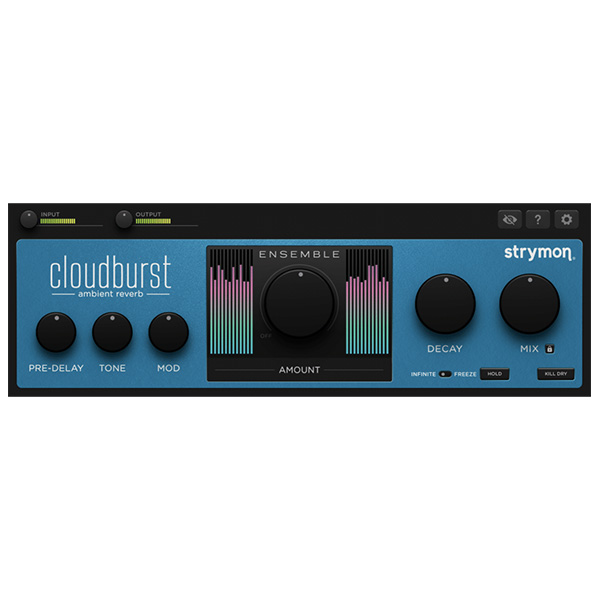
At the heart of Cloudburst is its 48-band real-time analysis system that generates harmonic overtones, blending your source with a shimmering synthesized string ensemble. The result? Magical layers of ambient reverb that breathe emotion into your music.
🌈 Perfect For:
🎹 Ambient Piano & Guitar
🎤 Ethereal Vocal Pads
🎬 Film Scores & Soundscapes
🎧 Chillwave, Dream Pop, Cinematic EDM & More
🎚️ Features That Inspire
✅ Modulation Control – Add lush movement & pitch-shifted stereo shimmer
✅ Decay Knob – Morphs from intimate rooms to infinite space with ease 🌌
✅ Hold Button – Activate Infinite or Freeze modes instantly 🎹
✅ Infinite Mode – Layer sound endlessly for evolving pads ♾️
✅ Freeze Mode – Lock in a moment and play freely over it ❄️
✅ Ensemble Texture – Adds organic harmonic richness and spatial depth 💫
🔍 Why Choose Cloudburst?
🌟 Ensemble reverb technology unlike anything else
🎛️ Real-time creative control with powerful FX modes
🎧 Organic stereo imaging with lush modulation
🎼 Inspires music creation instantly – no complicated routing or chains needed
💻 Compatible with major Windows DAWs (VST, VST3)
Compatibility checklist
- Windows 10,11 (64-bit Only)
- VST,VST3
- Formats: VST3 · VST
Requirements vary by supplied version. Confirm your setup with support before purchasing.
Delivery & activation
- Complete your purchaseReview compatibility and purchase details.
- Download your filesAccess available downloads through your order and account.
- Follow the included setup guideContact GetPlugins if you need installation help.
Activation, where included, is provided by GetPlugins. Publisher-account registration, transferable publisher keys and a publisher-issued licence are not included. Read the activation policy.
Frequently asked questions
How do I receive my download?
After payment, access available files from your order details and GetPlugins account. Contact support if a download is missing.
What activation is included?
Follow the activation instructions supplied with your download. Activation is provided by GetPlugins. Confirm device allowances and reinstall arrangements before ordering.
Will this work with my computer and DAW?
Check the compatibility information for this listing and ask us to confirm the exact supplied build. Libraries may require a compatible sampler or additional software.
What if I need installation help?
Email support@getplugins.io with your order number, operating system, DAW and any error message.
Which updates are included?
Activation and updates are separate. Confirm the available version and update arrangements before ordering; do not assume access to future publisher releases.
How do I request a refund?
Contact support with your order number and issue details. Read our Refund Policy for eligibility and the request process.

Reviews
There are no reviews yet.