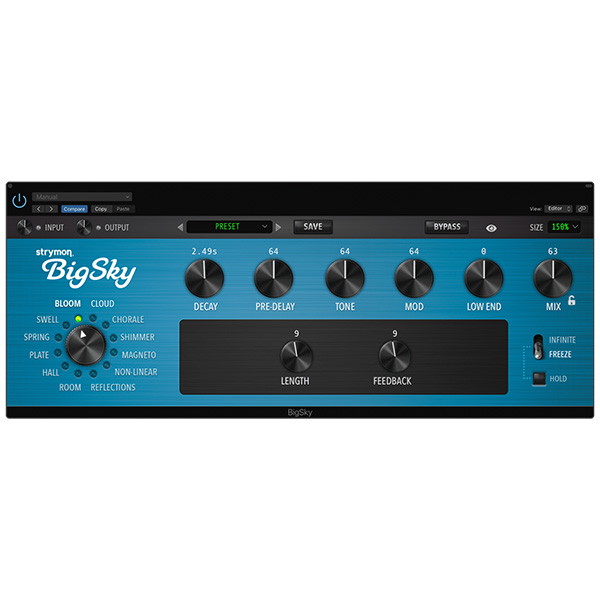
Strymon – BigSky (Windows)

Step beyond traditional reverb and into a universe of sonic atmosphere with Strymon BigSky – the industry-leading plugin…
Formats: VST3 · VST

£25.00

Discover Strymon – BigSky (Windows)

Step beyond traditional reverb and into a universe of sonic atmosphere with Strymon BigSky – the industry-leading plugin that delivers twelve breathtaking reverb engines in one powerful, intuitive interface. Designed for producers, composers, and sound designers, BigSky lets you transform any sound into a deep, emotional, and immersive experience. 🎶💫

Explore product features & full description

Strymon – BigSky (Windows) 🌌🎧

Step beyond traditional reverb and into a universe of sonic atmosphere with Strymon BigSky – the industry-leading plugin that delivers twelve breathtaking reverb engines in one powerful, intuitive interface. Designed for producers, composers, and sound designers, BigSky lets you transform any sound into a deep, emotional, and immersive experience. 🎶💫

☁️ Send Your Sound Into the Sky

From subtle ambiance to infinite dreamscapes, BigSky elevates your audio with exceptional clarity, warmth, and dimension. Each algorithm is meticulously crafted to deliver studio-quality spatial effects that go far beyond standard reverbs.

🔮 Explore 12 Iconic Reverb Engines:

🎐 Cloud – Airy, ethereal textures with smooth tails
🌈 Shimmer – Pitch-shifted brilliance with harmonic bloom
🎛️ Magneto – Tape-style multi-head delay meets reverb
🌊 Spring – Authentic spring reverb with vintage character
🏰 Hall, Plate, Room, Reflections, Bloom, Swell, and more…

Each mode is rich, responsive, and tuned to perfection, allowing you to craft the right mood for any genre — ambient, cinematic, electronic, or experimental.

🎚️ Shape, Customize & Create Instantly

BigSky’s streamlined interface makes creativity effortless. With no deep menu-diving, you’ll focus more on the music and less on the settings. Tweak parameters like Pre-Delay, Modulation, Decay, and EQ with simple, expressive controls that respond to your artistic touch.

🔧 Big Features, Big Sound:

✅ 12 world-class reverb machines
✅ Real-time control and automation support
✅ Smooth, musical modulation and spatial depth
✅ Beautifully designed interface for fast workflow
✅ Compatible with all major DAWs on Windows

🎶 Ideal For:

🎬 Film & Game Scoring
🎤 Dreamy Vocals & FX
🌌 Ambient, Chill, & Downtempo Music
🎹 Synth Pads & Instrumental Layers
🎸 Post-Rock & Shoegaze Sound Design

🌟 Why Choose BigSky?
Because reverb shouldn’t just fill space — it should inspire. With Strymon BigSky, you’re not just adding effects — you’re crafting immersive sonic environments that move listeners.


Compatibility checklist

  • Windows 10,11 (64-bit Only)
  • VST,VST3
  • Formats: VST3 · VST

Requirements vary by supplied version. Confirm your setup with support before purchasing.

Delivery & activation

  1. Complete your purchaseReview compatibility and purchase details.
  2. Download your filesAccess available downloads through your order and account.
  3. Follow the included setup guideContact GetPlugins if you need installation help.

Activation, where included, is provided by GetPlugins. Publisher-account registration, transferable publisher keys and a publisher-issued licence are not included. Read the activation policy.

Frequently asked questions

How do I receive my download?

After payment, access available files from your order details and GetPlugins account. Contact support if a download is missing.

What activation is included?

Follow the activation instructions supplied with your download. Activation is provided by GetPlugins. Confirm device allowances and reinstall arrangements before ordering.

Will this work with my computer and DAW?

Check the compatibility information for this listing and ask us to confirm the exact supplied build. Libraries may require a compatible sampler or additional software.

What if I need installation help?

Email support@getplugins.io with your order number, operating system, DAW and any error message.

Which updates are included?

Activation and updates are separate. Confirm the available version and update arrangements before ordering; do not assume access to future publisher releases.

How do I request a refund?

Contact support with your order number and issue details. Read our Refund Policy for eligibility and the request process.

Customer Reviews

Reviews

There are no reviews yet.

Be the first to review “Strymon – BigSky (Windows)”

Your email address will not be published. Required fields are marked *