Wes Borland is an American musician and artist who has carved out his own electrifying space in rock. As the sonic mastermind behind Limp Bizkit’s crushing riffs, Borland is known for combining raw, aggressive guitar work with fearless experimentalism.
About Wes Borland
An American musician and artist who has carved out his own electrifying space in rock. As the sonic mastermind behind Limp Bizkit’s crushing riffs, Borland is known for combining raw, aggressive guitar work with fearless experimentalism.
His stage presence is nothing short of legendary. He is a true visual artist, turning his performances into a spectacle with his wild costumes, face paint, and surreal masks. Borland is more than just a guitarist, he is a living, breathing work of art, redefining what it means to be a rock star.
Amplifiers
Amp
Based on the Roland© JC-120™ Jazz Chorus, this two-input channel with three-band EQ has become the iconic “king of clean” guitar amps with its signature clean, transparent tonal signature. A staple in Wes Borland’s touring rig, this combo amp can often be seen with various painted images on the speaker grilles of the enclosure.
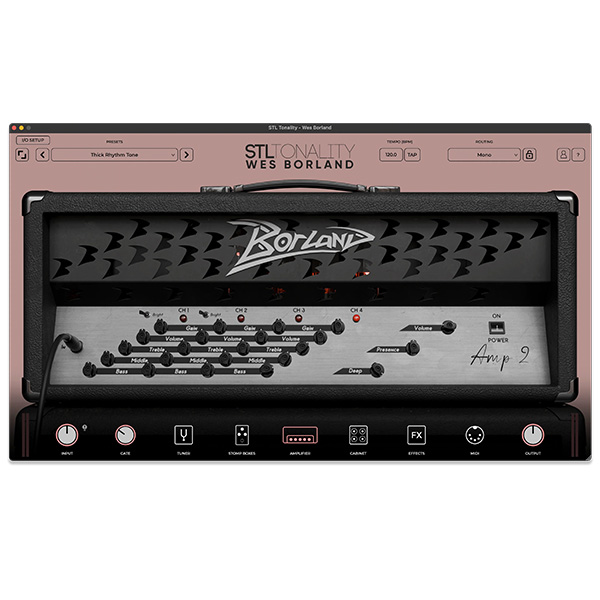
Amp 2
Based on the Diezel© VH4™, this four-channel, 100-watt amp is extremely versatile and can handle virtually any tone thanks to four distinct preamp voices, each with independent gain, EQ, and master controls. This amp is at the heart of much of Limp Bizkit’s heavier tones from the early 2000s.
Amp 3
Amp 3 is based on a 1965 Selmer© Zodiac™ 50 MKII tremolo. This two-channel amp offers the crisp, rich tones typical of vintage British combos, but with the inclusion of Selmer©’s unique tone selector system, this ingenious circuit gives the amp its distinctive, complex tonal character.
Preliminary effects
Tonality: Wes Borland also includes two Stomp Boxes and three effects pedals that he relies on both live and in the studio.
Mini Filter
Inspired by the Electro-Harmonix© Mini Q-Tron™. The Wes Borland Mini Filter is a filter envelope emulating the popular wailing wah-wah effect.
Big Wezz
Based on the Electro-Harmonix© Big Muff Pi™. The Wes Borland ‘Big Wezz’ is a circuit design emulation of the iconic fuzz pedal known for its crushing distortion and fat tone.
WB-8 Digital Delay
Inspired by the BOSS© DD-8™. The WB-8 Digital Delay replicates the delay modes used by Wes Borland.
Borland Delay
Based on the Dunlop© Echoplex© Delay. The Borland Delay emulates the legendary EP-3 tape echo tones.
WB7 Chorus/Flanger
Based on the Ibanez© CF7™ Chorus/Flanger, the WB7 Chorus/Flanger is capable of producing warm, vintage choral tones and morphing flange sounds.
Offices
To ensure maximum realism and accuracy, Wes and I measured every speaker cabinet in his touring rig. Using five different microphones and over 156 unique positions, we captured the most realistic impulse responses that can be used and adjusted in the plugin.








Reviews
There are no reviews yet.