SSL Fusion Stereo Image (Windows)

The Stereo Image Plug-in brings Fusion's mid-side circuit to your DAW. Acclaimed for its natural-sounding, 3D enhancing capabilities,…
Formats: confirm before ordering

£10.00

Discover SSL Fusion Stereo Image (Windows)

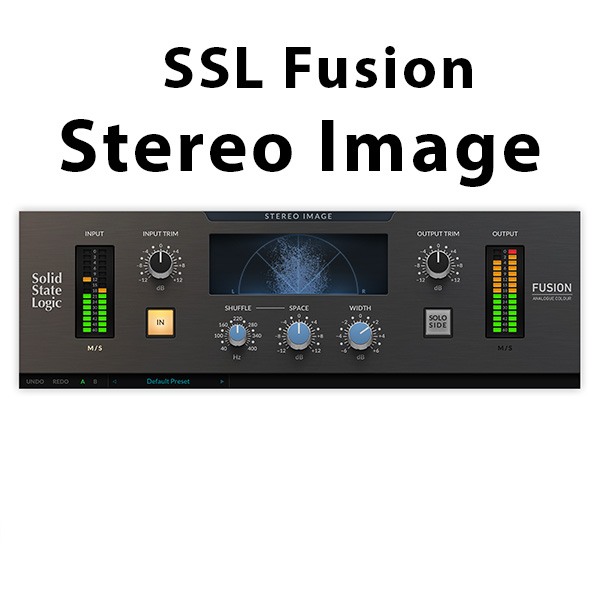
The Stereo Image Plug-in brings Fusion's mid-side circuit to your DAW. Acclaimed for its natural-sounding, 3D enhancing capabilities, Stereo Image Plug-in allows you to fine-tune the width, depth and space around your sounds, instruments, vocals and entire mix.

Apple M1 Native Support: Fusion Stereo Image is a universal binary, and features M1 Native support.

Modelled on the SSL Fusion Stereo Image Processor

Based on EMI engineer Alan blumlein's invention of modern stereo in 1931: Stereo Shuffling

Explore product features & full description

A JOURNEY THROUGH SPACE AND WIDTH

The Stereo Image Plug-in brings Fusion's mid-side circuit to your DAW. Acclaimed for its natural-sounding, 3D enhancing capabilities, Stereo Image Plug-in allows you to fine-tune the width, depth and space around your sounds, instruments, vocals and entire mix.


The Stereo Image Plug-in is modelled on the mid-side processing circuit from the SSL Fusion stereo outboard hardware processor. This true-analogue circuit utilizes a technique that separates a stereo signal into two channels: a sum (L+R) for the sounds in the centre (Mid) and a difference signal (L-R) for the sounds on the left and right (Side) allowing you to narrow or widen the stereo image using the WIDTH control.

The SPACE circuit is a frequency-dependent width control based on the concept of Stereo Shuffling, allowing you to inject interesting depth effects into your mix. Stereo Image Plug-in exposes a brand-new SHUFFLE control for changing the frequency cut-off in the SPACE circuit, allowing you to add weight and presence or carve space in the stereo field.

Watch Sean Divine guide us through applying width and depth to vocals, strings and full mix using Stereo Image Plug-in.
Key Features

  • Apple M1 Native Support: Fusion Stereo Image is a universal binary, and features M1 Native support.
  • Modelled on the SSL Fusion Stereo Image Processor
  • Based on EMI engineer Alan blumlein's invention of modern stereo in 1931: Stereo Shuffling
  • WIDTH control lets you increase the level of the side signal to narrow or widen the stereo image
  • SPACE control allows you to experiment with a broad bass-frequency boost or cut in the side signal
  • SHUFFLE parameter allows additional tweaking to the frequency cut-off in the SPACE circuit
  • Visualise the stereo image of the signal using the polar sample plot vector scope
  • Use SOLO SIDE to audition the stereo component of the signal
  • M/S monitoring
  • Modelled using a combination of real-life measurements, analogue circuit designs, and close collaboration with the original analogue designers of the SSL FUSION hardware
  • Preset management and A/B-ing system
  • Comes loaded with presets from world-class producers and engineers, including Adrian Hall, Alan Moulder, Caesar Edmunds, Charlie Holmes, Michael Brauer, Romesh Dodangoda and Sean Divine

Compatibility checklist

  • Confirm the supplied build, operating system and required host before ordering.

Requirements vary by supplied version. Confirm your setup with support before purchasing.

Delivery & activation

  1. Complete your purchaseReview compatibility and purchase details.
  2. Download your filesAccess available downloads through your order and account.
  3. Follow the included setup guideContact GetPlugins if you need installation help.

Activation, where included, is provided by GetPlugins. Publisher-account registration, transferable publisher keys and a publisher-issued licence are not included. Read the activation policy.

Frequently asked questions

How do I receive my download?

After payment, access available files from your order details and GetPlugins account. Contact support if a download is missing.

What activation is included?

Follow the activation instructions supplied with your download. Activation is provided by GetPlugins. Confirm device allowances and reinstall arrangements before ordering.

Will this work with my computer and DAW?

Check the compatibility information for this listing and ask us to confirm the exact supplied build. Libraries may require a compatible sampler or additional software.

What if I need installation help?

Email support@getplugins.io with your order number, operating system, DAW and any error message.

Which updates are included?

Activation and updates are separate. Confirm the available version and update arrangements before ordering; do not assume access to future publisher releases.

How do I request a refund?

Contact support with your order number and issue details. Read our Refund Policy for eligibility and the request process.

Customer Reviews

Reviews

There are no reviews yet.

Be the first to review “SSL Fusion Stereo Image (Windows)”

Your email address will not be published. Required fields are marked *