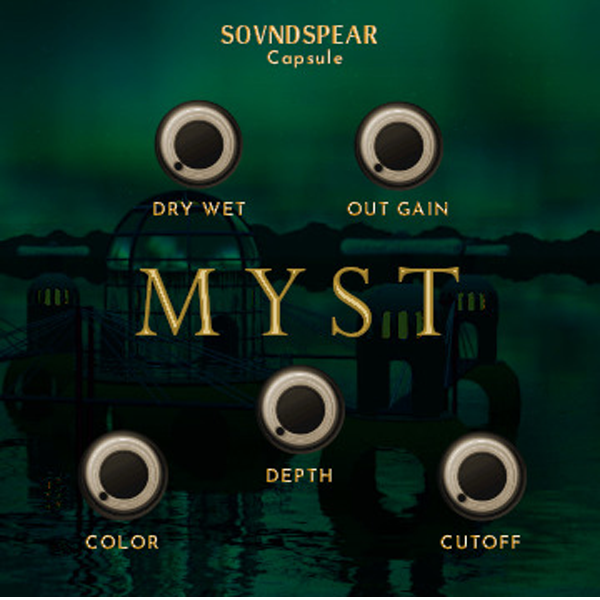
Soundspear – Myst (Windows)

When an instrument sounds good but feels empty, Soundspear – Myst (Windows) is the solution. This creative reverse…
Formats: VST3 · VST

£15.00

Discover Soundspear – Myst (Windows)

When an instrument sounds good but feels empty, Soundspear – Myst (Windows) is the solution. This creative reverse delay & atmosphere plugin adds instant depth, richness, and texture, turning ordinary sounds into immersive experiences. 🎶🔥

Explore product features & full description

🌌 Soundspear – Myst (Windows)  🎛️✨

When an instrument sounds good but feels empty, Soundspear – Myst (Windows) is the solution. This creative reverse delay & atmosphere plugin adds instant depth, richness, and texture, turning ordinary sounds into immersive experiences. 🎶🔥

Using a chain of reverse delays on a single frequency band, Myst expands and subtly distorts your audio—giving instruments more volume, character, and presence. From subtle polish on leads and pads to bold, colorful atmospheres, Myst adapts perfectly to your production style. 🚀🌌

🔑 Key Features:

🔄 Reverse Delay Processing – adds depth, dimension & space
🎚️ Dry/Wet Mix Control – balance clean and processed signal with precision
🎧 Out Gain – control output level for a polished mix
🌊 Depth Control – adjust the number of delay blocks for tailored ambience
🎨 Color Control – shape distortion & EQ post-processing
🎵 Cutoff Filter – fine-tune highs with low-pass filtering for clarity
Compatibility checklist

  • Windows 10,11 (64Bit Only)
  • VST3, VST
  • Formats: VST3 · VST

Requirements vary by supplied version. Confirm your setup with support before purchasing.

Delivery & activation

  1. Complete your purchaseReview compatibility and purchase details.
  2. Download your filesAccess available downloads through your order and account.
  3. Follow the included setup guideContact GetPlugins if you need installation help.

Activation, where included, is provided by GetPlugins. Publisher-account registration, transferable publisher keys and a publisher-issued licence are not included. Read the activation policy.

Frequently asked questions

How do I receive my download?

After payment, access available files from your order details and GetPlugins account. Contact support if a download is missing.

What activation is included?

Follow the activation instructions supplied with your download. Activation is provided by GetPlugins. Confirm device allowances and reinstall arrangements before ordering.

Will this work with my computer and DAW?

Check the compatibility information for this listing and ask us to confirm the exact supplied build. Libraries may require a compatible sampler or additional software.

What if I need installation help?

Email support@getplugins.io with your order number, operating system, DAW and any error message.

Which updates are included?

Activation and updates are separate. Confirm the available version and update arrangements before ordering; do not assume access to future publisher releases.

How do I request a refund?

Contact support with your order number and issue details. Read our Refund Policy for eligibility and the request process.

Customer Reviews

Reviews

There are no reviews yet.

Be the first to review “Soundspear – Myst (Windows)”

Your email address will not be published. Required fields are marked *