Slate Digital – Infinity EQ (Windows)

The Slate Digital Infinity EQ is all about workflow. Its intuitive interface is laid out to minimize mouse…
Formats: VST3 · AAX · VST

£17.99

Discover Slate Digital – Infinity EQ (Windows)

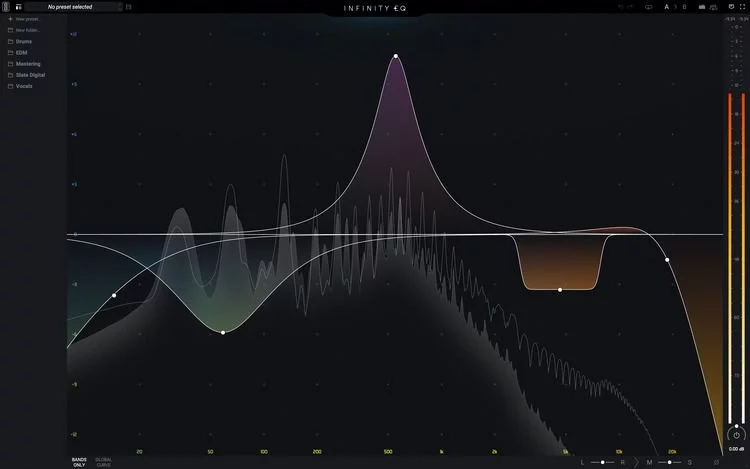
The Slate Digital Infinity EQ is all about workflow. Its intuitive interface is laid out to minimize mouse movements, with tight groupings for related functions and no right-click drop-down menus. Double-click on any point to create one of up to 24 filter bands, and use the sliders that hover above or below the band to…

24-band graphical drag-style EQ

Designed to streamline your workflow

Remarkably transparent zero-latency analog matching filters

Explore product features & full description

Optimize your workflow

The Slate Digital Infinity EQ is all about workflow. Its intuitive interface is laid out to minimize mouse movements, with tight groupings for related functions and no right-click drop-down menus. Double-click on any point to create one of up to 24 filter bands, and use the sliders that hover above or below the band to shape the slope and adjust the Q. For pinpoint listening, you can click the headphone icon to solo a band. And, the Infinity EQ lets you affect multiple bands simultaneously by selecting and linking band groups. Paired with automation, the tone-shaping possibilities of the Infinity EQ are nearly limitless.
Stunningly transparent sound

Featuring zero-latency analog matching, the Infinity EQ’s filters are remarkably transparent, which you need when performing surgical equalization. And when you push them, they also sound great with no brittle highs or flabby lows. Slate has packed the Infinity EQ with many helpful presets to speed up your process and inspire creative tone-crafting. The Infinity EQ is so versatile that it might become your desert-island equalizer!

Outstanding stereo processing

The Infinity EQ is a standout channel EQ for performing traditional parametric EQ functions, and it includes advanced stereo EQ capabilities, too. Easily select between Mid/Side or Left/Right processing to add width or carve out space, so instruments with timbres can sit better in the stereo field. A go-to method for top mix engineers, Mid/Side processing can be the difference between a good mix and a great mix.

Slate Digital Infinity EQ Plug-in Features:

  • 24-band graphical drag-style EQ
  • Designed to streamline your workflow
  • Remarkably transparent zero-latency analog matching filters
  • Compact control groupings minimize mouse clicks
  • Band solo function for pinpoint listening
  • Group bands for simultaneous control
  • Packed with helpful presets
  • M/S and L/R processing capability
  • Concurrent cut and boost on low and high shelves

Compatibility checklist

  • Windows 10.11 (64Bit Only)
  • VST, VST3, AAX
  • Formats: VST3 · AAX · VST

Requirements vary by supplied version. Confirm your setup with support before purchasing.

Delivery & activation

  1. Complete your purchaseReview compatibility and purchase details.
  2. Download your filesAccess available downloads through your order and account.
  3. Follow the included setup guideContact GetPlugins if you need installation help.

Activation, where included, is provided by GetPlugins. Publisher-account registration, transferable publisher keys and a publisher-issued licence are not included. Read the activation policy.

Frequently asked questions

How do I receive my download?

After payment, access available files from your order details and GetPlugins account. Contact support if a download is missing.

What activation is included?

Follow the activation instructions supplied with your download. Activation is provided by GetPlugins. Confirm device allowances and reinstall arrangements before ordering.

Will this work with my computer and DAW?

Check the compatibility information for this listing and ask us to confirm the exact supplied build. Libraries may require a compatible sampler or additional software.

What if I need installation help?

Email support@getplugins.io with your order number, operating system, DAW and any error message.

Which updates are included?

Activation and updates are separate. Confirm the available version and update arrangements before ordering; do not assume access to future publisher releases.

How do I request a refund?

Contact support with your order number and issue details. Read our Refund Policy for eligibility and the request process.

Customer Reviews

Reviews

There are no reviews yet.

Be the first to review “Slate Digital – Infinity EQ (Windows)”

Your email address will not be published. Required fields are marked *