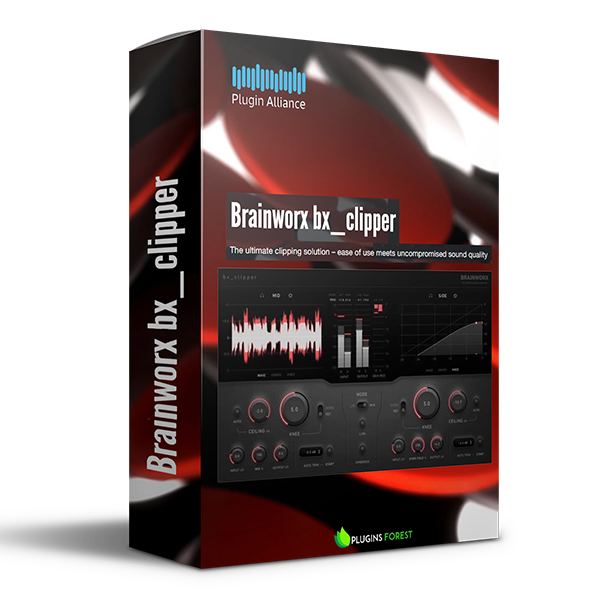
Plugin Alliance – Brainworx bx_clipper (Windows)
£20.00
Discover Plugin Alliance – Brainworx bx_clipper (Windows)
Create competitively loud masters and maintain clarity The Brainworx bx_clipper truncates the peaks of waveforms above a set threshold level (Ceiling). It allows you to create mixes that playback louder without increasing their peak level. Unlike a limiter, bx_clipper increases loudness while avoiding squashed pumping effects.
Increase loudness by clipping waveform peaks
Choose between soft clipping and hard clipping
Apply smooth and natural clipping using FET mode
Explore product features & full description
OVERVIEW
Create competitively loud masters and maintain clarity
The Brainworx bx_clipper truncates the peaks of waveforms above a set threshold level (Ceiling). It allows you to create mixes that playback louder without increasing their peak level. Unlike a limiter, bx_clipper increases loudness while avoiding squashed pumping effects.
Your limiter’s new best friend
Applying bx_clipper to the end of your mastering chain — before or after your limiter — will help you create modern and crystal-clear mixes that feel as dense and loud as the competition. bx_clipper picks up where your limiter leaves off and bridges the gap between loud and ultra-loud.
Choose from smooth to edgy clipping effects
The clipping engine found within bx_clipper offers two modes of operation. FET mode provides a smooth and natural sound, while Diode mode delivers edgy distortion. Combined with bx_clipper's Ceiling and Knee controls, FET mode and Diode mode allow you to choose from a spectrum of soft clipping to hard clipping effects.
Maximize loudness while avoiding distortion
bx_clipper's Auto Ceiling feature analyzes the peaks in your audio signal and automatically sets the plugin's Ceiling level. The level at which the Ceiling is set will maximize perceived loudness while avoiding unwanted distortion. As a result, bx_clipper allows you to create extremely loud masters without destroying your mix.
Avoid loudness bias with equal-loudness comparisons
The Auto Trim feature provided by bx_clipper analyzes the RMS difference between the input and processed signals. Auto Trim automatically adjusts bx_clipper's output level and lets you conduct equal-loudness comparisons. It helps you tame summing-related peaks that occur in instrument groups without unbalancing your mix.
Clip the mids and sides of your mixes independently
Similar to other Brainworx products, bx_clipper features dual-mono and M/S operation modes for enhanced stereo control. You can apply varying clipping effects to the left and right channels when working with an unsymmetrical mix. Create loud masters with clarity by using the aggressive Diode mode on the sides and the softer FET mode on the center of your stereo image.
Analog warmth and digital-only features
By combining analog-modeled circuits with a digital design, bx_clipper delivers the best of both worlds. Digital-only features like Ambience allow you to audition the information lost from clipping and craft unique creative effects. Another digital-only highlight is the Wet knob, which extends beyond 100% to deliver over-fold distortion, allowing you to infuse kicks and snares with the characteristic flavor of drum synthesizers from the 80s and 90s.
FEATURES
- Increase loudness by clipping waveform peaks
- Choose between soft clipping and hard clipping
- Apply smooth and natural clipping using FET mode
- Create edgy distortion using Diode mode
- Conduct level-matched A/B comparisons with Auto Trim
- Audition the information lost from clipping using the Ambience button
- Use the full soft-clipping range while avoiding hard-clipping with Auto Ceiling
- Process the left-right and mid-side channels independently
- Up to 32x oversampling
- Peak and waveform meters
- Scalable and color-customizable user interface
AUDIO EXAMPLES
Compatibility checklist
- Windows 10,11 (64Bit Only)
- VST2, VST3, AAX
- Formats: VST3 · VST2 · AAX
Requirements vary by supplied version. Confirm your setup with support before purchasing.
Delivery & activation
- Complete your purchaseReview compatibility and purchase details.
- Download your filesAccess available downloads through your order and account.
- Follow the included setup guideContact GetPlugins if you need installation help.
Activation, where included, is provided by GetPlugins. Publisher-account registration, transferable publisher keys and a publisher-issued licence are not included. Read the activation policy.
Frequently asked questions
How do I receive my download?
After payment, access available files from your order details and GetPlugins account. Contact support if a download is missing.
What activation is included?
Follow the activation instructions supplied with your download. Activation is provided by GetPlugins. Confirm device allowances and reinstall arrangements before ordering.
Will this work with my computer and DAW?
Check the compatibility information for this listing and ask us to confirm the exact supplied build. Libraries may require a compatible sampler or additional software.
What if I need installation help?
Email support@getplugins.io with your order number, operating system, DAW and any error message.
Which updates are included?
Activation and updates are separate. Confirm the available version and update arrangements before ordering; do not assume access to future publisher releases.
How do I request a refund?
Contact support with your order number and issue details. Read our Refund Policy for eligibility and the request process.

Reviews
There are no reviews yet.