ModeAudio – Airspace (Windows)

Immerse your sound in an endless variety of space and texture by combining stunning, real-world acoustics with classic…
Formats: VST3

£15.00

Discover ModeAudio – Airspace (Windows)

Immerse your sound in an endless variety of space and texture by combining stunning, real-world acoustics with classic studio gear and experimental processing in one easy-to-use effects plugin.

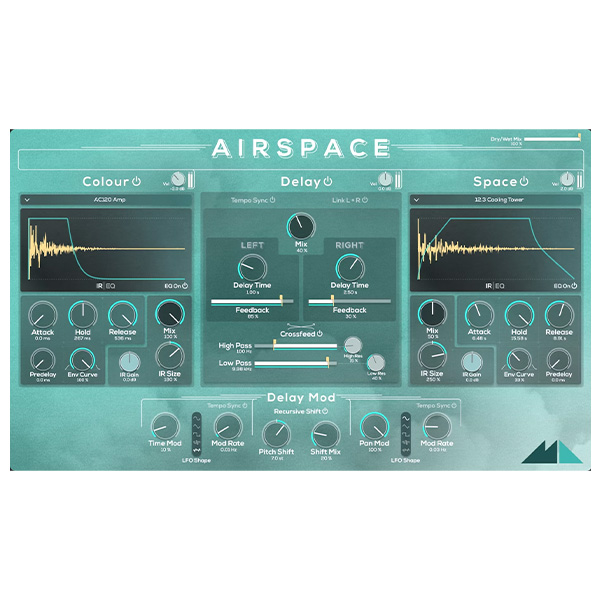
Combines convolution reverb and stereo delay effects for powerful spatial processing

Dual convolution reverb engines allow endless combinations of reverb flavors

Reverbs powered by over 450 carefully recorded impulse response samples, organized into 11 folders: Amplifiers, Drums & Percussion, Found Percussion, Kitchen, Piano,…

Explore product features & full description

Immerse your sound in an endless variety of space and texture by combining stunning, real-world acoustics with classic studio gear and experimental processing in one easy-to-use effects plugin.

A complete reverb and reflection ecosystem

Airspace is your new one-stop shop for creating rich sonic spaces and lush, evolving atmospheres inside your DAW, combining dynamic stereo delay and a dedicated modulation section with the real character and detail of convolution reverb.

From livening up your hip-hop, house or techno cuts with vibrant reverbs and bright, refracting echoes to immersing your Ambient projects and soundtracks in oceans of shimmering sound, Airspace is a complete suite of soundscape tools in one plugin!

Transport and transform your music.

Powered by a bank of over 450 meticulously recorded source samples, Airspace immerses your music in the stunning, realistic sound of a Grade I listed cathedral, an abandoned nuclear reactor or submarine, as well as a variety of concert halls, factories, churches, theatres and more.

Transform the very sonic fabric of your music by mixing sounds from vintage tube guitar amps, drum machines, and sought-after digital, plate, and spring reverb equipment, as well as pianos, appliances, and children’s toys.

Possibilities

  • Combines convolution reverb and stereo delay effects for powerful spatial processing
  • Dual convolution reverb engines allow endless combinations of reverb flavors
  • Reverbs powered by over 450 carefully recorded impulse response samples,
    organized into 11 folders: Amplifiers, Drums & Percussion, Found Percussion, Kitchen, Piano, Experimental Textures, Hardware Reverbs, Loops, Real Spaces (Long), Real Spaces (Medium), Real Spaces (Short), and Springs & Plates
  • Can change the perceived “size” of each impulse response from 20 to 500%,
    and offers full control over the AHR amplitude envelope, pre-delay, and gain
  • Built-in dual 4-band EQ effects to shape the sound of both impulse responses
  • Stereo delay features crossfeed, high-pass and low-pass filtering, resonance, and a dedicated section modulation including a 4-octave pitch shifter and two LFOs for modulating delay time and panning, complete with 5 switchable LFO shapes (sine, triangle, square, random and smooth-random)
  • Extensive library of over 240 presets included in 6 folders: Ambient, Blur, Cosmos, Reflect, Transform and Warp; also save your own presets

Compatibility checklist

  • Windows 10,11 (64Bit Only)
  • Full Version
  • VST3
  • Formats: VST3

Requirements vary by supplied version. Confirm your setup with support before purchasing.

Delivery & activation

  1. Complete your purchaseReview compatibility and purchase details.
  2. Download your filesAccess available downloads through your order and account.
  3. Follow the included setup guideContact GetPlugins if you need installation help.

Activation, where included, is provided by GetPlugins. Publisher-account registration, transferable publisher keys and a publisher-issued licence are not included. Read the activation policy.

Frequently asked questions

How do I receive my download?

After payment, access available files from your order details and GetPlugins account. Contact support if a download is missing.

What activation is included?

Follow the activation instructions supplied with your download. Activation is provided by GetPlugins. Confirm device allowances and reinstall arrangements before ordering.

Will this work with my computer and DAW?

Check the compatibility information for this listing and ask us to confirm the exact supplied build. Libraries may require a compatible sampler or additional software.

What if I need installation help?

Email support@getplugins.io with your order number, operating system, DAW and any error message.

Which updates are included?

Activation and updates are separate. Confirm the available version and update arrangements before ordering; do not assume access to future publisher releases.

How do I request a refund?

Contact support with your order number and issue details. Read our Refund Policy for eligibility and the request process.

Customer Reviews

Reviews

There are no reviews yet.

Be the first to review “ModeAudio – Airspace (Windows)”

Your email address will not be published. Required fields are marked *