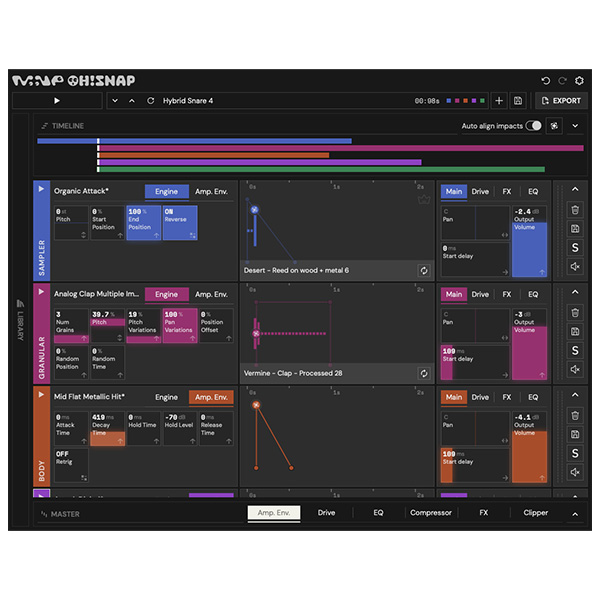
Oh! Snap is a drum sound generator plugin. It allows you to overlay any of the 5 available sound engines (Sampler, Noise, Body, Karplus, Granular) and automatically align them to create drum beats quickly and easily. Includes 700+ field-recorded samples to create organic and complex textures.
Import your own samples into Oh!Snap.
Export sound to an audio file in two clicks.
Create “woosh” sounds in seconds without having to place or trim audio clips.
Explore product features & full description
Oh! Snap is a drum sound generator plugin. It allows you to overlay any of the 5 available sound engines (Sampler, Noise, Body, Karplus, Granular) and automatically align them to create drum beats quickly and easily. Includes 700+ field-recorded samples to create organic and complex textures.
Peculiarities
Import your own samples into Oh!Snap.
Export sound to an audio file in two clicks.
Create “woosh” sounds in seconds without having to place or trim audio clips.
Complete your purchaseReview compatibility and purchase details.
Download your filesAccess available downloads through your order and account.
Follow the included setup guideContact GetPlugins if you need installation help.
Activation, where included, is provided by GetPlugins. Publisher-account registration, transferable publisher keys and a publisher-issued licence are not included. Read the activation policy.
Frequently asked questions
How do I receive my download?
After payment, access available files from your order details and GetPlugins account. Contact support if a download is missing.
What activation is included?
Follow the activation instructions supplied with your download. Activation is provided by GetPlugins. Confirm device allowances and reinstall arrangements before ordering.
Will this work with my computer and DAW?
Check the compatibility information for this listing and ask us to confirm the exact supplied build. Libraries may require a compatible sampler or additional software.
What if I need installation help?
Email support@getplugins.io with your order number, operating system, DAW and any error message.
Which updates are included?
Activation and updates are separate. Confirm the available version and update arrangements before ordering; do not assume access to future publisher releases.
How do I request a refund?
Contact support with your order number and issue details. Read our Refund Policy for eligibility and the request process.
Customer Reviews
Reviews
There are no reviews yet.
Be the first to review “MNE Audio Software – OhSnap (Windows)” Cancel reply


Reviews
There are no reviews yet.