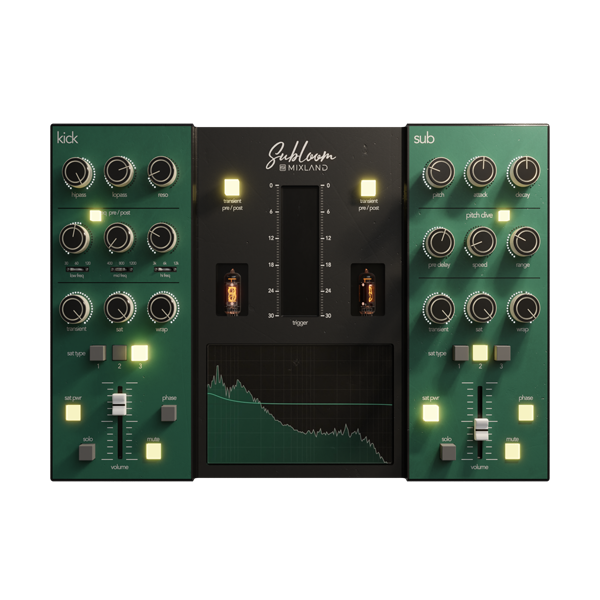
Transform your low-end into a monstrous, mix-ready powerhouse with Mixland's SUBLOOM – the ultimate subharmonic generator and low-frequency enhancer. Tailored for producers, engineers, and sound designers who crave deep, cinematic bass, SUBLOOM is the secret weapon for giving your tracks true bottom-end authority. 💪🎶
🌪️ Subharmonic Generation – Add rich, clean subs even when your original sound lacks depth.
🎛️ Dual-Band Control – Shape lows and sub-lows independently for total precision.
🔥 Drive & Warmth – Inject analog-style saturation to make your bass cut through any mix.
Explore product features & full description
💥 Mixland – SUBLOOM 🎛️
Transform your low-end into a monstrous, mix-ready powerhouse with Mixland's SUBLOOM – the ultimate subharmonic generator and low-frequency enhancer. Tailored for producers, engineers, and sound designers who crave deep, cinematic bass, SUBLOOM is the secret weapon for giving your tracks true bottom-end authority. 💪🎶
🔊 Core Features:
🌪️ Subharmonic Generation – Add rich, clean subs even when your original sound lacks depth.
🎛️ Dual-Band Control – Shape lows and sub-lows independently for total precision.
🔥 Drive & Warmth – Inject analog-style saturation to make your bass cut through any mix.
🧠 Smart Gain Compensation – Stay balanced even when pushing the low-end to the limit.
⚙️ Optimized for Windows – Smooth integration with all major DAWs (FL Studio, Ableton, Pro Tools & more).
🎨 Clean & Creative UI – Focus on the music with a streamlined interface designed for fast results.
🎯 Perfect For:
808s that slap harder ⚡
Basslines that rumble stadiums 🏟️
Kicks that punch with chest-thumping force 🥁
Film scores and sound design that demand sonic impact 🎬
Complete your purchaseReview compatibility and purchase details.
Download your filesAccess available downloads through your order and account.
Follow the included setup guideContact GetPlugins if you need installation help.
Activation, where included, is provided by GetPlugins. Publisher-account registration, transferable publisher keys and a publisher-issued licence are not included. Read the activation policy.
Frequently asked questions
How do I receive my download?
After payment, access available files from your order details and GetPlugins account. Contact support if a download is missing.
What activation is included?
Follow the activation instructions supplied with your download. Activation is provided by GetPlugins. Confirm device allowances and reinstall arrangements before ordering.
Will this work with my computer and DAW?
Check the compatibility information for this listing and ask us to confirm the exact supplied build. Libraries may require a compatible sampler or additional software.
What if I need installation help?
Email support@getplugins.io with your order number, operating system, DAW and any error message.
Which updates are included?
Activation and updates are separate. Confirm the available version and update arrangements before ordering; do not assume access to future publisher releases.
How do I request a refund?
Contact support with your order number and issue details. Read our Refund Policy for eligibility and the request process.
Customer Reviews
Reviews
There are no reviews yet.
Be the first to review “Mixland – SUBLOOM (Windows)” Cancel reply








Reviews
There are no reviews yet.