



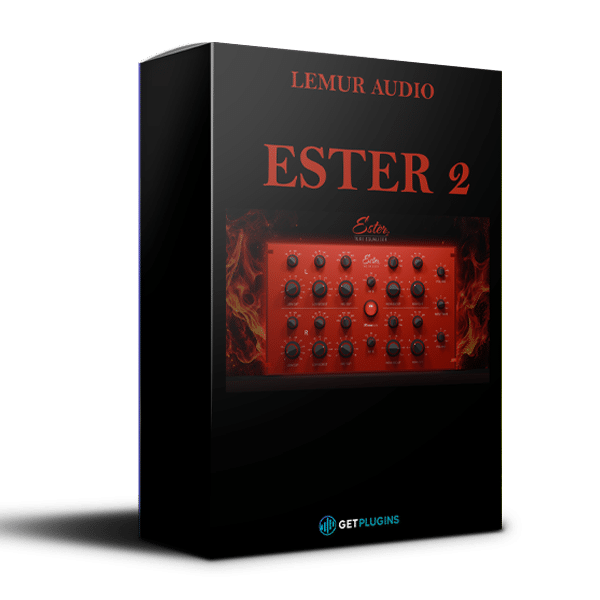
Lemur Audio – ESTER 2 (Windows)
£36.99
Discover Lemur Audio – ESTER 2 (Windows)
🔥 Experience Rich Analog Warmth, Vintage Tube Saturation & Professional Musical Equalization with Lemur Audio ESTER 2!
🎛️ Professional Passive Tube Equalizer – Experience broad, musical EQ curves inspired by classic analog hardware.
🔥 Analog-Modeled Tube Saturation – Add warmth, density, harmonic richness, and vintage character.
🎚️ Multiple Tube Voicings – Choose from 6072A, 6N1P, and the newer 6550 saturation model.
Explore product features & full description
🎛️ Lemur Audio – ESTER 2 | Premium Analog Tube Equalizer & Professional Saturation Plugin
🔥 Experience Rich Analog Warmth, Vintage Tube Saturation & Professional Musical Equalization with Lemur Audio ESTER 2!
Lemur Audio ESTER 2 is a professional passive tube equalizer and analog-style saturation plugin designed for music producers, mixing engineers, mastering professionals, and modern sound designers who demand rich harmonic character and precise tonal control.
Combining vintage-inspired tube circuitry, five interactive EQ filters, independent stereo processing, and advanced Mid/Side functionality, ESTER 2 brings the musical character of classic analog studio equipment into modern digital audio production.
Unlike conventional digital equalizers, ESTER 2 places its tube saturation stage before the passive EQ, allowing producers to control harmonic coloration and frequency shaping independently.
Whether you're adding warmth to vocals, enhancing punchy drums, sculpting bass frequencies, or polishing an entire master, ESTER 2 delivers smooth, musical equalization and distinctive analog-inspired character.
🎧 Shape Your Tone. Add Analog Warmth. Create Professional Mixes.
🚀 Key Features of Lemur Audio ESTER 2
-
🎛️ Professional Passive Tube Equalizer – Experience broad, musical EQ curves inspired by classic analog hardware.
-
🔥 Analog-Modeled Tube Saturation – Add warmth, density, harmonic richness, and vintage character.
-
🎚️ Multiple Tube Voicings – Choose from 6072A, 6N1P, and the newer 6550 saturation model.
-
🎵 Five Interactive EQ Filters – Shape your audio using Low Cut, Low Boost, Mid Cut, High Boost, and High Cut.
-
🔊 Powerful Low-Frequency Processing – Add weight and clarity using complementary bass boost and cut controls.
-
✨ Adjustable High-Frequency Q – Enhance presence, brightness, and air with flexible bandwidth control.
-
🎧 Dual-Mono & Mid/Side Processing – Shape left/right or center/side content independently.
-
⚡ Advanced Oversampling – Select Zero Latency, STD, HQ, or ULTRA processing modes.
-
🎚️ Independent Gain Controls – Manage saturation input and channel output levels precisely.
-
🎨 Customizable Interface – Personalize the plugin appearance with adjustable faceplate colors.
-
💻 Windows & macOS Compatibility – Integrates with supported professional DAWs.
The latest published ESTER 2 updates introduce an additional saturation model and expanded quality settings.
🔥 Authentic Tube Saturation – Add Warmth, Depth & Harmonic Character
Experience the musical qualities of analog-inspired valve processing with ESTER 2's integrated tube saturation engine.
Designed to reproduce the density, harmonic development, and nonlinear response associated with classic tube circuits, the saturation stage gives recordings a fuller and more expressive tonal character.
Instead of placing saturation after the equalizer, ESTER 2 positions its tube stage before the EQ network.
This architecture allows you to increase harmonic coloration without having subsequent EQ adjustments continuously change the amount of saturation.
🎚️ Independent Saturation Control
Adjust the input drive using the dedicated INPUT TRIM control, offering a ±24 dB range.
🔥 Rich Harmonic Coloration
Introduce additional harmonic density to vocals, instruments, drum buses, and complete mixes.
🎧 Level-Compensated Processing
The saturation stage compensates for its through-level, helping you evaluate tonal character without being distracted by unnecessary loudness increases.
✨ Musical Analog Response
Add subtle warmth, smooth coloration, or more pronounced saturation depending on your creative needs.
Create warm, professional-sounding audio with the flexibility of modern digital processing.
🎛️ Multiple Tube Models – Explore Different Analog Characters
ESTER 2 provides distinct saturation models designed to create different harmonic responses.
🎵 6072A – Smooth & Warm Tube Character
The 6072A model introduces harmonics progressively as the input drive increases.
Its gradual saturation response makes it useful for subtle warmth, fuller vocals, smooth instrument processing, and gentle mix coloration.
Perfect for: Vocals, acoustic instruments, piano, strings, and mastering applications.
🔥 6N1P – Bold & Aggressive Saturation
The 6N1P model remains cleaner at lower input levels before introducing more pronounced harmonic coloration at higher drive settings.
Its dynamic response provides a flexible option for producers seeking stronger analog-style character.
Perfect for: Drums, electric guitars, synthesizers, bass, and creative sound design.
⚡ 6550 – Additional Saturation Character
The newer 6550 saturation model expands ESTER 2's available tonal options, offering another approach to harmonic coloration and analog-inspired processing.
Use it to explore alternative saturation characteristics and develop distinctive processing chains.
Switch between tube models to discover the right harmonic character for your production.
🎚️ Five Interactive EQ Filters – Shape Every Frequency Musically
At the heart of Lemur Audio ESTER 2 is a carefully designed five-section passive equalizer.
Unlike fully independent digital parametric EQ bands, the filters interact as part of a shared passive network.
This interaction produces broad, smooth tonal curves that feel natural and musical, particularly when shaping complete instruments or mixes.
🔊 1. LOW BOOST – Add Weight & Power
Enhance the foundation of your audio with powerful low-frequency equalization.
Available Frequencies: 20 Hz, 40 Hz, 60 Hz, 100 Hz, and 140 Hz.
Boost Range: Up to +16 dB.
Use LOW BOOST to add depth to kick drums, warmth to bass guitars, and body to complete mixes.
🎛️ 2. LOW CUT – Remove Excess Low-End Energy
Control unwanted bass buildup and refine low-frequency clarity.
Available Frequencies: 30 Hz, 40 Hz, 100 Hz, and 400 Hz.
Cut Range: Up to −18 dB.
Combine LOW CUT with LOW BOOST to create the classic passive-EQ technique of adding bass weight while reducing muddiness above it.
🎵 3. MID CUT – Create Space & Clarity
Reduce unwanted midrange buildup using gentle, broad attenuation.
Available Frequencies: 200 Hz, 300 Hz, 400 Hz, 500 Hz, 600 Hz, and 700 Hz.
Cut Range: Up to −16 dB.
Ideal for reducing boxiness, clearing congested mixes, and giving individual instruments more room.
✨ 4. HIGH BOOST – Add Presence & Air
Enhance high-frequency detail, vocal clarity, and instrument brightness.
Frequency Range: 1.5 kHz to 16 kHz across selectable frequency positions.
Boost Range: Up to +14 dB.
The adjustable HF Q control allows you to shape the bandwidth of the high-frequency boost.
Create everything from gentle top-end polish to more focused presence enhancement.
🌊 5. HIGH CUT – Smooth Harsh Frequencies
Control excessive brightness and refine the top-end character of your mix.
Available Frequencies: 1.7 kHz, 4 kHz, 10 kHz, and 28 kHz.
Cut Range: Up to −14 dB.
Combine HIGH BOOST and HIGH CUT to create polished top-end curves with character and control.
🎧 Experience smooth, musical frequency shaping inspired by classic passive analog equalizers.
🎧 Dual-Mono & Mid/Side Processing – Advanced Stereo Control
ESTER 2 includes two fully independent processing channels, providing flexible stereo equalization.
🎚️ Left/Right Mode – Independent Stereo Processing
Process the left and right channels separately for precise tonal balancing.
Ideal for stereo recordings, instrument buses, and detailed mixing applications.
🌌 Mid/Side Mode – Shape Stereo Width & Depth
Switch to Mid/Side processing to independently control the center and side components of your stereo signal.
Use Mid/Side EQ to:
-
🎤 Enhance center vocal presence.
-
🎧 Add high-frequency air to the stereo sides.
-
🔊 Reinforce centered bass frequencies.
-
🌊 Refine stereo width and spatial balance.
-
🎛️ Create a more controlled, open-sounding master.
⚡ LINK Mode – Fast & Consistent Adjustments
Link both EQ channels to make symmetrical adjustments with a single control.
Move seamlessly between detailed stereo processing and efficient linked equalization.
🚀 Advanced Oversampling – Professional Audio Quality
ESTER 2 offers selectable processing modes to balance sonic quality and computer performance.
| Processing Mode | Main Benefit |
|---|---|
| ⚡ ZL (Zero Latency) | Processing without additional plugin latency |
| 🎧 STD | Standard processing quality |
| 🎚️ HQ | Higher-quality oversampled processing |
| 💎 ULTRA | Maximum available oversampling quality |
Choose a lighter setting for everyday production or higher-quality processing when preparing final mixes and masters.
The latest updates also allow oversampling preferences to be managed for playback and rendering.
🎶 Perfect for Mixing, Mastering & Music Production
🎤 Vocal Mixing
Add analog-style warmth, reduce unwanted midrange buildup, and enhance vocal presence without making recordings excessively harsh.
🥁 Drum Processing
Strengthen kick drums, enhance snare character, and add harmonic density to percussion or full drum buses.
🎸 Guitar & Bass
Give guitars added warmth, refine midrange frequencies, and create fuller bass tones using musical EQ curves.
🎹 Piano & Acoustic Instruments
Enhance tonal richness and balance instrument frequencies while preserving their natural character.
🎧 Stereo Bus Processing
Apply subtle harmonic coloration and broad tonal adjustments to improve cohesion across an entire mix.
🏆 Professional Mastering
Shape low-frequency weight, refine midrange clarity, and add high-frequency polish using controlled stereo or Mid/Side processing.
🌟 Why Choose Lemur Audio ESTER 2?
✅ Vintage-Inspired Tube Sound – Add warmth, density, and harmonic character.
✅ Five Musical EQ Sections – Sculpt frequencies using interactive passive-style curves.
✅ Three Saturation Models – Experiment with multiple analog-inspired tonal characteristics.
✅ Powerful Bass Enhancement – Combine LOW BOOST and LOW CUT for precise musical shaping.
✅ Adjustable High-Frequency Bandwidth – Add brightness, presence, or air with greater control.
✅ Independent Stereo Channels – Process left and right channels separately.
✅ Mid/Side Equalization – Enhance stereo width, center clarity, and spatial balance.
✅ Advanced Oversampling Modes – Balance latency, CPU usage, and audio quality.
✅ Customizable Appearance – Personalize the plugin interface to suit your studio.
✅ Professional DAW Integration – Use ESTER 2 in supported Windows and macOS production environments.
Compatibility checklist
- Windows 10,11 (64Bit Only)
- VST3, VST, AAX
- Formats: VST3 · AAX · VST
Requirements vary by supplied version. Confirm your setup with support before purchasing.
Delivery & activation
- Complete your purchaseReview compatibility and purchase details.
- Download your filesAccess available downloads through your order and account.
- Follow the included setup guideContact GetPlugins if you need installation help.
Activation, where included, is provided by GetPlugins. Publisher-account registration, transferable publisher keys and a publisher-issued licence are not included. Read the activation policy.
Frequently asked questions
How do I receive my download?
After payment, access available files from your order details and GetPlugins account. Contact support if a download is missing.
What activation is included?
Follow the activation instructions supplied with your download. Activation is provided by GetPlugins. Confirm device allowances and reinstall arrangements before ordering.
Will this work with my computer and DAW?
Check the compatibility information for this listing and ask us to confirm the exact supplied build. Libraries may require a compatible sampler or additional software.
What if I need installation help?
Email support@getplugins.io with your order number, operating system, DAW and any error message.
Which updates are included?
Activation and updates are separate. Confirm the available version and update arrangements before ordering; do not assume access to future publisher releases.
How do I request a refund?
Contact support with your order number and issue details. Read our Refund Policy for eligibility and the request process.



Reviews
There are no reviews yet.