LANDR – LANDR Composer (Windows)
£20.00
Discover LANDR – LANDR Composer (Windows)
Overcome creative barriers and speed up your workflow with a powerful AI-powered chord progression generator for creating melodies, basslines, and arpeggios.
Explore product features & full description
Overcome creative barriers and speed up your workflow with a powerful AI-powered chord progression generator for creating melodies, basslines, and arpeggios.
Create Amazing Ideas
Unlock AI-powered chord progressions and more with an intuitive plugin that finds unique sounds to match your personal musical style.
Easy chord creation
Create complex chord progressions and individual chords with ease—no music theory knowledge required.
Intelligent MIDI generation
Automatically create unique and inspiring MIDI sequences for chords, basslines, melodies and arpeggios.
Full workflow integration
Sync with your DAW, use the piano roll for precise MIDI editing , and drag and drop MIDI templates directly into your project.
Spark new inspiration
Take your music in new directions and discover inspiration with a creative assistant that will give you the perfect starting point or enhance your work along the way.
Speed up your creative process
Focus on creativity, not technical barriers, with an AI tool that helps you create chord progressions, arpeggios, melodies, and basslines faster.
Functions
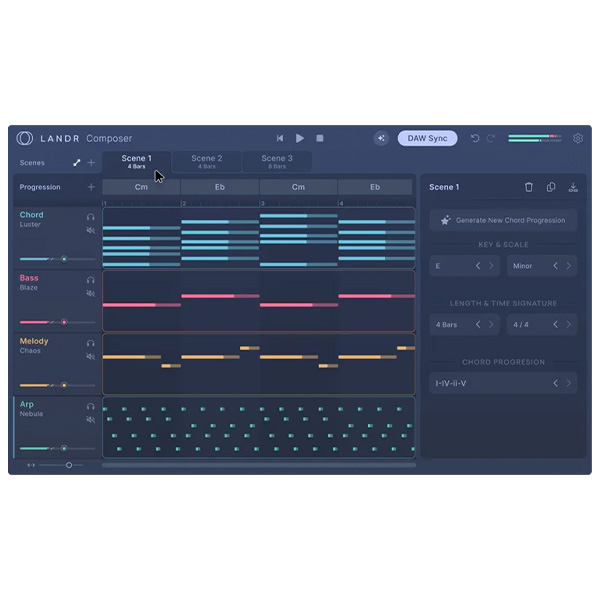
Assisted Chord Generation
Automatically create and customize complex chord progressions and individual chords.
Preset Sounds and MIDI Editing I
Use preset sounds and MIDI editing with the piano for precise control.
Generation
Create unique performances of chords, basses, melodies, and arpeggios with customizable modifiers like polyphony and humanization.
Scenes and Song Mode
Organize multiple musical ideas and arrange them into a complete composition.
Chord Progression Guide
Edit, move, and refine chords to perfect your harmonic progressions.
DAW Sync
Seamlessly integrate with your DAW for real-time adjustments.
Preset Sounds and MIDI Editing
Use preset sounds and MIDI editing with the piano roll for precise control.
Drag and Drop Integration
Easily drag and drop MIDI patterns into your DAW.
Compatibility checklist
- Windows 10.11 (64Bit Only)
- VST3, AAX
- Formats: VST3 · AAX
Requirements vary by supplied version. Confirm your setup with support before purchasing.
Delivery & activation
- Complete your purchaseReview compatibility and purchase details.
- Download your filesAccess available downloads through your order and account.
- Follow the included setup guideContact GetPlugins if you need installation help.
Activation, where included, is provided by GetPlugins. Publisher-account registration, transferable publisher keys and a publisher-issued licence are not included. Read the activation policy.
Frequently asked questions
How do I receive my download?
After payment, access available files from your order details and GetPlugins account. Contact support if a download is missing.
What activation is included?
Follow the activation instructions supplied with your download. Activation is provided by GetPlugins. Confirm device allowances and reinstall arrangements before ordering.
Will this work with my computer and DAW?
Check the compatibility information for this listing and ask us to confirm the exact supplied build. Libraries may require a compatible sampler or additional software.
What if I need installation help?
Email support@getplugins.io with your order number, operating system, DAW and any error message.
Which updates are included?
Activation and updates are separate. Confirm the available version and update arrangements before ordering; do not assume access to future publisher releases.
How do I request a refund?
Contact support with your order number and issue details. Read our Refund Policy for eligibility and the request process.

Reviews
There are no reviews yet.