🎛️ iZotope – Catalyst Series Bundle (Windows)
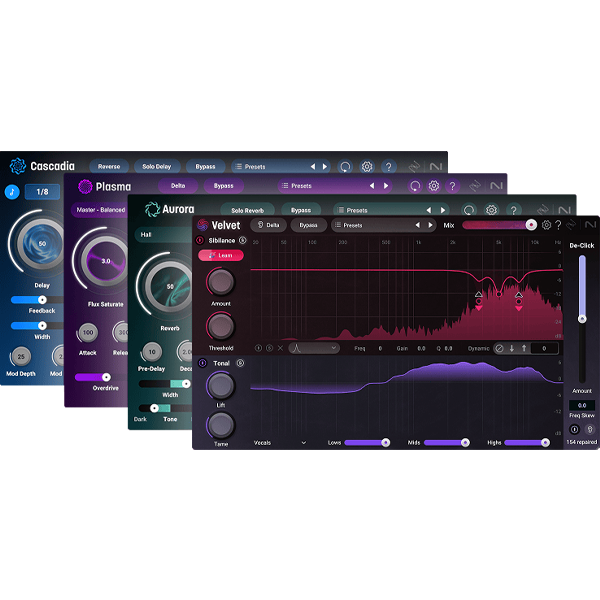
Discover the power of intelligent audio processing with the iZotope Catalyst Series Bundle (Windows) — a curated suite of four lightweight yet powerful plugins: Aurora, Cascadia, Plasma, and Velvet. Designed for efficiency, clarity, and creative control, these plug-ins go beyond traditional effects, offering smart tools for reverb, delay, saturation, and de-essing with adaptive, audio-responsive algorithms.
Whether you're producing, mixing, or mastering, the Catalyst series makes professional results faster and easier — all while using minimal system resources on your Windows DAW. 🎚️⚡
🌌 Aurora – Intelligent Reverb Plugin
Create 3D depth without mud. Aurora uses adaptive demasking to intelligently place instruments and vocals in the mix with clarity.
✅ 6 reverb types with tone shaping controls
✅ Adaptive demasking + sensitivity settings
✅ HP/LP filters, Delta & Bypass toggles
✅ 60+ pro presets & sleek interface
⛰️ Cascadia – Delay, Reinvented
Say goodbye to cluttered plugin chains. Cascadia delivers beat-synced, ping-pong, reverse, and pitch-drifting delays with built-in demasking for a clean, wide sound.
✅ Ping-pong & reverse modes
✅ Beat & time-based delays
✅ Classic pitch drift & width control
✅ 50+ pro presets for fast workflows
⚡ Plasma – Adaptive Saturation Engine
Powered by Flux Saturation Technology, Plasma applies smart, dynamic saturation to bring warmth, character, and punch to your mix — only where it’s needed.
✅ 24 target profiles for mixing/mastering
✅ Attack, release, and overdrive control
✅ Mid/Side & Transient/Sustain modes
✅ 49 tailored presets + intuitive UI
🎤 Velvet – Smart De-Esser & Tone Shaper
Tame harsh vocals and fine-tune tonal balance with Velvet, featuring Sibilance Learn, tone separation, and powerful de-clicking tools.
✅ Intelligent de-essing with tone shaping
✅ De-Click for removing unwanted artifacts
✅ 8 vocal profiles + channel soloing
✅ 50+ presets and mix-friendly interface
🧰 Why Producers Love Catalyst (Windows):
✔️ Smart, audio-responsive processing
✔️ Lightweight, CPU-efficient plugins
✔️ Professional sound without the clutter
✔️ Easy integration with all major Windows DAWs
🎯 Perfect For:
🎧 Mixing engineers needing quick, smart tools
🎵 Music producers seeking clarity & control
🎙️ Vocal producers needing clean, polished vocals
🎹 Anyone looking to speed up their workflow without compromising on sound



Reviews
There are no reviews yet.