Hinder brings uniqueness and character to your tone. You can't go wrong with it.
New is not always better. That's why we looked into something that was proven and true. Bucket Brigade Delay has stood the test of time, but since we were not limited to the confinements of its era, we kicked it up a notch.
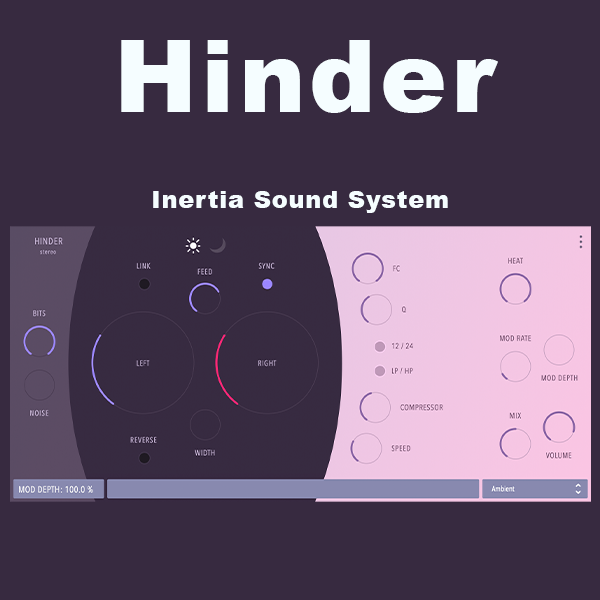
Its core has been accurately modeled after BBD principles. But it comes with many useful and creative features, towards sound design and versatility. It aims to be a Swiss army knife when a vintage delay tone is needed.
- Accurate BBD modeling with sound tweaking freedom
- The overall tone for a brighter or darker sound
- Separate or Linked Delay Time for Left and Right Channel
- Focused or wider delay effect control
- Feedback LP / HP analog-modeled filters
- Feedback Compression module with amount and speed controls
- Overdrive via the HEAT parameter that applies to the resampling and feedback filters
- Delay line modulation for Chorus and Flanger effects
- Bit Depth and Quantisation artifact mix control
- Synced to host or free-running
- A portable and intuitive preset system
- Explanatory on-screen tooltips on the mouse hover over the parameters
- Minimal, clean UI
Accurate BBD modeling with sound tweaking freedom
Hinder has been built following the BBD principle of operation. However, it exposes several of the design parameters to the user, but also adds new ones such as L/R channel delay time decoupling, width, and reverse delay, so that creative realms can be explored.
The overall tone for a brighter or darker sound
We try to cover as much ground as possible. You can change the overall tone of the plugin by setting the bright/dark parameter.
Separate or Linked Delay Times for Left and Right Channel
Delay times can be set up separately for the Left and Right channels so that interesting/polyrhythmic patterns can be created
Stereo Width
Width control for wider delay effects.
Feedback LP / HP analog-modeled filters
Hinder features analog-modeled resonant Lowpass and Highpass filters in its feedback path, that can further shape your tone
Feedback Compression module with Amount and Speed controls
Hinder features a compressor module in its feedback path that in combination with feedback and heat can create sounds that vary from punchy repeats to overdriven noisy drones.
Overdrive via the HEAT parameter
Heat adjustment that reflects the resampling, and feedback filters, can significantly tune Hinder towards a cleaner or overdriven sound character
Chorus and Flanger effects
Hinder features delay modulation, turning it into a chorus or flanger effect, with all the creative directions that can be achieved with the aforementioned modules and tweaking parameters.
Bit Depth and Quantisation artifact mix control
Hinder features controls for input signal quantization and quantization artifact mix, which is a standard BBD element. But by exposing it to the user it can be creatively employed in combination with heat and feedback compression for noisy droney delay soundscapes.
Synced to host or free-running
Hinder can be set up to sync to the host. Moving from sync to free will recall the previous parameter values.
Preset System
HINDER comes with many built-in presets that cover a fair ground of standard delay use for Guitars, Vocals, Drums, and everything in between. But many of them also point towards a sound design point of view, them being droney, noisy, or glitchy.









Reviews
There are no reviews yet.