
Discover GForce – Oberheim OB-X (Windows)
🎛️ GForce Oberheim OB-X Plug-in – 🎹 Iconic Analog. Unlimited Digital Power. 🚀
🎹 Iconic OB-X sound engine with modern enhancements
🧠 Advanced modulation via X-Modifier (X-LFO + X-ADSR)
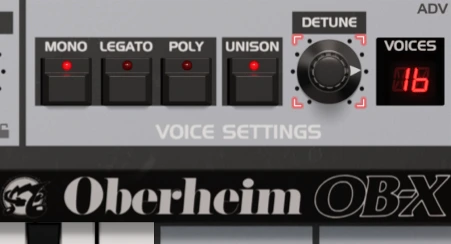
🎛️ 16-voice polyphony with unison, legato & mono modes
Explore product features & full description
🎛️ GForce Oberheim OB-X Plug-in – 🎹 Iconic Analog. Unlimited Digital Power. 🚀
Step into the world of legendary analog synthesis with the GForce Oberheim OB-X — a stunning software revival of the classic 1980s OB-X synthesizer, used by genre-defining artists like Prince, Van Halen, and Rush. 🎸✨ Now reimagined for today’s DAWs, this faithful emulation brings vintage tone and modern control together in one essential virtual instrument. 💻🎶
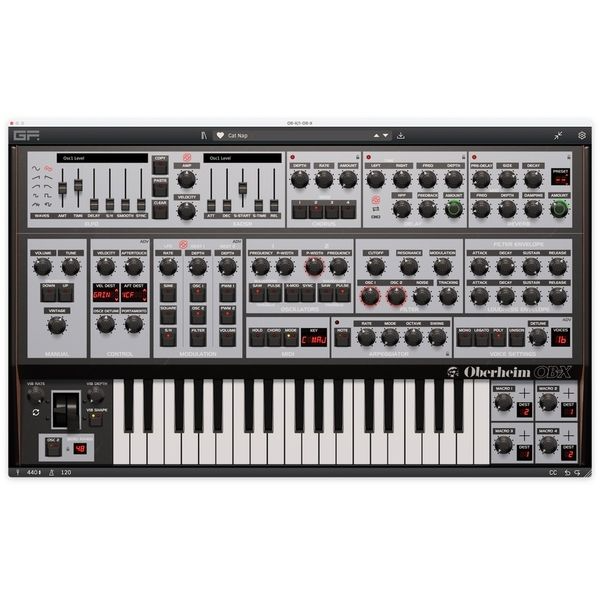
🔊 Authentic OB-X Sound with Modern Muscle
Rebuilt with X-Modifier technology, up to 16-voice polyphony, and powerful modulation tools, the OB-X plug-in delivers the signature warmth of analog synthesis — plus the expressive depth modern producers demand. With onboard Chord Mode, a performance-ready Arpeggiator, and per-voice panning, this synth adapts effortlessly across genres like EDM, synthwave, hip-hop, and cinematic scoring. 🎧🎼
🌀 Analog Grit Meets Digital Precision
Embrace the charm of classic hardware with the Vintage knob, designed to inject subtle pitch and tone fluctuations — the same analog imperfections that made the OB-X so musical and alive. Whether you're after epic pads, chunky basses, or vibrant leads, this synth lets your sound evolve with every note. 🔁🎛️
🚀 Limitless Modulation with X-LFO & X-ADSR
GForce pushes creativity further with intuitive modulation paths — no patch cables or complex routing. Easily animate nearly any parameter for rich, dynamic movement using the powerful X-LFO and X-ADSR sections. 🔧💡
🎵 Studio-Grade FX & Performance Tools
OB-X is more than just tone — it’s performance-ready. Tweak your sound with built-in Chorus, Delay, and Reverb, while advanced Velocity and Aftertouch support, plus 4 programmable macros, give you complete expressive control right from your MIDI controller. 🎚️🎹
🌟 Key Features:
-
🎹 Iconic OB-X sound engine with modern enhancements
-
🧠 Advanced modulation via X-Modifier (X-LFO + X-ADSR)
-
🎛️ 16-voice polyphony with unison, legato & mono modes
-
🎼 Arpeggiator & Chord Mode for real-time creativity
-
🔁 Vintage knob for analog-style pitch/tonal drift
-
🌐 400+ factory presets from vintage to modern styles
-
🖥️ Scalable user interface for any workflow
-
🎵 Built-in FX: Chorus, Delay, Reverb
-
🎚️ Full Aftertouch & Velocity support
-
🛠️ 4 Custom Macros for fast sound shaping
🎯 Perfect For:
-
🧑🎤 Sound designers, synth lovers, and producers
-
🎥 Film composers & scoring artists
-
🎛️ Anyone chasing vintage analog tone with modern versatility
Compatibility checklist
- Windows 10,11 (64-bit Only)
- VST3, AAX
- Formats: VST3 · AAX
Requirements vary by supplied version. Confirm your setup with support before purchasing.
Delivery & activation
- Complete your purchaseReview compatibility and purchase details.
- Download your filesAccess available downloads through your order and account.
- Follow the included setup guideContact GetPlugins if you need installation help.
Activation, where included, is provided by GetPlugins. Publisher-account registration, transferable publisher keys and a publisher-issued licence are not included. Read the activation policy.
Frequently asked questions
How do I receive my download?
After payment, access available files from your order details and GetPlugins account. Contact support if a download is missing.
What activation is included?
Follow the activation instructions supplied with your download. Activation is provided by GetPlugins. Confirm device allowances and reinstall arrangements before ordering.
Will this work with my computer and DAW?
Check the compatibility information for this listing and ask us to confirm the exact supplied build. Libraries may require a compatible sampler or additional software.
What if I need installation help?
Email support@getplugins.io with your order number, operating system, DAW and any error message.
Which updates are included?
Activation and updates are separate. Confirm the available version and update arrangements before ordering; do not assume access to future publisher releases.
How do I request a refund?
Contact support with your order number and issue details. Read our Refund Policy for eligibility and the request process.
Reviews
There are no reviews yet.