iZotope Music Production Suite 5 Pro (Windows)
iZotope Music Production Suite 5 Pro (Windows) Original price was: £999.99.Current price is: £89.99.
Back to products

Exponential Audio – Symphony 3D (Windows)

Stake your claim in the multichannel audio market with the Symphony 3D reverb plug-in from Exponential Audio. This…
Formats: confirm before ordering

£22.00

Discover Exponential Audio – Symphony 3D (Windows)

Stake your claim in the multichannel audio market with the Symphony 3D reverb plug-in from Exponential Audio. This essential mix and mastering plug-in is perfect for building space in any Atmos, Auro 13.1, or NHK listening environment. Loads of immersive presets take your sound sources from opulent cathedrals and lively corridors to the blackest depths…

Software Type: Multi-channel Reverb

Download/Boxed: Download

Format: AAX, VST2, VST3

Explore product features & full description

Tech Specs

  • Software Type: Multi-channel Reverb
  • Platform: PC
  • Upgrade/Full: Full
  • Download/Boxed: Download
  • Bit Depth: 64-bit
  • Format: AAX, VST2, VST3
  • Hardware Requirements - PC: Intel Core 2 Duo / AMD Athlon 64 X2 or higher, 4GB RAM minimum
  • OS Requirements - PC: Windows 7 SP1 or later
  • Manufacturer Part Number: SYMPH3D_RD

Atmos/Auro Reverb Generator for Music and Post Production

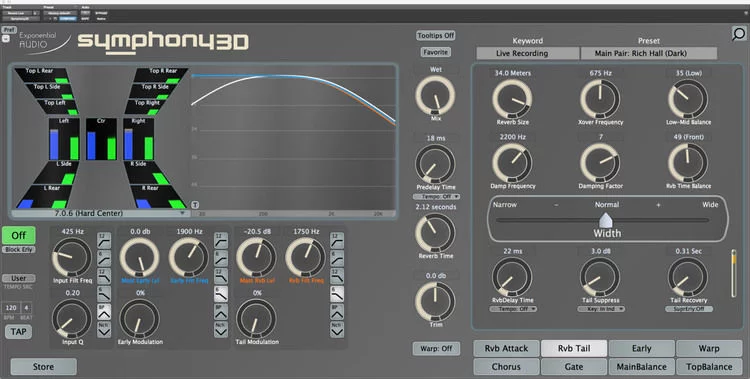
Stake your claim in the multichannel audio market with the Symphony 3D reverb plug-in from Exponential Audio. This essential mix and mastering plug-in is perfect for building space in any Atmos, Auro 13.1, or NHK listening environment. Loads of immersive presets take your sound sources from opulent cathedrals and lively corridors to the blackest depths of space and subterranean caverns, with virtually no learning curve to stand between you and creative freedom. Power users can further place their audio in the surround environments using onboard EQ, filter, modulation, and width controls. Adding value to the Symphony 3D plug-in is a slew of submenus, including the user-favorite Warp menu, which warms and roughs up reverbs with overdrive or enhances their dynamics with compression and expansion. And with onboard tempo match and ducking ("Tail Suppress") controls, Symphony 3D is just as useful for music-making as it is for world-building. Hungry for tastier reverbs and added audio dimensionality? Pick up your copy of Exponential Audio's Symphony 3D plug-in through Sweetwater today.

Symphony vs Symphony 3D — which plug-in is right for me?

Both of Exponential Audio's powerful Symphony reverb plug-ins, Symphony standard and Symphony 3D, are built around the same warm and powerful audio engine and loaded with the same essential features. Where these plug-ins differ are their surround capabilities. Symphony standard can take you everywhere from stereo to 8-channel SDDS. Symphony 3D readies your audio for the big screen, with full Extended Atmos, Auro 13.1, and NHK 22.2 (VST3 only) multichannel support. Contact your Sweetwater Sales Engineer to learn more about these audio standards or for help choosing which Symphony plug-in is right for your needs.
Exponential Audio Symphony 3D Reverb Plug-in Features:

  • Supported channel formats: mono, stereo, LCR, LCRS, Quad, 5.0/5.1, 6.0/6.1, 7.0/7.1, SDDS, Atmos Bed, Extended Atmos, Auro 9.1/11.1/13.1, and NHK 22.2 (VST3 only), plus additional 3D formats
  • Backward compatible with Symphony standard
  • Loaded with warm, immersive, and aggressive reverb presets
  • Great for multichannel and audio for film/game
  • Tempo-sync pre-delay allows reverbs to bloom behind the beat
  • Ducking section preserves your source audio
  • Warp subsection lets you overdrive, compress, and expand your reverbs
  • Compatibility: Windows 7–10 (64-bit) 3GHz+ multi-core processor recommended.
  • Formats: AAX, VST 2/3,

Compatibility checklist

  • Confirm the supplied build, operating system and required host before ordering.

Requirements vary by supplied version. Confirm your setup with support before purchasing.

Delivery & activation

  1. Complete your purchaseReview compatibility and purchase details.
  2. Download your filesAccess available downloads through your order and account.
  3. Follow the included setup guideContact GetPlugins if you need installation help.

Activation, where included, is provided by GetPlugins. Publisher-account registration, transferable publisher keys and a publisher-issued licence are not included. Read the activation policy.

Frequently asked questions

How do I receive my download?

After payment, access available files from your order details and GetPlugins account. Contact support if a download is missing.

What activation is included?

Follow the activation instructions supplied with your download. Activation is provided by GetPlugins. Confirm device allowances and reinstall arrangements before ordering.

Will this work with my computer and DAW?

Check the compatibility information for this listing and ask us to confirm the exact supplied build. Libraries may require a compatible sampler or additional software.

What if I need installation help?

Email support@getplugins.io with your order number, operating system, DAW and any error message.

Which updates are included?

Activation and updates are separate. Confirm the available version and update arrangements before ordering; do not assume access to future publisher releases.

How do I request a refund?

Contact support with your order number and issue details. Read our Refund Policy for eligibility and the request process.

Customer Reviews

Reviews

There are no reviews yet.

Be the first to review “Exponential Audio – Symphony 3D (Windows)”

Your email address will not be published. Required fields are marked *