Deltaarray – GigLad PC Arranger 🎹🎛️🎶
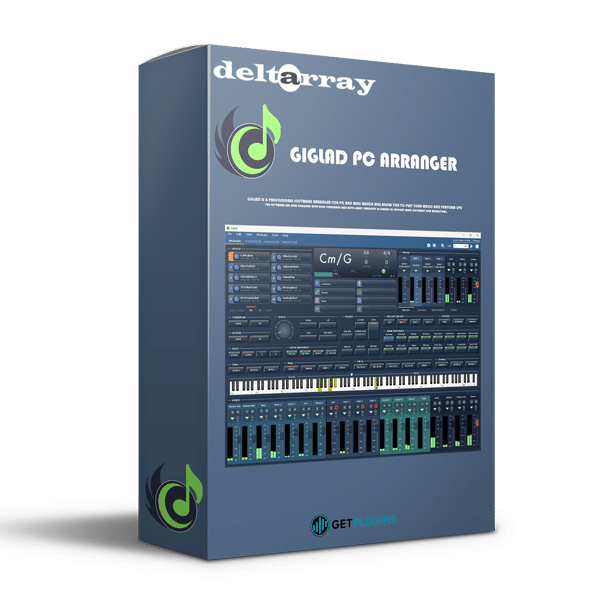
GigLad by Deltarray is a powerful PC-based arranger and live performance tool designed for musicians, composers, and live performers who need a flexible, real-time backing band. Whether you're a solo artist, keyboardist, or live performer, GigLad provides a comprehensive arrangement and auto-accompaniment system that lets you create full-band performances on the fly.
🔥 Key Features & Capabilities
✅ Real-Time Arranger & Auto-Accompaniment – Play chords and melodies, and let GigLad generate intelligent, dynamic backing tracks in various musical styles.
✅ Multi-Instrument Support – Seamlessly control drums, bass, guitars, keys, and orchestral instruments within one system.
✅ MIDI & VST Integration – Load VST instruments and MIDI controllers to expand your sound possibilities.
✅ Live Performance Mode – Perfect for gigs, jam sessions, and solo performances, allowing quick chord progression changes and real-time variations.
✅ Style-Based Playing – Includes built-in styles for pop, rock, jazz, EDM, orchestral, and more.
✅ Custom Song Arrangements – Create and edit your own song structures, chord progressions, and backing tracks.
✅ Advanced Chord Recognition – Supports complex chord voicings for realistic and expressive accompaniments.
✅ Loop & Sequence Mode – Arrange loops and sequences to create your own dynamic arrangements.
✅ High-Quality Sound Engine – Delivers studio-grade instrument sounds with low-latency performance.
✅ Built-In Effects – Includes EQ, reverb, delay, and dynamics processing for professional sound shaping.
🎛️ Sound Design & Workflow
🎹 Live Chord Input – Play chords in real-time and let GigLad generate a full-band accompaniment instantly.
🎼 Pre-Programmed Styles & Rhythms – Choose from hundreds of styles or import your own.
🎚️ Mix & Customize Instruments – Adjust instrument levels, panning, and effects to suit your performance.
🔄 Quick Variations & Fills – Add intro, outro, fills, and variations for a natural and dynamic performance.
🎧 Seamless DAW Integration – Use GigLad as a plugin or standalone software to create arrangements in your favorite DAW.
🎶 Ideal for…
🔥 Live Performers & Gigging Musicians – Use GigLad as your real-time backing band.
🎹 Keyboardists & Solo Artists – Play with a full-band accompaniment without needing a backing track.
🎼 Composers & Songwriters – Quickly sketch song ideas with auto-arrangement tools.
🎛️ Producers & Arrangers – Create and fine-tune arrangements before finalizing recordings.
🚀 Why Choose GigLad?
✅ All-in-one arranger and auto-accompaniment software.
✅ Perfect for live performances, songwriting, and composition.
✅ Deep MIDI and VST integration for limitless sound possibilities.
✅ User-friendly interface with powerful customization options.
🎹 Want to dive deeper? Let me know if you need setup help, style programming tips, or performance tricks! 🚀🔥


Agustín Ocampo –
Podrían sacar una apps para iPad , sería genial y se masificaria potencialmente las ventas
getplugins –
We only have PC version of Giglad 5
https://getplugins.io/product/deltarray-giglad-pc-arranger-5/
m31asy (verified owner) –
Great arranger in the 4.2.5 release for playing with a lot of expansion possibilitys. If you dont have the space for a Wersi OAX then this is a space saving solution.
Your creativity are not set any borders. Use one or three manuals (midi keyboards) foot pedals and upto 4 Sounds at the same time. Its fun to use at home. I think its even possible to use it on a live stage. Great job, cant await to get the new Giglad 5
getplugins –
https://getplugins.io/product/deltarray-giglad-pc-arranger-5/