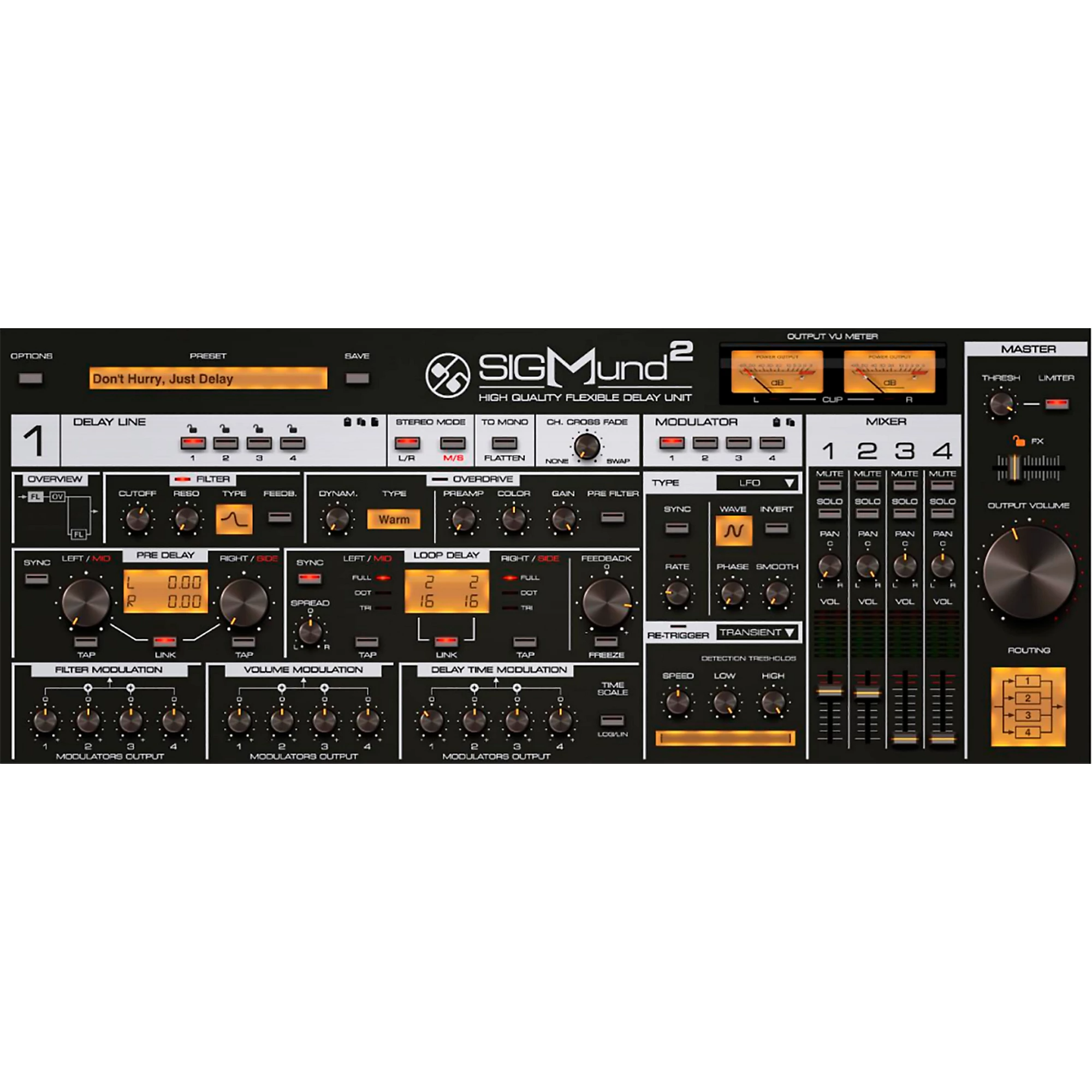
D16 Group – Sigmund 2 (Windows)

Unleash the full potential of delay with Sigmund 2 by D16 Group, a cutting-edge multi-tap delay plugin for…
Formats: VST3 · VST

£25.00

Discover D16 Group – Sigmund 2 (Windows)

Unleash the full potential of delay with Sigmund 2 by D16 Group, a cutting-edge multi-tap delay plugin for Windows designed for producers, sound designers, and audio engineers who crave deep control and sonic creativity. Whether you're crafting rich stereo textures, rhythmic delay patterns, or spacey feedback FX, Sigmund 2 delivers studio-grade sound, endless modulation options,…

Explore product features & full description

D16 Group – Sigmund 2 (Windows) 🔁 | Precision Multi-Tap Delay Redefined

Unleash the full potential of delay with Sigmund 2 by D16 Group, a cutting-edge multi-tap delay plugin for Windows designed for producers, sound designers, and audio engineers who crave deep control and sonic creativity. Whether you're crafting rich stereo textures, rhythmic delay patterns, or spacey feedback FX, Sigmund 2 delivers studio-grade sound, endless modulation options, and intuitive usability. 🎶🧠

🎯 Why Choose Sigmund 2?

✅ 4 Independent Delay Lines – With individual control over every parameter
✅ High-fidelity analog-style sound engine
✅ Built-in filters, overdrive, and limiter per tap
✅ Fully modular routing matrix for custom setups
✅ Perfect for vocals, synths, guitars, drums, and FX design

🔊 The Delay Plugin That Thinks Like a Synth
Sigmund 2 isn't just a delay—it's a creative audio processor. With four fully configurable delay units, you can design rhythmic patterns, build complex modulations, or transform simple sounds into evolving sonic landscapes. Each line includes its own multimode filter, saturation, and amplitude control, letting you shape your echoes with total precision. 🌌🔁

🧠 Advanced Modulation Engine
🎚️ 4 LFOs + Envelope Followers
📊 Mod Matrix with over 40 modulation targets
🎵 Create tempo-synced effects, dub delays, phasers, choruses & more

🎨 Feature Highlights

🎛️ 4 high-quality, configurable delay lines
🎚️ Flexible signal routing with drag-and-drop ease
🎧 Analog-modeled filters and soft-clip saturation
🎚️ Built-in peak limiter for output control
🖥️ Resizable GUI with real-time visual feedback
🧩 200+ presets for quick inspiration

💻 System Compatibility
✔️ VST2 / VST3 / VST (Windows only)
✔️ Low CPU usage with pristine audio quality
✔️ Full DAW integration with MIDI learn and automation

🎼 Perfect For:
🎹 Electronic Music Producers – Create syncopated, rhythmic delay patterns
🎸 Guitarists & Synth Players – Add analog warmth and dimension
🎧 Mix Engineers – Design spacious, layered FX
🎬 Sound Designers – Craft experimental audio textures & motion

Compatibility checklist

  • Windows 10,11 (64Bit Only)
  • VST3, VST
  • Formats: VST3 · VST

Requirements vary by supplied version. Confirm your setup with support before purchasing.

Delivery & activation

  1. Complete your purchaseReview compatibility and purchase details.
  2. Download your filesAccess available downloads through your order and account.
  3. Follow the included setup guideContact GetPlugins if you need installation help.

Activation, where included, is provided by GetPlugins. Publisher-account registration, transferable publisher keys and a publisher-issued licence are not included. Read the activation policy.

Frequently asked questions

How do I receive my download?

After payment, access available files from your order details and GetPlugins account. Contact support if a download is missing.

What activation is included?

Follow the activation instructions supplied with your download. Activation is provided by GetPlugins. Confirm device allowances and reinstall arrangements before ordering.

Will this work with my computer and DAW?

Check the compatibility information for this listing and ask us to confirm the exact supplied build. Libraries may require a compatible sampler or additional software.

What if I need installation help?

Email support@getplugins.io with your order number, operating system, DAW and any error message.

Which updates are included?

Activation and updates are separate. Confirm the available version and update arrangements before ordering; do not assume access to future publisher releases.

How do I request a refund?

Contact support with your order number and issue details. Read our Refund Policy for eligibility and the request process.

Customer Reviews

Reviews

There are no reviews yet.

Be the first to review “D16 Group – Sigmund 2 (Windows)”

Your email address will not be published. Required fields are marked *