🌌 Convex Audio – Atrium (Windows) | Next-Generation Spatial Reverb 🎶✨
Atrium by Convex Audio is a high-quality acoustic space modeling plugin designed to deliver immersive, realistic reverb and precise stereo positioning with unmatched flexibility. Tailored for producers, composers, sound designers, and modern music creators, Atrium transforms your mixes into dynamic, spatially rich audio experiences.
🚀 Design Stunning Acoustic Spaces Instantly
Atrium combines a powerful acoustic simulation engine with an intuitive interface, allowing you to create virtual spaces in seconds.
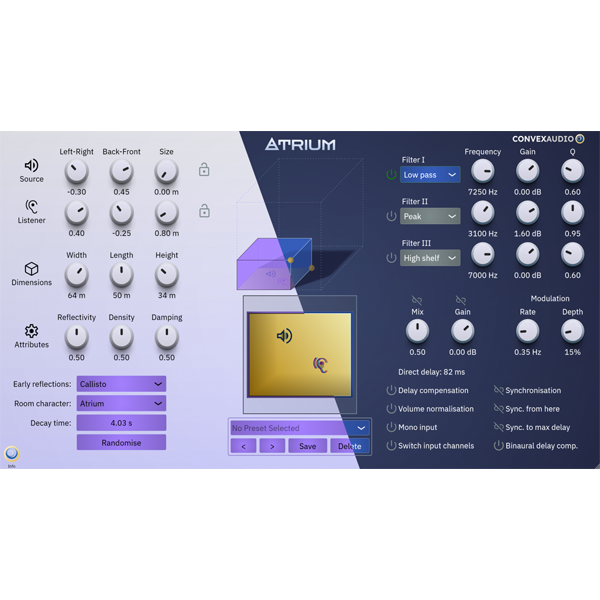
Simply drag the room, position your sound sources and listener, and Atrium automatically calculates stereo width, depth, and room feel, delivering professional results without complicated setup.
✔ Realistic reverb with intuitive controls
✔ Effortless stereo positioning and depth perception
✔ Fast, efficient workflow for any project
🧠 Advanced Spatial Audio & Stereo Control
No conventional reverb or panning tool can match Atrium’s ability to create a convincing stereo field, immersive room presence, and true depth.
Its algorithmic reverb engine provides maximum customization while keeping the interface responsive, creative, and easy-to-use.
✔ Control early reflections, room characteristics, and stereo width
✔ Adjustable color, resonance, and pitch modulation
✔ Multi-layered preset manager for instant inspiration
🔄 Sync Feature – Cohesive Multi-Instrument Spaces
Atrium’s Sync feature allows you to place multiple instruments in a single virtual room, creating a realistic and immersive ensemble experience.
Track up to 16 synchronized instances with a 2D room view for complete control over direction, depth, and spatial interaction.
✔ Quick setup for complex arrangements
✔ Ideal for music, film, and game production
✔ Real-time monitoring across multiple instances
🎛️ Creative Flexibility & Customization
Atrium gives producers advanced tools to fine-tune every aspect of their acoustic spaces.
With a resizable interface, parametric filters, and a randomization button, you can experiment, iterate, and craft unique reverb environments effortlessly.
✔ 3 parametric filters for precise tonal shaping
✔ Reverb pitch modulation for creative sound design
✔ Self-documenting interface with tooltips for every control
🌍 Perfect for Any Audio Project
Atrium integrates seamlessly into music production, sound design for film or games, podcasts, and immersive media projects.
Its combination of high-quality reverb, precise stereo positioning, and workflow efficiency makes it a must-have tool for modern audio professionals.
✔ Superior sound quality with minimal effort
✔ Compatible with any DAW or production setup
✔ Inspires creativity and fast experimentation
🎯 Why Modern Creators Choose Atrium
✔ Realistic and immersive acoustic modeling
✔ Precise stereo positioning and depth control
✔ Maximum customization with minimal complexity
✔ Efficient workflow for producers, composers, and sound designers








Reviews
There are no reviews yet.