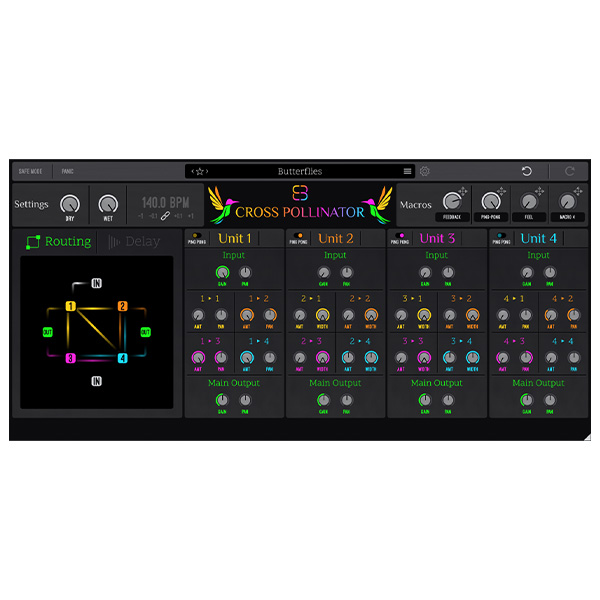
Create more interesting, complex, dynamic, and lively delays with Cross Pollinator’s unique ability to route multiple delay lines into one another.
Innovative modulation sources for dynamic audio manipulation
Achieve real-time audio transformation, breaking away from static textures
Customize parameters for precise control of modulation depth, speed, and sound characteristics
Explore product features & full description
A New Breed Of Delay
Create more interesting, complex, dynamic, and lively delays with Cross Pollinator’s unique ability to route multiple delay lines into one another.
Ultimate Creative Control
Dial in delay times with 32nd note precision across multiple tempo divisions and completely control the signal flow between delay units to make more rhythmically interesting and dynamic delays.
Versatile Tone Shaping
Give each delay unit a different character, with separate output effects for each unit.
Apply drive to add anything from subtle warmth to harsh bite.
Use the filter to subtly shape a delay unit’s sound, or completely alter its tone.
More Than Just a Delay
Cross Pollinator can create much more than just delays. Make stereo-wideners, subtle pseudo-reverbs, metallic sound-warpers, and much more.
Over 100 High Quality Presets
Browse through all of your presets without leaving the main interface.
Every preset is categorized with useful tags to help you find the preset you're looking for faster.
Features of Cross Pollinator
Innovative modulation sources for dynamic audio manipulation
Achieve real-time audio transformation, breaking away from static textures
Customize parameters for precise control of modulation depth, speed, and sound characteristics
Create rich and complex audio textures ideal for avant-garde sound design
Versatile sound palette adaptable to various genres and creative applications
Intuitive user interface for an efficient and creative workflow
Dynamic envelopes for expressive and evolving sound shaping
Explore multiple LFO shapes, from traditional waveforms to complex patterns
Flexible routing options for experimenting with different signal paths
Convenient controls designed for both new and experienced sound designers
Smooth transitions between sound textures with morphing capabilities
Multiparameter mapping for high control and creativity in shaping your sound
Presets for quick inspiration and facilitating creative experimentation
Built on high-quality audio processing algorithms for clear and professional sound
Automation-ready for precise control over modulation changes
Compatible with a variety of digital audio workstations (DAWs)
Responsive performance with low latency, suitable for real-time use
Interactive visual feedback to enhance understanding and manipulation
Regular updates and support to stay relevant in evolving production environments.
Complete your purchaseReview compatibility and purchase details.
Download your filesAccess available downloads through your order and account.
Follow the included setup guideContact GetPlugins if you need installation help.
Activation, where included, is provided by GetPlugins. Publisher-account registration, transferable publisher keys and a publisher-issued licence are not included. Read the activation policy.
Frequently asked questions
How do I receive my download?
After payment, access available files from your order details and GetPlugins account. Contact support if a download is missing.
What activation is included?
Follow the activation instructions supplied with your download. Activation is provided by GetPlugins. Confirm device allowances and reinstall arrangements before ordering.
Will this work with my computer and DAW?
Check the compatibility information for this listing and ask us to confirm the exact supplied build. Libraries may require a compatible sampler or additional software.
What if I need installation help?
Email support@getplugins.io with your order number, operating system, DAW and any error message.
Which updates are included?
Activation and updates are separate. Confirm the available version and update arrangements before ordering; do not assume access to future publisher releases.
How do I request a refund?
Contact support with your order number and issue details. Read our Refund Policy for eligibility and the request process.
Customer Reviews
Reviews
There are no reviews yet.
Be the first to review “BDSP Cross Pollinator (Windows)” Cancel reply









Reviews
There are no reviews yet.