


AYAIC – Dragon Fader (Windows)
£41.99
Discover AYAIC – Dragon Fader (Windows)
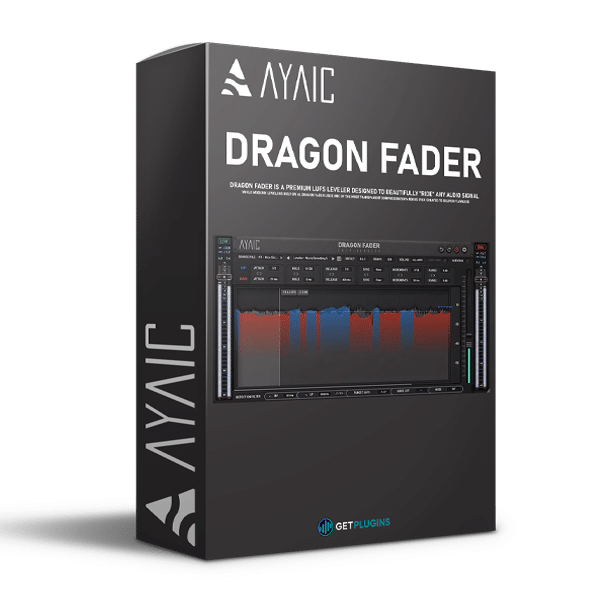
AYAIC Dragon Fader is a professional audio processing plugin designed to deliver precise loudness control, transparent gain riding, and consistent audio levels throughout your mix. Combining LUFS-based automatic leveling, intelligent compression and expansion, advanced sidechain processing, and true-peak limiting, it gives producers, mixing engineers, mastering professionals, and content creators detailed control over dynamic balance.
Integrated LUFS: Evaluate overall perceived loudness.
Loudness Range (LRA): Examine loudness variation throughout a performance.
Peak Level: Monitor signal peaks and identify potential level issues.
Explore product features & full description
AYAIC – Dragon Fader
Professional LUFS Leveling and Intelligent Gain Riding Plugin
AYAIC Dragon Fader is a professional audio processing plugin designed to deliver precise loudness control, transparent gain riding, and consistent audio levels throughout your mix. Combining LUFS-based automatic leveling, intelligent compression and expansion, advanced sidechain processing, and true-peak limiting, it gives producers, mixing engineers, mastering professionals, and content creators detailed control over dynamic balance.
Unlike conventional compressors that primarily control signal dynamics through fixed compression settings, Dragon Fader automatically adjusts gain toward a user-defined loudness target. Its flexible processing modes and editable gain-riding automation help maintain consistent levels while preserving the natural dynamics and tonal character of the source material.
From lead vocals and backing tracks to dialogue, instrumental buses, podcasts, and complete mixes, Dragon Fader provides a versatile solution for precise loudness management and professional audio production.
Intelligent LUFS-Based Automatic Leveling
Dragon Fader uses loudness measurement based on the ITU-R BS.1770 standard to adjust audio toward a selected target level. Users can set a target between −50 and −10 LUFS, making the plugin suitable for detailed level correction across a wide variety of audio sources.
Its gain-riding fader operates across a range of −20 dB to +30 dB, providing substantial flexibility for managing inconsistent recordings, balancing vocal performances, and controlling overall signal levels.
Integrated metering provides access to important audio measurements, including:
- Integrated LUFS: Evaluate overall perceived loudness.
- Loudness Range (LRA): Examine loudness variation throughout a performance.
- Peak Level: Monitor signal peaks and identify potential level issues.
- AES-17 RMS: Measure average signal level using the AES-17 reference method.
These measurements help users make informed decisions about gain adjustment, loudness consistency, and output level management.
Four Flexible Processing Modes
Dragon Fader features four operating modes designed to support different mixing and automation workflows.
FREE Mode
Process incoming audio in real time, allowing the plugin to adjust gain dynamically during playback. This mode is useful for live monitoring, vocal leveling, dialogue processing, and general mixing tasks.
INT Mode
Pre-analyze an imported WAV or AIFF file to calculate the required gain-riding behavior before playback. This approach provides a visual representation of the expected gain adjustments and allows users to inspect the leveling curve.
WRITE Mode
Generate automation data as your DAW plays the project. This enables you to capture the plugin's gain adjustments and incorporate them into an editable production workflow.
READ Mode
Reproduce previously generated automation data for repeatable gain control and consistent playback.
Dragon Fader supports CSV automation import and export, as well as gain-track WAV export, giving engineers additional flexibility when transferring or editing gain-riding information.
All four modes maintain consistent latency, helping avoid changes to DAW delay compensation when switching operating modes.
Transparent Compression and Expansion
Dragon Fader combines compression and expansion functions to manage both louder and quieter passages intelligently.
The EXP control increases the level of quieter sections, helping improve consistency across vocals, spoken-word recordings, and instruments with uneven dynamics. The DUCK control reduces sections that exceed the desired level, keeping louder passages under control.
Users can adjust the processing response through configurable timing in milliseconds, synchronized musical note values, or automatic timing.
Additional controls include Single and Dual Rider Path options and adjustable detection windows ranging from 20 to 3000 milliseconds. These settings allow the gain-riding behavior to range from responsive level correction to smoother, more gradual movement.
This combination provides detailed control over dynamic consistency without requiring every source to be processed with conventional compression alone.
Advanced Sidechain Processing
Dragon Fader supports mono and stereo sidechain signals, enabling external audio to influence the plugin's gain adjustments.
This functionality is particularly useful for creating space between competing elements in a mix. For example, a vocal signal can control the level of background music, helping dialogue remain intelligible without requiring constant manual volume adjustments.
Additional applications include rhythmic ducking, instrumental separation, and dynamic interaction between buses.
The sidechain detection circuit includes:
- High-pass and low-pass filtering
- Adjustable filter frequencies from 20 Hz to 22 kHz
- Selectable 6 dB or 12 dB per octave filter slopes
- A Listen function for monitoring the detected signal
- Mono and stereo sidechain compatibility
These controls let engineers shape which frequencies influence the gain-riding behavior, making the detector more responsive to the specific elements that matter in a mix.
Integrated True-Peak Brickwall Limiter
Dragon Fader includes a true-peak brickwall limiter designed to control output peaks and help prevent excessive signal levels.
The limiter uses 4x oversampling and detailed peak checking to improve peak detection. Its adjustable ceiling ranges from −3.0 to 0.0 dBTP, allowing users to establish an appropriate output ceiling for their workflow.
Automatic gain compensation can account for additional level introduced by the expansion stage, helping maintain more predictable output levels during processing.
This integrated peak-control stage makes Dragon Fader useful for workflows that require both consistent loudness and additional protection against excessive output peaks.
Seven Shared Level Planes
Dragon Fader introduces seven shared Level Planes that can be used across plugin instances within the same project.
The Quick Set function allows users to assign an instance to a specific Level Plane with a single click. This helps organize related audio sources and establish consistent loudness relationships throughout a session.
For example, producers can organize lead vocals, backing vocals, instrumental groups, and buses into separate level relationships, making it easier to maintain a structured and repeatable mixing workflow.
This feature is particularly valuable in complex sessions containing numerous tracks and multiple instances of the plugin.
Real-Time Visual Feedback and Customization
The plugin's visual interface provides a detailed overview of the incoming waveform, target range, level boundaries, and gain-adjustment history.
Users can monitor how the Target, Minimum, and Maximum settings influence the signal and inspect the resulting gain-riding behavior during operation.
The interface also offers practical customization options, including:
- Freely resizable plugin window
- Zoom settings from 25% to 150%
- Separate, resizable values window
- Customizable colors for groups and meter tiles
- Visual gain-riding history and level boundaries
These features make complex loudness adjustments easier to inspect and manage during detailed mixing sessions.
Ideal for Mixing, Mastering, Vocals, and Dialogue
AYAIC Dragon Fader is suitable for a broad range of professional audio applications.
- Vocal Mixing: Maintain consistent vocal levels across phrases while preserving expressive dynamics.
- Music Production: Balance instruments and musical layers with automatic gain adjustments.
- Mix Bus Processing: Manage broad level variations and improve consistency across grouped sources.
- Dialogue Editing: Control uneven speech levels for film, television, video, and spoken-word projects.
- Podcast Production: Reduce unwanted level differences between spoken passages and recordings.
- Sidechain Ducking: Automatically lower background music or supporting instruments when another source becomes active.
- Mastering Workflows: Apply loudness-aware gain management alongside appropriate peak control and other mastering processors.
- Broadcast and Content Creation: Monitor loudness measurements and maintain more consistent audio levels.
Whether you're working on a complex multitrack production or a single dialogue recording, Dragon Fader offers precise control over loudness, gain movement, and dynamic balance.
Key Features
- Professional LUFS-based automatic leveler
- Intelligent automatic gain riding
- Transparent compression and expansion
- Adjustable loudness target from −50 to −10 LUFS
- Gain fader range from −20 dB to +30 dB
- BS.1770 loudness measurement
- Integrated LUFS, LRA, peak, and AES-17 RMS metering
- Four operating modes: FREE, INT, WRITE, and READ
- WAV and AIFF pre-analysis
- Editable gain-riding automation
- CSV automation import and export
- Gain-track WAV export
- Mono and stereo sidechain support
- Adjustable sidechain detection filters
- Single and Dual Rider Path options
- Detection windows from 20 to 3000 milliseconds
- Integrated true-peak brickwall limiter
- 4x limiter oversampling
- Adjustable limiter ceiling from −3.0 to 0.0 dBTP
- Automatic gain compensation
- Seven shared Level Planes
- Consistent latency across operating modes
- 106 factory presets
- Resizable and customizable interface
- Mono and stereo channel support
- iLok USB, machine, or Cloud activation
Achieve Consistent Levels with AYAIC Dragon Fader
AYAIC Dragon Fader combines intelligent loudness leveling, flexible gain riding, detailed sidechain control, and integrated true-peak limiting in one professional audio plugin. Its LUFS-based processing, four operating modes, editable automation, and shared Level Planes provide a practical workflow for managing level consistency across individual tracks and complex sessions.
For producers, mixing engineers, mastering professionals, and content creators, Dragon Fader offers a versatile approach to controlling audio levels while retaining the musical character of the source material.
Use it to refine vocal performances, balance dialogue, manage instrumental dynamics, create sidechain-driven movement, and establish more consistent loudness throughout your productions.
Explore more professional tools in our Mixing & Mastering Plugins collection or discover additional processors in our Vocal Processing Plugins category.
For official product information and technical specifications, visit the AYAIC Dragon Fader official website.
Compatibility checklist
- Windows 10,11 (64Bit Only)
- VST3, AAX
- Formats: VST3 · AAX
Requirements vary by supplied version. Confirm your setup with support before purchasing.
Delivery & activation
- Complete your purchaseReview compatibility and purchase details.
- Download your filesAccess available downloads through your order and account.
- Follow the included setup guideContact GetPlugins if you need installation help.
Activation, where included, is provided by GetPlugins. Publisher-account registration, transferable publisher keys and a publisher-issued licence are not included. Read the activation policy.
Frequently asked questions
How do I receive my download?
After payment, access available files from your order details and GetPlugins account. Contact support if a download is missing.
What activation is included?
Follow the activation instructions supplied with your download. Activation is provided by GetPlugins. Confirm device allowances and reinstall arrangements before ordering.
Will this work with my computer and DAW?
Check the compatibility information for this listing and ask us to confirm the exact supplied build. Libraries may require a compatible sampler or additional software.
What if I need installation help?
Email support@getplugins.io with your order number, operating system, DAW and any error message.
Which updates are included?
Activation and updates are separate. Confirm the available version and update arrangements before ordering; do not assume access to future publisher releases.
How do I request a refund?
Contact support with your order number and issue details. Read our Refund Policy for eligibility and the request process.


Reviews
There are no reviews yet.