ADSR Sounds – Drum Machine ( Windows)
£27.00
Discover ADSR Sounds – Drum Machine ( Windows)
🥁 ADSR Sounds – Drum Machine (Windows) 🎶🔥Supercharge your beat-making with ADSR Drum Machine, a powerful drum sampler and sequencer designed to bring your rhythms to life on Windows. Packed with modern drum sounds, intuitive workflow, and creative effects, this plugin makes it easier than ever to build hard-hitting beats across any genre. 🚀
Explore product features & full description
🥁 ADSR Sounds – Drum Machine (Windows) 🎶🔥
Supercharge your beat-making with ADSR Drum Machine, a powerful drum sampler and sequencer designed to bring your rhythms to life on Windows. Packed with modern drum sounds, intuitive workflow, and creative effects, this plugin makes it easier than ever to build hard-hitting beats across any genre. 🚀
🔊 Why Drum Machine?
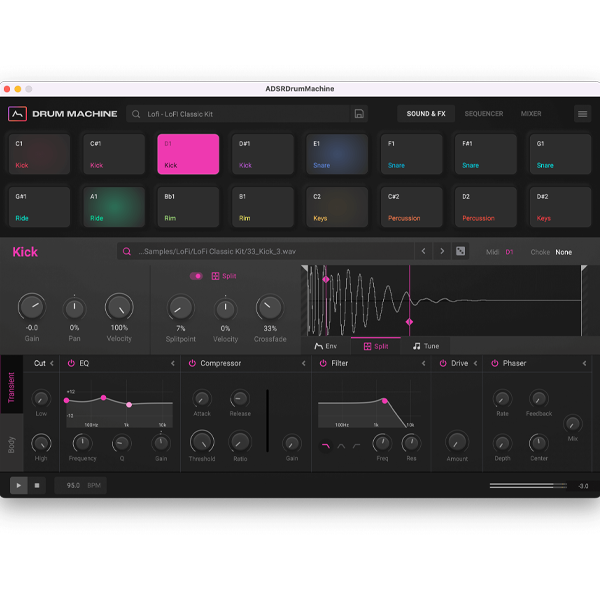
With 16 flexible pads, drag-and-drop sample swapping, built-in effects, and genre-ready presets, ADSR Drum Machine gives you everything from punchy kicks and crisp snares to 808s and cinematic percussion. Whether you’re producing hip-hop, EDM, trap, house, or lo-fi, it delivers instant inspiration and pro-level results. 🎛️✨
🎛️ Key Features:
✔️ 16-Pad Drum Engine – Load, edit, and trigger samples with ease
✔️ Multimode Filters & FX – Add punch, space, and character to your drums
✔️ Drag & Drop Workflow – Swap samples and patterns instantly
✔️ Built-in Sequencer – Program grooves and complex rhythms in seconds
✔️ Huge Preset Library – Kickstart creativity with ready-made kits
✔️ Optimized for Windows – Smooth performance inside your DAW

Compatibility checklist
- Windows 10,11 (64Bit Only)
- VST3, VST
- Formats: VST3 · VST
Requirements vary by supplied version. Confirm your setup with support before purchasing.
Delivery & activation
- Complete your purchaseReview compatibility and purchase details.
- Download your filesAccess available downloads through your order and account.
- Follow the included setup guideContact GetPlugins if you need installation help.
Activation, where included, is provided by GetPlugins. Publisher-account registration, transferable publisher keys and a publisher-issued licence are not included. Read the activation policy.
Frequently asked questions
How do I receive my download?
After payment, access available files from your order details and GetPlugins account. Contact support if a download is missing.
What activation is included?
Follow the activation instructions supplied with your download. Activation is provided by GetPlugins. Confirm device allowances and reinstall arrangements before ordering.
Will this work with my computer and DAW?
Check the compatibility information for this listing and ask us to confirm the exact supplied build. Libraries may require a compatible sampler or additional software.
What if I need installation help?
Email support@getplugins.io with your order number, operating system, DAW and any error message.
Which updates are included?
Activation and updates are separate. Confirm the available version and update arrangements before ordering; do not assume access to future publisher releases.
How do I request a refund?
Contact support with your order number and issue details. Read our Refund Policy for eligibility and the request process.

Reviews
There are no reviews yet.