Accentize – Chameleon Surround (Windows)
£15.00
Discover Accentize – Chameleon Surround (Windows)
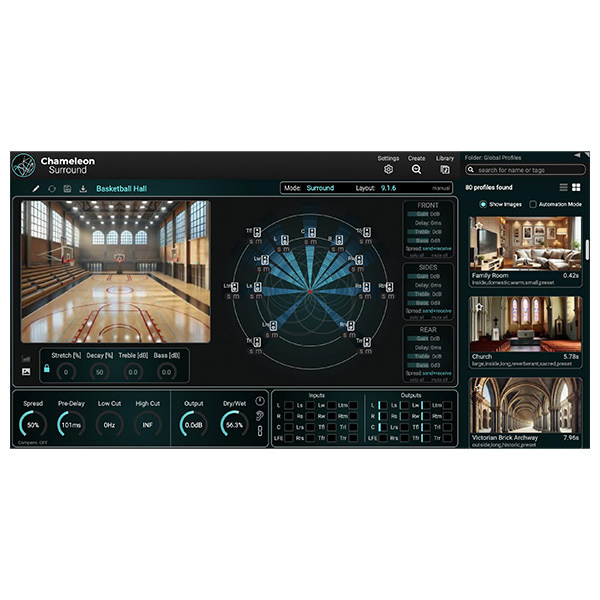
Chameleon Surround is the atmospheric reverb you’ve always dreamed of. Now, with the arrival of Chameleon Surround, reverb capabilities have expanded beyond standard stereo reverb into immersive, multi-dimensional sound. This new version takes Chameleon’s renowned reverb matching technology and augments it with powerful surround sound capabilities, making it an indispensable tool for more complex audio…
Support for surround sound up to version 9.1.6.
Create multi-channel 3D spaces from a mono signal.
Ability to add images to profiles for easy searching and playback.
Explore product features & full description
Chameleon Surround is the atmospheric reverb you’ve always dreamed of. Now, with the arrival of Chameleon Surround, reverb capabilities have expanded beyond standard stereo reverb into immersive, multi-dimensional sound. This new version takes Chameleon’s renowned reverb matching technology and augments it with powerful surround sound capabilities, making it an indispensable tool for more complex audio systems like Atmos movies, TV shows, and immersive games. It now includes a ton of new presets and a great preset browser, plus a stunning selection of room reverbs right out of the box, including halls, small rooms, car interiors and more.
Peculiarities
- Support for surround sound up to version 9.1.6.
- Create multi-channel 3D spaces from a mono signal.
- Ability to add images to profiles for easy searching and playback.
- New “Browser Library” option for faster work in single-window mode.
- 80 surround sound settings.
- The initial selection of settings can be automatically loaded at plugin startup.
- Individual adjustment of front, side and rear reverb.
- Two different surround sound visualization modes (speaker output, perceived direction).
- New spread parameter with automatic gain compensation for controlling the cross-feed of reverb between channels.
Compatibility checklist
- Windows 10,11 (64Bit Only)
- VST3, AAX
- Formats: VST3 · AAX
Requirements vary by supplied version. Confirm your setup with support before purchasing.
Delivery & activation
- Complete your purchaseReview compatibility and purchase details.
- Download your filesAccess available downloads through your order and account.
- Follow the included setup guideContact GetPlugins if you need installation help.
Activation, where included, is provided by GetPlugins. Publisher-account registration, transferable publisher keys and a publisher-issued licence are not included. Read the activation policy.
Frequently asked questions
How do I receive my download?
After payment, access available files from your order details and GetPlugins account. Contact support if a download is missing.
What activation is included?
Follow the activation instructions supplied with your download. Activation is provided by GetPlugins. Confirm device allowances and reinstall arrangements before ordering.
Will this work with my computer and DAW?
Check the compatibility information for this listing and ask us to confirm the exact supplied build. Libraries may require a compatible sampler or additional software.
What if I need installation help?
Email support@getplugins.io with your order number, operating system, DAW and any error message.
Which updates are included?
Activation and updates are separate. Confirm the available version and update arrangements before ordering; do not assume access to future publisher releases.
How do I request a refund?
Contact support with your order number and issue details. Read our Refund Policy for eligibility and the request process.

Reviews
There are no reviews yet.