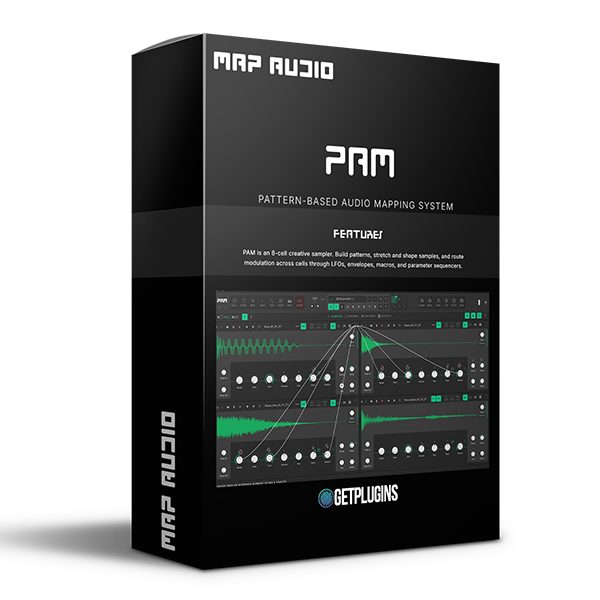
MAP Audio – PAM + Factory Content (Windows)

MAP Audio – PAM v1.4.31 + Factory Content | Creative Sampler & Pattern Sequencer Plugin
Formats: VST3 · Standalone

£41.99

Discover MAP Audio – PAM + Factory Content (Windows)

MAP Audio – PAM v1.4.31 + Factory Content | Creative Sampler & Pattern Sequencer Plugin

Step Sequencer with note, pitch, slice & stretch tracks

Piano roll mode with full pitch range & scale filtering

Tracker-style sequencing for precise control over notes, velocity, and probability

Explore product features & full description

MAP Audio – PAM v1.4.31 + Factory Content | Creative Sampler & Pattern Sequencer Plugin

Unlock next-level creativity with MAP Audio PAM v1.4.31, an innovative eight-segment creative sampler designed for producers, beat makers, and sound designers. With powerful sequencing, modulation, and sample manipulation tools, PAM lets you build complex patterns, reshape audio, and design unique sounds—all within a dynamic and intuitive workflow.


Advanced Creative Sampling Engine

PAM features an 8-cell grid, where each cell operates as an independent sampler with its own effects and modulation. Route modulation between cells to create deep, evolving sound structures and complex signal chains.


Powerful Pattern & Sequencing Tools

  • Step Sequencer with note, pitch, slice & stretch tracks
  • Piano roll mode with full pitch range & scale filtering
  • Tracker-style sequencing for precise control over notes, velocity, and probability
  • Slice-based sequencing with automatic transient detection

Create anything from tight drum patterns to evolving melodic sequences with ease.


Flexible Modulation & Sound Design

  • 6 Global LFOs with tempo sync and multiple wave shapes
  • Envelope modulation with attack/release control and sidechain routing
  • Parameter sequencers & macros for deep automation
  • Randomization tools to generate unique variations instantly

Creative Workflow Features

  • CtrlAll global macro system with A/B crossfader
  • Looper with overdubbing, external input & 8 variations
  • Variation engine for controlled randomization
  • Real-time performance control for live creativity

Built-in Mixing & Effects

  • Full 8-track mixer with volume, pan, mute & solo
  • Per-track effects chain including EQ, filter, delay, compressor & more
  • Seamless integration of sound design and mixing in one plugin

Key Features

  • 8 independent sampler cells with routing
  • Advanced slicing with transient detection
  • Pattern editor, tracker & piano roll modes
  • Powerful modulation system (LFOs, envelopes, macros)
  • Looper with overdub & live performance features
  • Randomization & variation tools
  • Factory content included for instant inspiration

Perfect For

  • Music producers & beat makers
  • Electronic & hip-hop production
  • Sound designers & experimental artists
  • Live performers & loop-based creators

Take full control of your samples and create complex, evolving music with MAP Audio PAM – the ultimate creative sampler and sequencing tool.
Compatibility checklist

  • Windows 10,11 (64-bit)
  • Instant Download | Full Version
  • VST3, CLAP, Standalone
  • Formats: VST3 · Standalone

Requirements vary by supplied version. Confirm your setup with support before purchasing.

Delivery & activation

  1. Complete your purchaseReview compatibility and purchase details.
  2. Download your filesAccess available downloads through your order and account.
  3. Follow the included setup guideContact GetPlugins if you need installation help.

Activation, where included, is provided by GetPlugins. Publisher-account registration, transferable publisher keys and a publisher-issued licence are not included. Read the activation policy.

Frequently asked questions

How do I receive my download?

After payment, access available files from your order details and GetPlugins account. Contact support if a download is missing.

What activation is included?

Follow the activation instructions supplied with your download. Activation is provided by GetPlugins. Confirm device allowances and reinstall arrangements before ordering.

Will this work with my computer and DAW?

Check the compatibility information for this listing and ask us to confirm the exact supplied build. Libraries may require a compatible sampler or additional software.

What if I need installation help?

Email support@getplugins.io with your order number, operating system, DAW and any error message.

Which updates are included?

Activation and updates are separate. Confirm the available version and update arrangements before ordering; do not assume access to future publisher releases.

How do I request a refund?

Contact support with your order number and issue details. Read our Refund Policy for eligibility and the request process.

Customer Reviews

Reviews

There are no reviews yet.

Be the first to review “MAP Audio – PAM + Factory Content (Windows)”

Your email address will not be published. Required fields are marked *