Soundspear – Superlimit (Windows)
£15.00
Discover Soundspear – Superlimit (Windows)
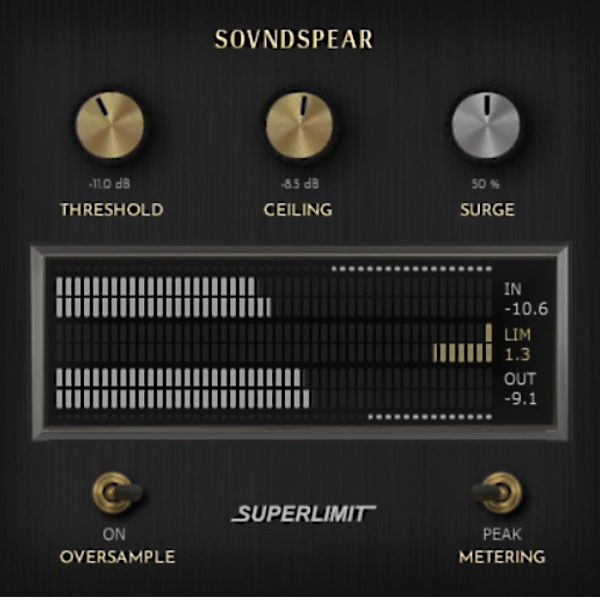
Redefine your dynamics with Soundspear – Superlimit (Windows), a cutting-edge limiter plugin that combines classic analog warmth with modern digital precision. 🚀 More than just a limiter, Superlimit adds harmonic richness, musical character, and pro-level clarity, making your mixes sound bold and polished. 🎶✨
Explore product features & full description
🔊 Soundspear – Superlimit (Windows 🎛️🔥
Redefine your dynamics with Soundspear – Superlimit (Windows), a cutting-edge limiter plugin that combines classic analog warmth with modern digital precision. 🚀 More than just a limiter, Superlimit adds harmonic richness, musical character, and pro-level clarity, making your mixes sound bold and polished. 🎶✨
Powered by forward-analysis architecture with signal ballistics, Superlimit ensures smooth, natural transitions without harsh clipping—preserving the true dynamic essence of your music.
And with its unique Surge knob, you go beyond limiting: 💥 transient enhancement that makes drums punch, basslines hit harder, and full mixes cut through with power and presence.
🔑 Key Features:
🎚️ Threshold – control where limiting begins
🚫 Ceiling – set maximum output with precision
⚡ Surge Knob – enhance transients with analog-style punch
🎧 Stereo Link – consistent stereo dynamics across channels
📊 Accurate Metering – switch between Peak dB & LUFS
Compatibility checklist
- Windows 10,11 (64Bit Only)
- VST3, VST
- Formats: VST3 · VST
Requirements vary by supplied version. Confirm your setup with support before purchasing.
Delivery & activation
- Complete your purchaseReview compatibility and purchase details.
- Download your filesAccess available downloads through your order and account.
- Follow the included setup guideContact GetPlugins if you need installation help.
Activation, where included, is provided by GetPlugins. Publisher-account registration, transferable publisher keys and a publisher-issued licence are not included. Read the activation policy.
Frequently asked questions
How do I receive my download?
After payment, access available files from your order details and GetPlugins account. Contact support if a download is missing.
What activation is included?
Follow the activation instructions supplied with your download. Activation is provided by GetPlugins. Confirm device allowances and reinstall arrangements before ordering.
Will this work with my computer and DAW?
Check the compatibility information for this listing and ask us to confirm the exact supplied build. Libraries may require a compatible sampler or additional software.
What if I need installation help?
Email support@getplugins.io with your order number, operating system, DAW and any error message.
Which updates are included?
Activation and updates are separate. Confirm the available version and update arrangements before ordering; do not assume access to future publisher releases.
How do I request a refund?
Contact support with your order number and issue details. Read our Refund Policy for eligibility and the request process.

Reviews
There are no reviews yet.