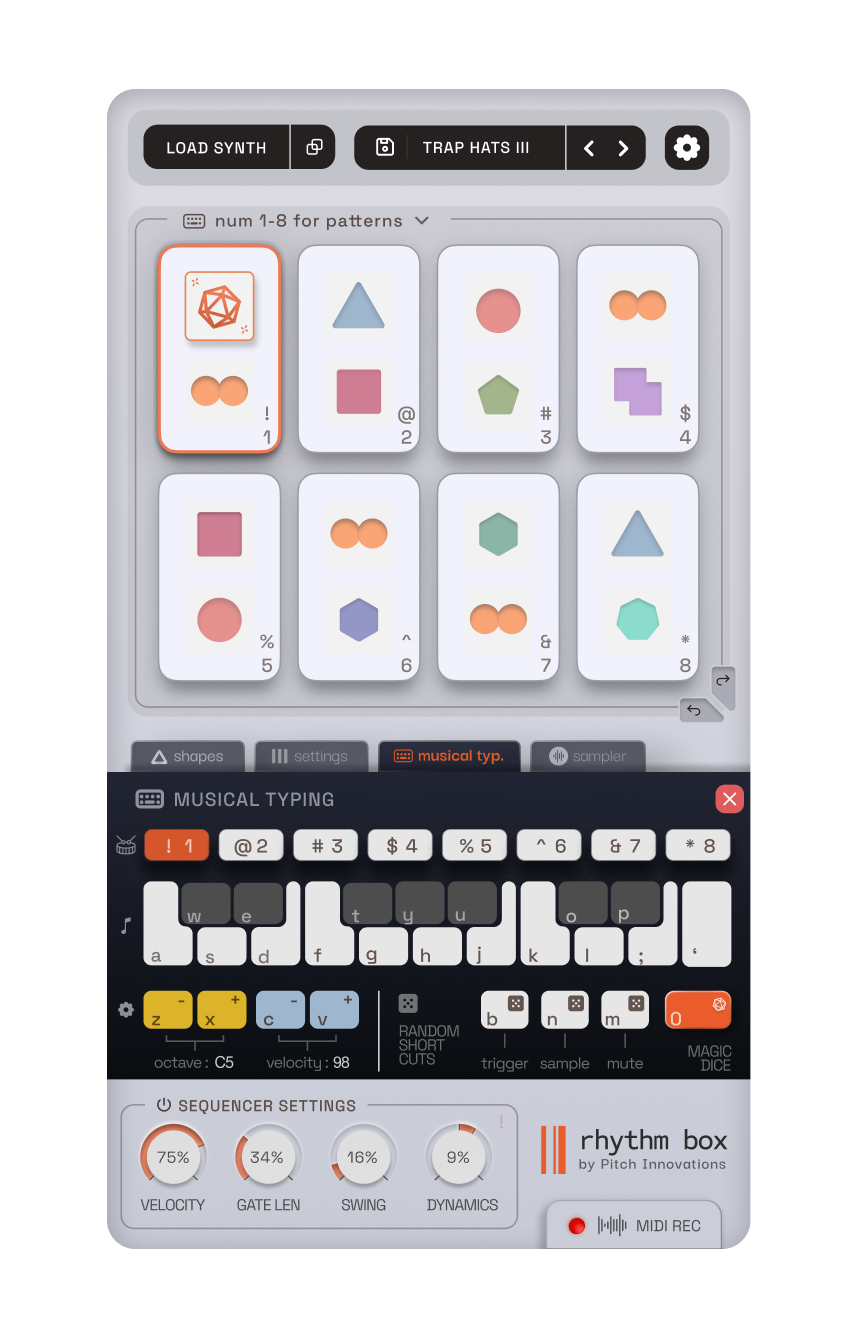
Pitch Innovation – Rhythm Box (Windows)

Rhythm Box by Pitch Innovations is a revolutionary rhythm generation plugin for Windows that goes far beyond basic…
Formats: VST3 · VST

£10.00

Discover Pitch Innovation – Rhythm Box (Windows)

Rhythm Box by Pitch Innovations is a revolutionary rhythm generation plugin for Windows that goes far beyond basic beat programming. Designed for producers, composers, and live performers, Rhythm Box transforms your DAW into a living, breathing groove machine that responds to your creativity and evolves with your music. 🎶⚡

Explore product features & full description

🎛️ Pitch Innovations – Rhythm Box (Windows) 🥁

Rhythm Box by Pitch Innovations is a revolutionary rhythm generation plugin for Windows that goes far beyond basic beat programming. Designed for producers, composers, and live performers, Rhythm Box transforms your DAW into a living, breathing groove machine that responds to your creativity and evolves with your music. 🎶⚡

🔥 Key Features:

🧠 Intelligent Rhythm Generator
Build beats on the fly with AI-powered rhythm sequencing. Whether you need tight trap hi-hats, bouncy Afrobeat percussion, or glitchy IDM rhythms — Rhythm Box crafts genre-flexible grooves in seconds.

🎚️ Groove Control with a Human Touch
Add swing, shuffle, and timing variation to create humanized, natural-feeling beats that move with your track — not against it.

🥁 Multi-Layer Percussion Engine
Stack, mix, and blend multiple rhythm layers using different samples and timing settings. Create polyrhythms, syncopation, or layered drum textures with ease.

🎹 MIDI Output to Any Instrument
Send generated rhythms to your favorite VST instruments, drum machines, or hardware synths via MIDI routing. Use Rhythm Box as a performance-ready groove engine or compositional sketchpad.

📦 Custom Presets & Style Templates
Load up genre-based presets or save your own rhythmic blueprints for future projects. Switch between trap kits, world percussion, cinematic drums, or even abstract glitch beats.

🖱️ Drag-and-Drop Simplicity
Preview grooves and drag MIDI clips directly into your DAW’s timeline — perfect for quick inspiration during your workflow.

🎯 Perfect For:

🎧 Beatmakers seeking fast, fresh groove ideas
🎬 Media composers needing evolving percussive textures
🎹 Live performers who want real-time rhythm control
🎛️ Electronic producers craving unique rhythmic motion

🛠️ Why Choose Rhythm Box?

✅ Intelligent rhythm generation with full creative control
✅ Inspires unique grooves without over-editing MIDI
✅ Easy integration into any DAW workflow
✅ VST3/VST plugin format – Windows compatible
✅ Built by the creators of Scaler & Eternal Arps for forward-thinking musicians

Compatibility checklist

  • Windows 10,11 (64Bit Only)
  • VST3, VST
  • Formats: VST3 · VST

Requirements vary by supplied version. Confirm your setup with support before purchasing.

Delivery & activation

  1. Complete your purchaseReview compatibility and purchase details.
  2. Download your filesAccess available downloads through your order and account.
  3. Follow the included setup guideContact GetPlugins if you need installation help.

Activation, where included, is provided by GetPlugins. Publisher-account registration, transferable publisher keys and a publisher-issued licence are not included. Read the activation policy.

Frequently asked questions

How do I receive my download?

After payment, access available files from your order details and GetPlugins account. Contact support if a download is missing.

What activation is included?

Follow the activation instructions supplied with your download. Activation is provided by GetPlugins. Confirm device allowances and reinstall arrangements before ordering.

Will this work with my computer and DAW?

Check the compatibility information for this listing and ask us to confirm the exact supplied build. Libraries may require a compatible sampler or additional software.

What if I need installation help?

Email support@getplugins.io with your order number, operating system, DAW and any error message.

Which updates are included?

Activation and updates are separate. Confirm the available version and update arrangements before ordering; do not assume access to future publisher releases.

How do I request a refund?

Contact support with your order number and issue details. Read our Refund Policy for eligibility and the request process.

Customer Reviews

Reviews

There are no reviews yet.

Be the first to review “Pitch Innovation – Rhythm Box (Windows)”

Your email address will not be published. Required fields are marked *