Venomode – Phrasebox 2 (Windows)
£25.00
Discover Venomode – Phrasebox 2 (Windows)
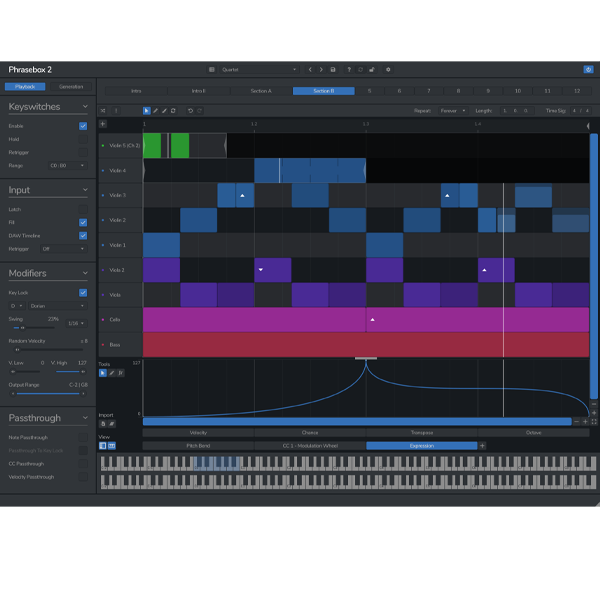
Step into a new era of MIDI creation with Phrasebox 2 by Venomode – the ultimate MIDI phrase generator and arpeggiator, now fully optimized for Windows-based DAWs. Whether you're building evolving melodies, crafting complex polyrhythms, or automating MIDI controls across channels, Phrasebox 2 transforms your chords into expressive, dynamic musical ideas. 🎶⚡
Polyrhythms & Euclidean rhythms
Independent loop points per row
Grid-aligned or free-floating timing
Explore product features & full description
🎹 Venomode – Phrasebox 2 (Windows) 🎛️
Step into a new era of MIDI creation with Phrasebox 2 by Venomode – the ultimate MIDI phrase generator and arpeggiator, now fully optimized for Windows-based DAWs. Whether you're building evolving melodies, crafting complex polyrhythms, or automating MIDI controls across channels, Phrasebox 2 transforms your chords into expressive, dynamic musical ideas. 🎶⚡
🚀 Key Features:
🎼 Intelligent Phrase Arpeggiation
Unlike traditional arps, Phrasebox 2 lets you create polyphonic, multi-channel sequences from any chord input. Every note is mapped using user-defined rules — so your phrases are unique, reactive, and inspiring.
✔️ Instant transformations with each chord change!
📝 Freeform Phrase Editing
Say goodbye to rigid steps and grids. Create phrases of any length, rhythm, or complexity — from minimalist grooves to cinematic motifs.
🎲 Add probabilities to notes for organic, evolving performance.
🧠 Creative Timing Engine
Design rhythmically rich sequences using:
-
Polyrhythms & Euclidean rhythms
-
Independent loop points per row
-
Grid-aligned or free-floating timing
🎛️ Multi-Channel MIDI Automation
Animate your sound in real time with dedicated controller lanes:
🎚️ Filters, 🎹 Sustain, 🎯 Pitch bends & more.
💡 Also works in controller-only mode for modulating external MIDI clips.
🧩 Advanced Row Logic & Routing
Each row can have its own:
🎯 MIDI channel | 🔁 Transposition rules | 🎨 Custom name & color
✔️ Organize layers like a pro and build deeply expressive arrangements.
⚡ Instant Phrase Generator
Stuck in a creative rut? Tap the random generator to instantly create fresh melodic or modulated MIDI content—tailored to your rules.
🎯 Perfect For:
-
🎧 Electronic, ambient, and experimental producers
-
🎼 Film, game & trailer composers needing evolving themes
-
🧪 Sound designers pushing MIDI modulation boundaries
-
🎹 Producers seeking unique, automated musical inspiration
🛠️ Why Phrasebox 2 for Windows?
✅ Native VST3 support for all major Windows DAWs (FL Studio, Ableton Live, Cubase & more)
✅ Designed for inspiration and hands-on composition
✅ Intuitive workflow with deep control over timing & phrasing
✅ Ultra-responsive performance and low CPU load
Compatibility checklist
- Windows 10,11 (64Bit Only)
- VST3, VST
- Formats: VST3 · VST
Requirements vary by supplied version. Confirm your setup with support before purchasing.
Delivery & activation
- Complete your purchaseReview compatibility and purchase details.
- Download your filesAccess available downloads through your order and account.
- Follow the included setup guideContact GetPlugins if you need installation help.
Activation, where included, is provided by GetPlugins. Publisher-account registration, transferable publisher keys and a publisher-issued licence are not included. Read the activation policy.
Frequently asked questions
How do I receive my download?
After payment, access available files from your order details and GetPlugins account. Contact support if a download is missing.
What activation is included?
Follow the activation instructions supplied with your download. Activation is provided by GetPlugins. Confirm device allowances and reinstall arrangements before ordering.
Will this work with my computer and DAW?
Check the compatibility information for this listing and ask us to confirm the exact supplied build. Libraries may require a compatible sampler or additional software.
What if I need installation help?
Email support@getplugins.io with your order number, operating system, DAW and any error message.
Which updates are included?
Activation and updates are separate. Confirm the available version and update arrangements before ordering; do not assume access to future publisher releases.
How do I request a refund?
Contact support with your order number and issue details. Read our Refund Policy for eligibility and the request process.

Reviews
There are no reviews yet.