Pulsar Modular – P440 Sweet Spot EQ (Windows)
£32.00
Discover Pulsar Modular – P440 Sweet Spot EQ (Windows)
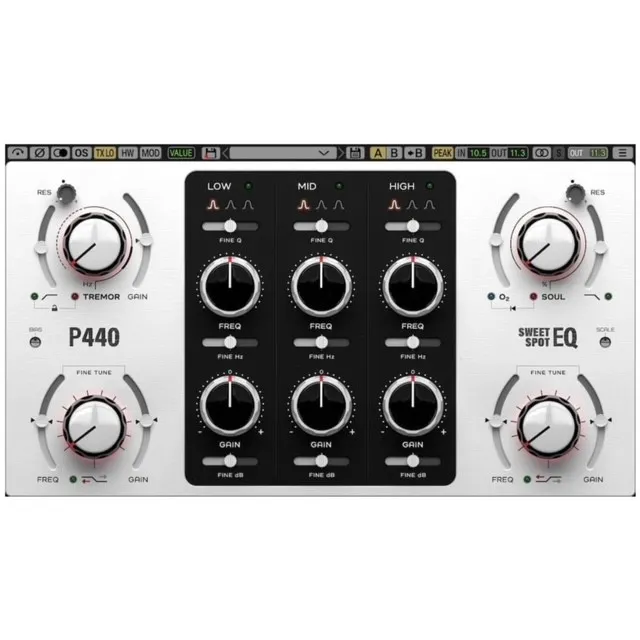
Take your mixing and mastering to the next level with Pulsar Modular P440 Sweet Spot EQ – a high-fidelity, analog-modeled equalizer that delivers pristine sound shaping with warmth and precision. Whether you're a music producer, mixing engineer, or mastering pro, this plugin offers surgical accuracy and musicality in a beautifully designed interface.
Explore product features & full description
Pulsar Modular P440 Sweet Spot EQ 🎛️✨ – The Ultimate Analog-Modeled Equalizer for Precision Sound
Take your mixing and mastering to the next level with Pulsar Modular P440 Sweet Spot EQ – a high-fidelity, analog-modeled equalizer that delivers pristine sound shaping with warmth and precision. Whether you're a music producer, mixing engineer, or mastering pro, this plugin offers surgical accuracy and musicality in a beautifully designed interface.
🎶 Why Choose P440 Sweet Spot EQ?
✅ Authentic Analog Feel – Modeled after premium analog hardware for a rich, warm sound.
✅ Ultra-Transparent Processing – Achieve precise EQ adjustments without unwanted artifacts.
✅ Unique Sweet Spot Control – Find the perfect balance for every track with ease.
✅ Intuitive Interface – Designed for smooth workflow and creative freedom.
✅ CPU-Friendly & Highly Efficient – Flawless performance, even in complex sessions.
🔥 Perfect for:
🎼 Mixing & Mastering – Fine-tune your tracks with surgical precision or broad tonal shaping.
🎤 Vocals & Instruments – Enhance clarity, remove mud, and bring out natural warmth.
🎚️ Sound Design – Sculpt frequencies for unique sonic textures.
Compatibility checklist
- Windows 10,11 (64 Bit Only)
- VST, VST3
- Formats: VST3 · VST
Requirements vary by supplied version. Confirm your setup with support before purchasing.
Delivery & activation
- Complete your purchaseReview compatibility and purchase details.
- Download your filesAccess available downloads through your order and account.
- Follow the included setup guideContact GetPlugins if you need installation help.
Activation, where included, is provided by GetPlugins. Publisher-account registration, transferable publisher keys and a publisher-issued licence are not included. Read the activation policy.
Frequently asked questions
How do I receive my download?
After payment, access available files from your order details and GetPlugins account. Contact support if a download is missing.
What activation is included?
Follow the activation instructions supplied with your download. Activation is provided by GetPlugins. Confirm device allowances and reinstall arrangements before ordering.
Will this work with my computer and DAW?
Check the compatibility information for this listing and ask us to confirm the exact supplied build. Libraries may require a compatible sampler or additional software.
What if I need installation help?
Email support@getplugins.io with your order number, operating system, DAW and any error message.
Which updates are included?
Activation and updates are separate. Confirm the available version and update arrangements before ordering; do not assume access to future publisher releases.
How do I request a refund?
Contact support with your order number and issue details. Read our Refund Policy for eligibility and the request process.

Reviews
There are no reviews yet.