PSP Datamix A567 models the equalizer module from the classic first-generation Datamix console. Officially approved and endorsed by Eddie Kramer, who recorded legendary bands such as Jimi Hendrix, Led Zeppelin, KISS, and others on original Datamix consoles during the golden era of The Record Plant and Electric Lady studios, the plugin captures the essence of…
Three bands of equalization: Low (peak on gain, peak or shelving at cut depending on frequency), Mid (peak on gain and notch-type…
Dual FAT sampling: In the PSP Datamix A567, FAT is automatically switched on for low (below 50 kHz) sample rates and switched…
64-bit double-precision floating point math for ultra-low total filter errors and correct filter characteristics across the frequency spectrum.
Explore product features & full description
An equalizer for tracking and mixing
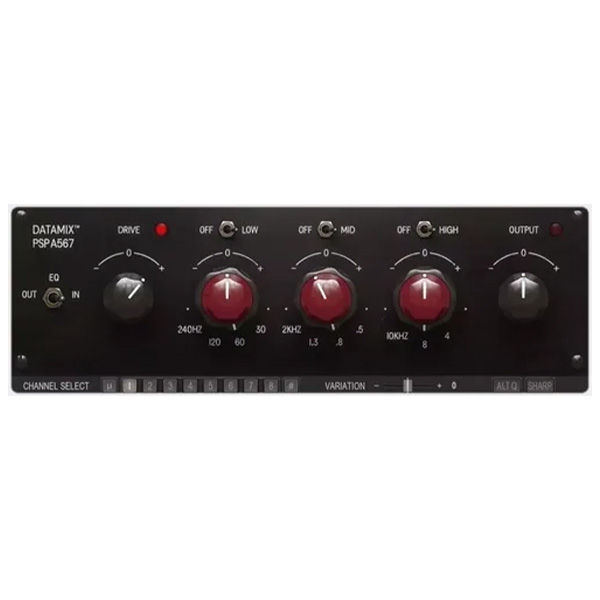
PSP Datamix A567 models the equalizer module from the classic first-generation Datamix console. Officially approved and endorsed by Eddie Kramer, who recorded legendary bands such as Jimi Hendrix, Led Zeppelin, KISS, and others on original Datamix consoles during the golden era of The Record Plant and Electric Lady studios, the plugin captures the essence of that iconic sound. Give it a try!
Peculiarities
Three bands of equalization: Low (peak on gain, peak or shelving at cut depending on frequency), Mid (peak on gain and notch-type cut), and High (peak on gain, shelving at cut).
Dual FAT sampling: In the PSP Datamix A567, FAT is automatically switched on for low (below 50 kHz) sample rates and switched off for higher ones. This ensures accurate processing regardless of sample rate.
64-bit double-precision floating point math for ultra-low total filter errors and correct filter characteristics across the frequency spectrum.
We modeled the preamp section at the input.
Output section with transformer emulation.
Change the character of the sound by selecting a specific channel setting, a mid setting or an “ideal” setting corresponding to the exact frequencies at the cue points.
Adjustable left/right channel spread of the settings.
The Alt Q mode allows for a softer effect by fixing the Q for each band regardless of the selected frequency.
The Sharp mode adds a pronounced resonance in the High range.
All actual parameter values, such as gain and frequency, may differ from those displayed. This is a typical characteristic of analog equalizers.
Complete your purchaseReview compatibility and purchase details.
Download your filesAccess available downloads through your order and account.
Follow the included setup guideContact GetPlugins if you need installation help.
Activation, where included, is provided by GetPlugins. Publisher-account registration, transferable publisher keys and a publisher-issued licence are not included. Read the activation policy.
Frequently asked questions
How do I receive my download?
After payment, access available files from your order details and GetPlugins account. Contact support if a download is missing.
What activation is included?
Follow the activation instructions supplied with your download. Activation is provided by GetPlugins. Confirm device allowances and reinstall arrangements before ordering.
Will this work with my computer and DAW?
Check the compatibility information for this listing and ask us to confirm the exact supplied build. Libraries may require a compatible sampler or additional software.
What if I need installation help?
Email support@getplugins.io with your order number, operating system, DAW and any error message.
Which updates are included?
Activation and updates are separate. Confirm the available version and update arrangements before ordering; do not assume access to future publisher releases.
How do I request a refund?
Contact support with your order number and issue details. Read our Refund Policy for eligibility and the request process.
Customer Reviews
Reviews
There are no reviews yet.
Be the first to review “PSP Datamix A567 (Windows)” Cancel reply










Reviews
There are no reviews yet.