Antares – Vocal De-Esser (Windows)
£15.00
Discover Antares – Vocal De-Esser (Windows)
Smooth out harsh vocal sounds with the easiest-to-use AI-powered Vocal De-Esser plugin. Vocal De-Esser is trained on the unique characteristics of the human voice to control sibilance without compromising the performance or tone of your vocal tracks.
Explore product features & full description
AI-powered Sibilance Control
Smooth out harsh vocal sounds with the easiest-to-use AI-powered Vocal De-Esser plugin. Vocal De-Esser is trained on the unique characteristics of the human voice to control sibilance without compromising the performance or tone of your vocal tracks.
Tame Sibilance in Your Vocals
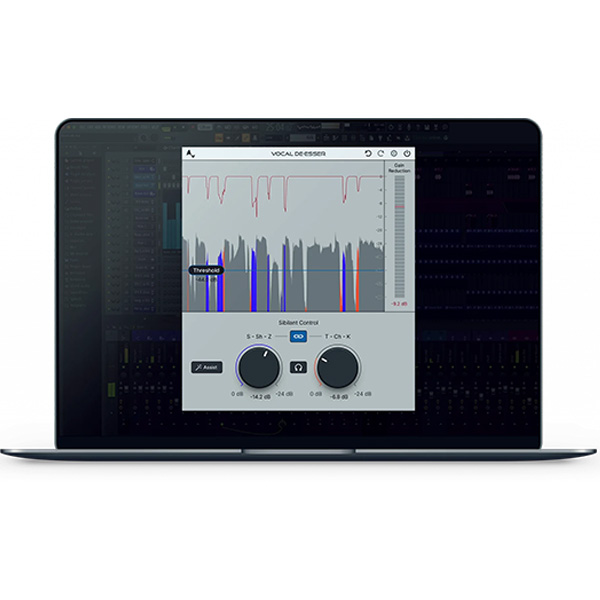
Hissing “S”s and tiresome “T” sounds, known as sibilance, can ruin an otherwise perfect vocal recording. Vocal De-Esser quickly removes these harsh vocal sounds with the press of a button. The result is more time to focus on your mix.
Artificial Intelligence, True Confidence
We worked with professional vocalists to ensure that the AI-powered Vocal De-Esser truly understands the nuances of the human vocal voice. The result is a powerful yet easy-to-use plugin that provides real-time sibilance control you can trust.
Save Your Mix
Eliminate excessive vocal sibilance where it’s needed most. The Vocal De-Esser features separate controls for soft (S, Sh, Z) and hard (T, Ch, K) sibilance, individually adjusted for maximum effectiveness in reducing these harsh vocal sounds.
Speak Easy
Not just for singing. Use Vocal De-Esser to clean up spoken dialogue for movies, podcasts, interviews, and more. Since the AI-powered detection works in real-time, you can even use it live.
Compatibility checklist
- Windows 10,11 (64Bit Only)
- VST3 Only
- Formats: VST3
Requirements vary by supplied version. Confirm your setup with support before purchasing.
Delivery & activation
- Complete your purchaseReview compatibility and purchase details.
- Download your filesAccess available downloads through your order and account.
- Follow the included setup guideContact GetPlugins if you need installation help.
Activation, where included, is provided by GetPlugins. Publisher-account registration, transferable publisher keys and a publisher-issued licence are not included. Read the activation policy.
Frequently asked questions
How do I receive my download?
After payment, access available files from your order details and GetPlugins account. Contact support if a download is missing.
What activation is included?
Follow the activation instructions supplied with your download. Activation is provided by GetPlugins. Confirm device allowances and reinstall arrangements before ordering.
Will this work with my computer and DAW?
Check the compatibility information for this listing and ask us to confirm the exact supplied build. Libraries may require a compatible sampler or additional software.
What if I need installation help?
Email support@getplugins.io with your order number, operating system, DAW and any error message.
Which updates are included?
Activation and updates are separate. Confirm the available version and update arrangements before ordering; do not assume access to future publisher releases.
How do I request a refund?
Contact support with your order number and issue details. Read our Refund Policy for eligibility and the request process.

Reviews
There are no reviews yet.