Audiomodern – Playbeat 3 (Windows)
£15.00
Discover Audiomodern – Playbeat 3 (Windows)
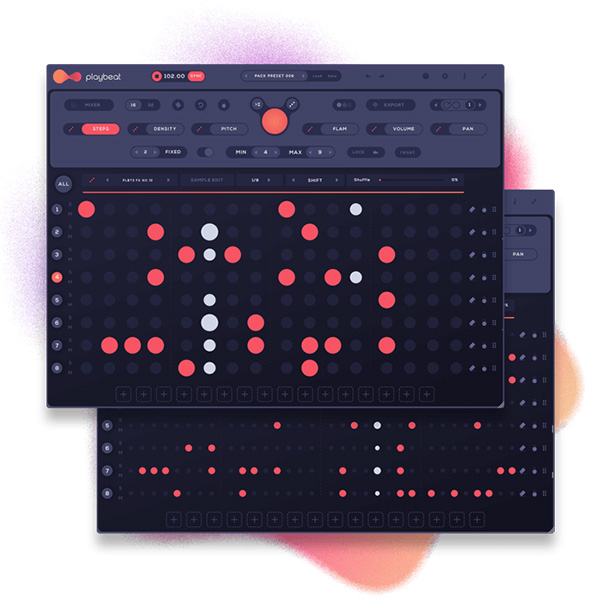
With the help of our newest true A.I. SMART algorithm, you can Create infinite variations of the grooves while maintaining creativity, inspiration, and momentum. No two patterns will ever be the same.
Explore product features & full description
It is the only Plugin that creates patterns based on what you like
With the help of our newest true A.I. SMART algorithm, you can Create infinite variations of the grooves
while maintaining creativity, inspiration, and momentum. No two patterns will ever be the same.
SMART™ Algorithm Explained
We're taking a unique step into a new field of AI for music production software. You can now train the app to learn your preferred patterns with your day-to-day activity, The app then adapts to your style and generates personalized patterns to achieve the perfect user experience. In this way, as you improve, it becomes more advanced to suit your needs.
Smart by Design
Unlike other groove creators that are limited to one specific algorithm, Playbeat innovates by using advanced
sonic analysis algorithms to create or remix completely original grooves that never repeat and always sound great!
With the ability to generate and suggest different combinations for your beats on the fly, you'll always have something fresh and
new, from simple pattern remixes to more complex drum beats. The more you play, the more combinations you get.
Compatibility checklist
- Windows 10,11 (64Bit Only)
- Full Version
- VST, VST3, AAX and Standalone
- Formats: VST3 · AAX · Standalone · VST
Requirements vary by supplied version. Confirm your setup with support before purchasing.
Delivery & activation
- Complete your purchaseReview compatibility and purchase details.
- Download your filesAccess available downloads through your order and account.
- Follow the included setup guideContact GetPlugins if you need installation help.
Activation, where included, is provided by GetPlugins. Publisher-account registration, transferable publisher keys and a publisher-issued licence are not included. Read the activation policy.
Frequently asked questions
How do I receive my download?
After payment, access available files from your order details and GetPlugins account. Contact support if a download is missing.
What activation is included?
Follow the activation instructions supplied with your download. Activation is provided by GetPlugins. Confirm device allowances and reinstall arrangements before ordering.
Will this work with my computer and DAW?
Check the compatibility information for this listing and ask us to confirm the exact supplied build. Libraries may require a compatible sampler or additional software.
What if I need installation help?
Email support@getplugins.io with your order number, operating system, DAW and any error message.
Which updates are included?
Activation and updates are separate. Confirm the available version and update arrangements before ordering; do not assume access to future publisher releases.
How do I request a refund?
Contact support with your order number and issue details. Read our Refund Policy for eligibility and the request process.

Reviews
There are no reviews yet.