TOMO Audiolabs LISA (Windows)

A new way to apply dynamic EQ TOMO Audiolabs’ LISA is the only tool of its kind: An…
Formats: VST3 · AAX · VST

£15.00

Discover TOMO Audiolabs LISA (Windows)

A new way to apply dynamic EQ TOMO Audiolabs’ LISA is the only tool of its kind: An all-analog dynamic EQ, featuring a dedicated opto compressor cell for each of its 6 bands. This exacting model of the original brings a new way of applying dynamic EQ to the digital domain. Now you can take…

Precise emulation of the unique TOMO Audiolabs LISA

Independent opto-compression based dynamic section for each of its 6 bands per channel, switchable between compression and expansion.

Includes two parametric mid bands, parametric low and high bands with a shelving mode, and two dedicated boost bands - plus highpass…

Explore product features & full description

OVERVIEW

A new way to apply dynamic EQ
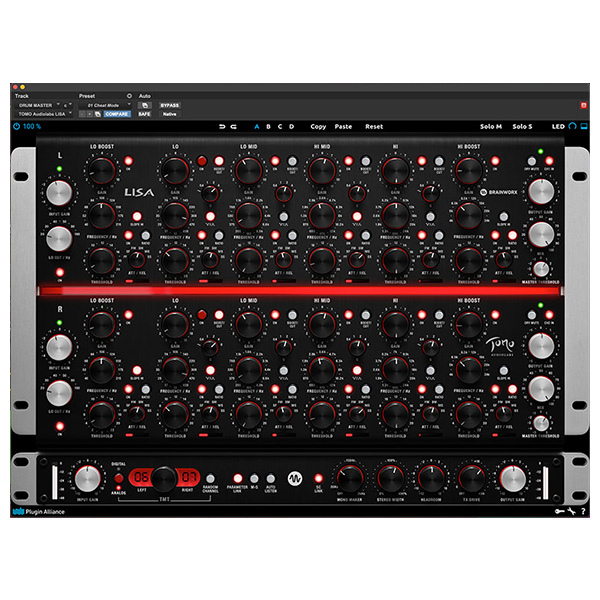
TOMO Audiolabs’ LISA is the only tool of its kind: An all-analog dynamic EQ, featuring a dedicated opto compressor cell for each of its 6 bands. This exacting model of the original brings a new way of applying dynamic EQ to the digital domain. Now you can take advantage of the character and workflow of this boutique mastering-grade hardware in the box.

Six bands of smooth opto compression and expansion
LISA employs a dedicated, modern opto compression circuit for each of its six bands per channel. Its program-dependent compression and expansion averages around a 3:1 ratio, or a selectable 10:1 ratio—both with a soft knee, and the option to change between slow, medium and fast settings for attack and release.

Dials in like an old school EQ, controls like a high-end compressor
With a layout reminiscent of the high-end Sontec and Massenburg EQs, LISA invites an intuitive, ears-first approach to sculpting your tone. Rather than simply applying a fixed EQ curve, the extent of your cut or boost breathes and dances along with your audio. With its proportional bandwidths, deeper cuts become increasingly more narrow and surgical, while larger boosts become tighter, more precise and note-like as they increase in intensity.

A perfect complement to the master buss, and selected individual tracks
This dynamic EQ was designed with mastering applications in mind, making it perfect for controlling kick and bass without reducing low frequency extension, or enhancing them without adding undue boominess to the mix. It can reduce sibilance in vocals or harshness in cymbals without sacrificing brightness, and even precisely target specific elements in the mix, especially in mid-side mode. Use the separate mono version of the plugin to elegantly reshape single instruments like bass guitar, drums and voice.

Parallel bands for more forgiving processing
Another unique feature of LISA is its parallel circuit concept. In the conventional series wiring found in most EQs, 100% of the distortion and rectification influences the signal path. But LISA’s parallel circuitry allows individual bands to be processed in similar fashion to a mixing console, enabling more extensive, more sensitive and more subtle processing. This makes it possible to musically apply extreme EQ settings that would not be possible with a traditional EQ.

Plugin only additions including the new “TX Drive”
As always, the engineers at Brainworx have added new digital-only features that would be impossible in the analog domain. In addition to regular favorites like the Mono Maker, Stereo Width, Auto Listen, Headroom and TMT controls, the LISA adds a new feature for the first time: TX Drive. This new parameter allows you to dial in more or less transformer saturation and character, separate from the other analog characteristics of the device.
FEATURES

  • Precise emulation of the unique TOMO Audiolabs LISA
  • Independent opto-compression based dynamic section for each of its 6 bands per channel, switchable between compression and expansion.
  • Includes two parametric mid bands, parametric low and high bands with a shelving mode, and two dedicated boost bands - plus highpass and lowpass filters.
  • Parallel circuits allows for greater changes in frequency with more transparency.
  • TMT — Brainworx patent-registered “Tolerance Modeling Technology” (US Patent No. 10,725,727)
  • Six EQ bands with a broad frequency overlap provide optimum processing flexibility.
  • Includes a separate mono version for individual tracks such bass, kick, snare and vocals.
  • Scalable User Interface.
  • Artist Presets to get you started on a variety of sources.
  • New TX Drive feature acts like a "Headroom" control for the transformer model only. A new Brainworx innovation!
  • Plugin only features include Brainworx’ Mono Maker, Stereo Width, Headroom, Auto Listen, a dedicated mono version, and patented “TMT” technology for enhanced realism and depth.

AUDIO EXAMPLES

Compatibility checklist

  • Windows 10,11 (64Bit Only)
  • Full Version
  • VST, VST3, AAX
  • Formats: VST3 · AAX · VST

Requirements vary by supplied version. Confirm your setup with support before purchasing.

Delivery & activation

  1. Complete your purchaseReview compatibility and purchase details.
  2. Download your filesAccess available downloads through your order and account.
  3. Follow the included setup guideContact GetPlugins if you need installation help.

Activation, where included, is provided by GetPlugins. Publisher-account registration, transferable publisher keys and a publisher-issued licence are not included. Read the activation policy.

Frequently asked questions

How do I receive my download?

After payment, access available files from your order details and GetPlugins account. Contact support if a download is missing.

What activation is included?

Follow the activation instructions supplied with your download. Activation is provided by GetPlugins. Confirm device allowances and reinstall arrangements before ordering.

Will this work with my computer and DAW?

Check the compatibility information for this listing and ask us to confirm the exact supplied build. Libraries may require a compatible sampler or additional software.

What if I need installation help?

Email support@getplugins.io with your order number, operating system, DAW and any error message.

Which updates are included?

Activation and updates are separate. Confirm the available version and update arrangements before ordering; do not assume access to future publisher releases.

How do I request a refund?

Contact support with your order number and issue details. Read our Refund Policy for eligibility and the request process.

Customer Reviews

Reviews

There are no reviews yet.

Be the first to review “TOMO Audiolabs LISA (Windows)”

Your email address will not be published. Required fields are marked *