Unison – MIDI Wizard v2.2.48
AI-Powered Chord Progression & Melody Generator for Music Production
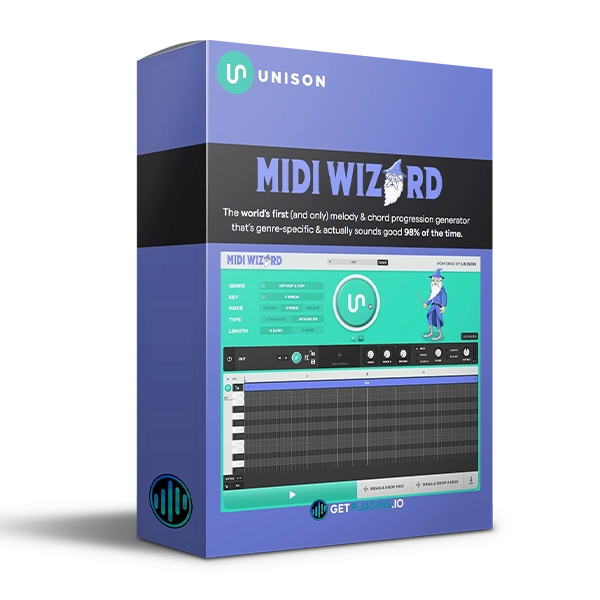
Unison MIDI Wizard v2.2.48 is an advanced MIDI composition plugin designed to help producers quickly generate chord progressions, melodies, and complete musical ideas tailored to different genres.
With redesigned generation algorithms, AI-powered features, a built-in synthesizer, sampler, factory presets, and integrated effects, MIDI Wizard provides a creative environment for developing musical ideas without starting from an empty MIDI editor.
The plugin features Chord, Melody, and Hybrid modes, allowing you to generate everything from rhythmic chord progressions and lead melodies to combinations of chords and melodies.
Explore our MIDI and music production plugins for more creative composition tools.
AI Chord & Melody Generation
MIDI Wizard is designed to generate musical ideas based on your selected genre and workflow.
Create:
- Chord progressions
- Lead melodies
- MIDI sequences
- Rhythmic chords
- Top-line melodies
- Hybrid chord and melody arrangements
- Genre-specific musical ideas
The generation system provides a fast starting point for producers looking to develop new songs and compositions.
Three Powerful Generation Modes
Chord Mode
Create chord progressions in different formats, including block and rhythmic styles.
Use them as the foundation for:
- Pop songs
- EDM tracks
- Hip-hop productions
- House music
- Electronic compositions
- Cinematic music
Melody Mode
Generate melodic top lines ranging from longer lead phrases to shorter melodic passages.
This can help you quickly develop hooks, leads, and memorable musical motifs.
Hybrid Mode
Hybrid Mode combines chord and melody generation with AI-assisted algorithms to create more complete musical ideas.
This makes it useful when you want to generate complementary chord and melody combinations quickly.
32 Genres
MIDI Wizard's generation algorithms have been redesigned for 32 different genres, allowing the generated musical material to better match the style you're working in.
Choose a genre and generate new musical ideas without manually programming every note.
For additional production tools, explore our music production plugins collection.
Built-In Synthesizer & Sampler
MIDI Wizard includes a built-in synthesizer with 200 factory presets, along with a sampler for working with your own sounds.
The system can automatically load a synth preset designed to complement the generated MIDI material.
Features include:
- Built-in synthesizer
- 200 factory presets
- Macro controls
- Preset browsing
- Sound customization
- Built-in sampler
- Drag-and-drop audio passages
This makes it possible to generate both MIDI ideas and sounds within the same workflow.
16 Built-In Effects
MIDI Wizard includes 16 customizable effects for processing your generated chords and melodies.
Use the effects to:
- Add saturation
- Create distortion
- Add spatial effects
- Shape tone
- Add character
- Create atmospheric textures
This gives you additional sound-shaping options without immediately needing external effects plugins.
AI Chord Progression Recognition
One of MIDI Wizard's creative features is its ability to analyze an existing MIDI chord progression and generate melodies that complement it.
Simply drag and drop a MIDI chord progression into the plugin, allowing the system to detect the chords and create matching melodic ideas.
This can be useful when you already have a harmonic foundation but need inspiration for the melody.
Unison Link Integration
MIDI Wizard can connect with other Unison music-production tools through Unison Link.
This allows MIDI Wizard to work with tools such as Bass Dragon, creating complementary basslines for generated chord progressions and melodies.
The workflow can also be expanded with other Unison tools for drums and sound design.
Humanized MIDI Performance
MIDI Wizard provides additional controls for making generated sequences feel more natural.
Features include:
- Velocity sensitivity
- Velocity sweep
- Humanized chord progressions
- Humanized melody sequences
- Chord labels
- MIDI editing workflow
These controls can help move generated ideas away from overly rigid patterns and toward more expressive performances.
Export MIDI & Audio
Once you've created an idea, MIDI Wizard allows you to drag and drop or export your creations, making it easy to continue production in your DAW.
Use generated material as the foundation for:
- Full songs
- Hooks
- Chord progressions
- Basslines
- Lead melodies
- Electronic arrangements
- Songwriting ideas
Explore our MIDI plugins for additional MIDI-generation and sequencing tools.
Key Features
- AI-powered melody generation
- AI chord progression generation
- Chord, Melody and Hybrid modes
- 32 genre-based generation systems
- Redesigned generation algorithms
- Built-in synthesizer
- 200 factory presets
- Built-in sampler
- 16 integrated effects
- AI chord recognition
- Melody generation from existing MIDI chords
- Velocity sensitivity
- Humanized MIDI sequences
- Chord labeling
- Drag-and-drop workflow
- MIDI export
- Audio export
- Unison Link integration
Perfect For
- Music Producers
- Songwriters
- Beat Makers
- EDM Producers
- Hip-Hop Producers
- Pop Producers
- House Producers
- Electronic Music Producers
- Film Composers
- MIDI Programmers
- Music Beginners
- Creative Sound Designers
Why Choose Unison MIDI Wizard?
Unison MIDI Wizard v2.2.48 combines AI-assisted music generation with MIDI composition tools, a synthesizer, sampler, effects, and genre-specific algorithms. Instead of spending hours searching for the right chord progression or melody, producers can quickly generate ideas and then customize them to fit their production.
Whether you're looking for a melody generator, chord progression generator, MIDI composition tool, or AI-assisted songwriting workflow, MIDI Wizard provides a fast way to turn musical ideas into usable material.
Explore more MIDI and songwriting plugins to expand your creative workflow.
For official product information, visit the Unison Audio website

Reviews
There are no reviews yet.