SPECIFICATION
Supported Plugin Formats
AAX Native, VST2, VST3
Supported Operating Systems
Windows 11 down to Windows 8
PC
x64-compatible CPU
System Requirements
Display resolution: 1440 × 900px or 1280 × 960px or higher
Memory: 2 GB RAM
Plug-in Version of a Legendary EQ
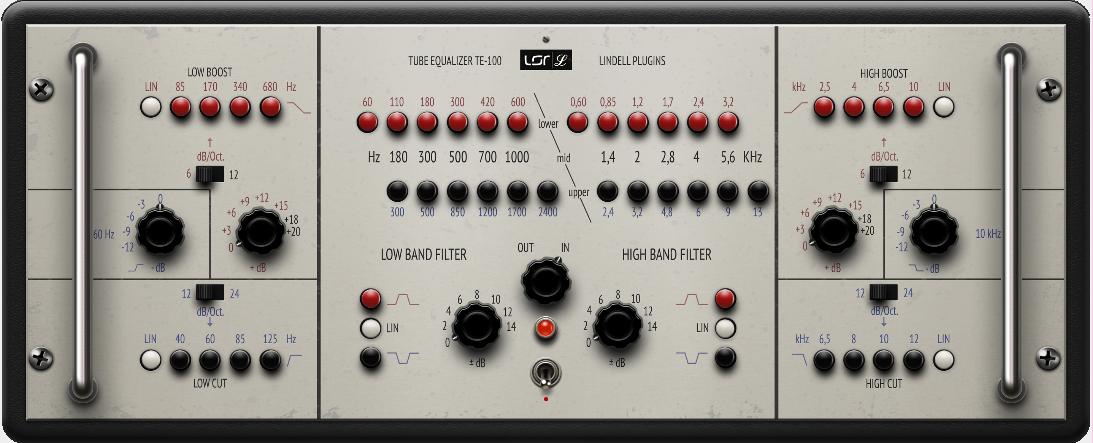
The Lindell Audio TE-100 tube EQ plug-in is a faithful hardware circuit model of the famous Klein & Hummel UE-100 equalizer. Introduced in 1961 and packing eight bands of EQ, 14 tubes, and over 60 pounds of girth, the UE-100 owned four rack spaces and could heat your studio in winter - but it did things no other EQ could do. Using its unique push-button-equipped control set, you could add impossibly fat, warm low end and silky, airy highs; sculpt the midrange; eliminate low end muddiness; and attenuate high end harshness - all with surgical precision. There's an alluring three-dimensional quality to the sound of this rare historical equalizer, and Sweetwater engineers agree: the Lindell Audio TE-100 nails it to a tee.
Lindell Audio TE-100 Tube EQ Plug-in at a Glance:
- Like no other EQ you've ever used
- With the TE-100, perfect EQ is attainable
- Meticulous modeling, and a few modern touches
Like no other EQ you've ever used
The Klein & Hummel UE-100 equalizer was built on an all-tube, minimum-phase circuit that utilized six discrete filter modules, forming an army of bandpass filters capable of creating dynamic curves suitable for any source. Its unique push-button frequency selection provided an easy way to not only to recall settings but also to change them on the fly while recording or mixing. The UE-100 became famous for its warm, musical curves and precise response, offering a banquet of options for equalizing frequencies by boosting and/or cutting across the spectrum to shape the signal. It was this impressive sound-shaping dexterity that gave the UE-100 a reputation in engineering circles as being a Pultec on steroids.
With the TE-100, perfect EQ is attainable
Zero in on your sound with the lowpass and highpass filters that bookend the TE-100, then boost at one of four critical frequencies with rounded or Hi-Q shelves to add body and presence. In the midrange section, create dual-parametric bandpass filters to bring out the true character of your signal. The TE-100's push-button frequency selectors give you a unique way to shape frequency response, by focusing on each corner frequency of a filter and moving these frequencies closer or further apart as your ears guide the way to the perfect EQ.
Meticulous modeling, and a few modern touches
For the TE-100 plug-in, Lindell Audio meticulously modeled the all-tube and transformer hardware circuit of the UE-100 to bring you an exacting software emulation, right down to the unit's innovative push-buttons and filter bypass that keeps the tubes in the circuit. While they were at it, they added a couple of cool workflow-enhancing touches. Optimize for a variety of situations with the TE-100's internal oversampling adjustment, level calibration, and Analog mode, which adds tasty additional tonal coloration - along with the noise floor of the original 1960s unit! You can dial in precise gain adjustments in half-dB steps, as opposed to the 2-3dB resolution available via the knobs of the original hardware unit.
Lindell Audio TE-100 Tube EQ Plug-in Features:
- Faithful hardware circuit model of the Klein & Hummel UE-100
- Nails the sound and behavior of a legendary vintage equalizer from the 1960s
- One of the most coveted tube EQs in recording history
- 8 bands let you sculpt the perfect curve for critical frequencies in a track or mix
- Parametric lowpass and highpass filters permit sweet and musical broad or focused curves
- Out/in switch bypasses the filters but keeps the tubes in the circuit
- Revel in the warm tube saturation and musical bands of classic Rundfunk broadcast EQ
- Analog mode adds transformer saturation and simulated noise floor of the original hardware
- Create dynamic Pultec-style frequency response curves that simultaneously cut and boost
- Offers full control over workflow with:
- Adjustable oversampling rate
- Level calibration
- Resizable interface
Put a legendary EQ to work with the Lindell Audio TE-100 plug-in!







Reviews
There are no reviews yet.