
Discover reMIDI Sampler 2 (Windows)
Introducing reMIDI 2, the follow up to reMIDI that allows you to take MIDI sampling to the next level with its new features. reMIDI 2 is a MIDI effect plugin that samples musical notes from MIDI files that allows you to quickly find, chop, key shift and time-stretch samples and map them to a controller.
Sample from over 1700 complete compositions with masterfully chosen chords, progressions, and melodies
Go beyond robotic arpeggiators by triggering natural MIDI sequences
Use reMIDI 2 with any MIDI Controller and create custom MIDI note bindings
Explore product features & full description
Introducing reMIDI 2, the follow up to reMIDI that allows you to take MIDI sampling to the next level with its new features. reMIDI 2 is a MIDI effect plugin that samples musical notes from MIDI files that allows you to quickly find, chop, key shift and time-stretch samples and map them to a controller.
reMIDI 2 is a plugin instrument capable of outputting MIDI as well as audio. A simple sine wave synth sound is built in for scratch work, so you can quickly find a loop for export as a MIDI file entirely within it.
The idea is to trigger other instruments via reMIDI, and how this is set up depends on the host DAW. For VST hosts (ie, Ableton Live), reMIDI loads as an instrument plugin onto a MIDI track, the output of which is sent to a second track (hosting the target instrument) using the DAW’s routing system.
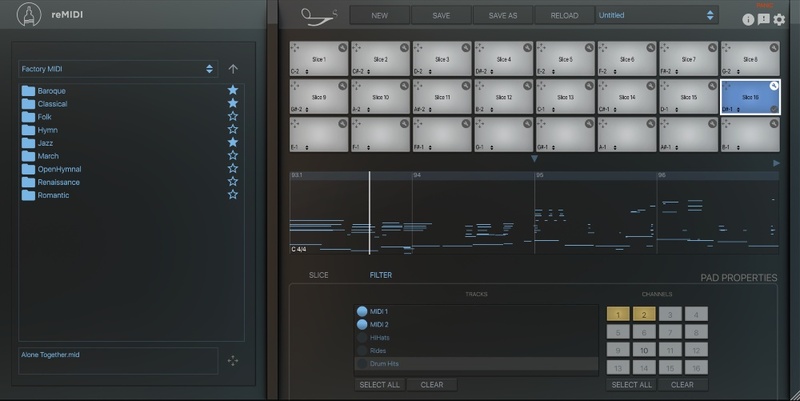
For Audio Unit hosts (ie, Logic Pro), the included reMIDI_MFX MIDI effect plugin is loaded up instead. This is identical to the regular reMIDI, but it sits in front of the target instrument on the same track, outputting MIDI directly. It’s certainly the more elegant of the two approaches, although it only captures the raw triggering notes to the track, not the chords output by the plugin.
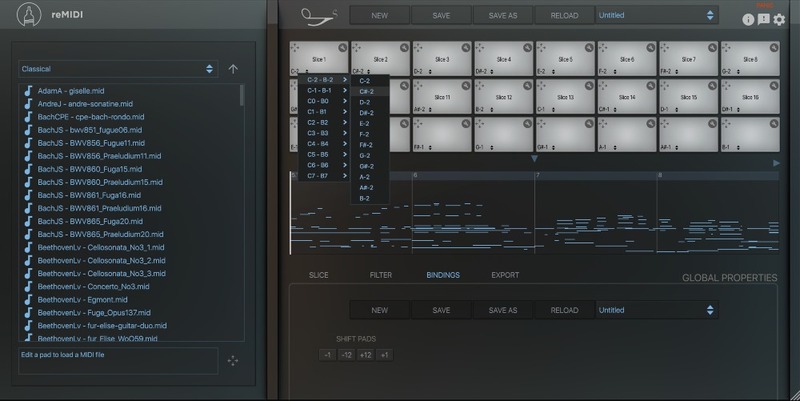
Each pad is assignable to have its own selected slice from the MIDI file loaded into the pad. You can combine different MIDI files (for melodic/drum MIDI) or record MIDI into pads from reMIDI MIDI input/output.
Now Included with reMIDI 2: SW Jazz Complete MIDI Pack
The complete set contains over 1000 files in 11 volumes. Each volume contains 100 Jazz block chord progressions in MIDI format.
These MIDI files can be dragged into any DAW, but why not just use SongWish’s reMIDI 2, a MIDI sampler VST. reMIDI 2 can load these MIDI files with some convenient features to play and edit them with.
You can animate these block chords with other MIDI utilities such as arpeggiators. Or get your jazz hands-on editing these progressions in your favourite DAW by modifying, adding/removing notes, or even changing the timing.
Features
- Sample from over 1700 complete compositions with masterfully chosen chords, progressions, and melodies
- Go beyond robotic arpeggiators by triggering natural MIDI sequences
- Use reMIDI 2 with any MIDI Controller and create custom MIDI note bindings
- A grid layout of 120 total pads, effectively giving you 120 reMIDIs
- Easily audition automatically sampled slices of MIDI that loop perfectly at the touch of a key
- Drag sampled chords and progressions out to your DAW
- Easily work with MIDI without using a piano roll/note editor
- Trust the musical wisdom of master composers – they offer timeless hooks, motifs, themes, and variations – all waiting to be discovered by sampling
- Over 150 composers (Bach, Beethoven, Chopin, Mozart, Gershwin, etc)
- 8 different genres (Baroque, Classical, Folk, Hymn, Jazz, March, Renaissance, and Romantic)
- Save your own sample sets to the preset bank for later use
- Easily cut the tempo in half or multiply it by any factor while staying in sync with your DAW
- Assign any VST / AU instrument to reMIDI to control your favourite synths
- Once you find a loop or a chord progression from a MIDI file you can keep searching the same file or other files for variations
- Instantly transpose all the notes for endless remixing possibilities
- No tedious manual slicing. Just set your starting point and slice size and reMIDI chops up the entire file into even parts
- Use multiple instances of reMIDI to build a complete band of virtual instruments (drums, bass, keys, and leads). With this setup, you can conduct a whole band with one finger!
- The built-in MIDI file browser makes it a breeze to instantly preview sections of full compositions or MIDI loop packs. Find inspiration in a flash
- Browse the factory MIDI containing hundreds of high-quality files organized by style and composer
- Expand the MIDI library by favouriting your own organized files and folders. Limitless sampling!
System Requirements
Windows
- Windows 7 and later (32 or 64-bit)
- VST
Please Note: reMIDI is not currently compatible with NI Maschine and Reason 11.
Compatibility checklist
- Confirm the supplied build, operating system and required host before ordering.
Requirements vary by supplied version. Confirm your setup with support before purchasing.
Delivery & activation
- Complete your purchaseReview compatibility and purchase details.
- Download your filesAccess available downloads through your order and account.
- Follow the included setup guideContact GetPlugins if you need installation help.
Activation, where included, is provided by GetPlugins. Publisher-account registration, transferable publisher keys and a publisher-issued licence are not included. Read the activation policy.
Frequently asked questions
How do I receive my download?
After payment, access available files from your order details and GetPlugins account. Contact support if a download is missing.
What activation is included?
Follow the activation instructions supplied with your download. Activation is provided by GetPlugins. Confirm device allowances and reinstall arrangements before ordering.
Will this work with my computer and DAW?
Check the compatibility information for this listing and ask us to confirm the exact supplied build. Libraries may require a compatible sampler or additional software.
What if I need installation help?
Email support@getplugins.io with your order number, operating system, DAW and any error message.
Which updates are included?
Activation and updates are separate. Confirm the available version and update arrangements before ordering; do not assume access to future publisher releases.
How do I request a refund?
Contact support with your order number and issue details. Read our Refund Policy for eligibility and the request process.







Reviews
There are no reviews yet.