🌸 Oeksound – bloom
🚀 Intelligent Adaptive Tone Shaping for Professional Audio
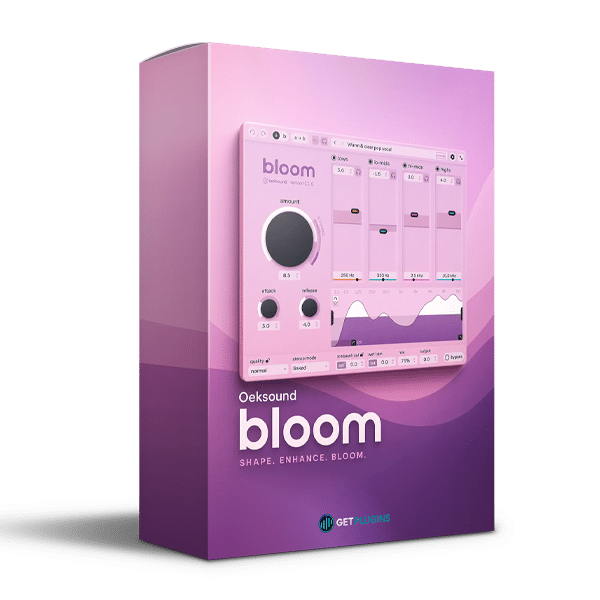
Oeksound bloom is an innovative adaptive tone-shaping plugin designed to transform the tonal balance, warmth, clarity, and character of your audio. Unlike traditional EQ plugins that rely on fixed frequency boosts and cuts, bloom intelligently analyzes incoming audio and dynamically adjusts its processing according to the changing characteristics of the signal.
Whether you're working with vocals, drums, bass, guitars, synthesizers, or complete mixes, bloom helps bring out the best in your sound with natural-sounding tonal adjustments and powerful creative control.
Combining intelligent spectral processing with an intuitive interface, bloom makes it easy to refine dull recordings, control tonal irregularities, enhance brightness, and add warmth without making your audio sound unnatural.
✨ Intelligent Adaptive Tone Shaping
Bloom goes beyond conventional equalization by continuously analyzing your audio and adapting its frequency adjustments in real time.
Its context-aware processing helps you:
- 🎯 Correct tonal imbalances dynamically.
- 🌟 Enhance clarity, warmth, and brightness.
- 🎚️ Control unwanted frequency build-ups.
- 🔊 Bring out hidden details in dull recordings.
- 🎧 Achieve a more balanced and refined sound.
- ⚡ Make significant tonal changes while maintaining a natural character.
🎛️ Four Powerful Tone Controls
Bloom features four intuitive tone controls that allow you to customize the tonal character of your audio.
Each control influences a different frequency region, giving you flexible control over the overall tonal balance.
- Lows: Add warmth, depth, and weight to your sound.
- Low-Mids: Shape body and reduce excessive boxiness.
- High-Mids: Improve presence, definition, and clarity.
- Highs: Enhance brightness, openness, and air.
Shape your ideal sound with four flexible controls instead of relying on complicated EQ adjustments.
🔥 Squash Mode – Add Energy and Character
When you need more aggressive tonal shaping, bloom's Squash Mode takes processing further by introducing frequency-dependent upward and downward compression.
This allows you to:
- Bring quieter details forward.
- Create more energetic and upfront sounds.
- Add character and controlled grit without conventional saturation.
- Shape drums, buses, and individual instruments.
- Explore more creative tonal transformations.
🎚️ Advanced Processing and Creative Control
Bloom offers additional processing controls to help you fine-tune its behavior for different audio sources and production requirements.
Explore powerful features including:
- Adjustable attack and release controls.
- Stereo processing with Linked, Mid/Side, and Left/Right modes.
- Adjustable processing frequency range.
- Low-cut and high-cut filters.
- Wet/Dry Mix control.
- Wet Trim and output gain adjustments.
- External sidechain support.
- Normal, High, and Low Latency quality modes.
- A/B comparison and factory preset browser.
🎤 Perfect for Vocals, Instruments, and Mix Buses
Bloom is designed to work across a wide range of music production and audio engineering applications.
Ideal for:
- Vocals: Add presence, warmth, and clarity while maintaining a natural tonal balance.
- Drums: Enhance punch, detail, and overall energy.
- Bass: Shape low-frequency weight and definition.
- Guitars: Refine body, brightness, and tonal character.
- Synthesizers: Transform electronic sounds with controlled tonal shaping.
- Orchestral Instruments: Bring out detail and balance complex instrumental recordings.
- Mix Buses: Create cohesion and refine the overall tonal character.
- Mastering: Make subtle or creative tonal adjustments to complete mixes.
🎼 Designed for Modern Music Creators
Whether you're producing EDM, Hip-Hop, Pop, Trance, Cinematic Music, Rock, or Electronic Music, Oeksound bloom offers a versatile approach to tonal shaping.
From individual tracks to complete mixes, bloom gives producers, composers, and mixing engineers a creative way to discover and enhance the tonal potential of their audio.
⚡ Why Choose Oeksound bloom?
- Adaptive Processing: Automatically responds to the changing tonal characteristics of audio.
- Natural Sound: Delivers smooth tonal adjustments without relying on static EQ curves.
- Creative Tone Shaping: Easily enhance warmth, brightness, presence, and clarity.
- Squash Mode: Add energy, density, and character through frequency-dependent compression.
- Stereo Flexibility: Process stereo signals using Linked, Mid/Side, or Left/Right modes.
- Versatile Workflow: Suitable for individual tracks, groups, mix buses, and mastering.
🎹 Transform Your Sound with Intelligent Tone Shaping
Oeksound bloom is more than a conventional EQ alternative. It is a creative adaptive tone shaper that helps you refine, balance, and transform audio with intelligent processing.
Whether you want to add warmth to vocals, bring life to dull instruments, enhance the energy of drums, or give your entire mix a more polished sound, bloom provides the flexibility and precision to achieve your creative vision.
Discover new tonal possibilities and let your sound bloom! 🌸🎧







Reviews
There are no reviews yet.