


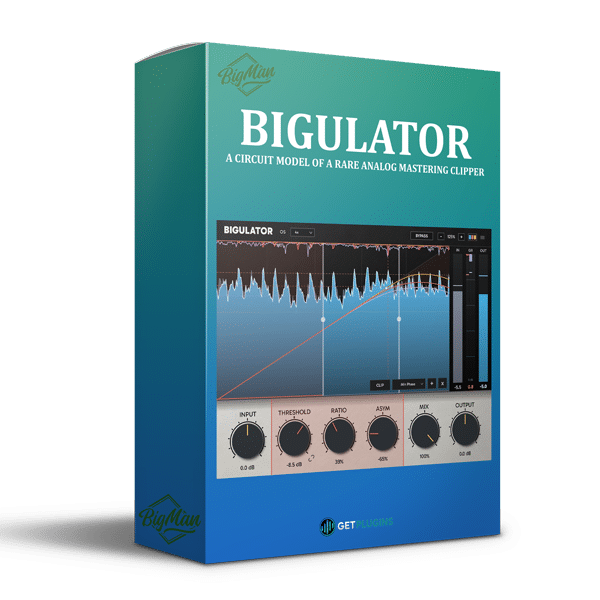
Big Man Labs – Bigulator (Windows)
£35.99
Discover Big Man Labs – Bigulator (Windows)
Big Man Labs Bigulator is an advanced audio mastering plugin that models the circuitry of a rare analog mastering clipper, delivering increased loudness, controlled peaks, and rich harmonic character while preserving the musical quality of the original signal. Combining detailed circuit emulation with modern digital processing, Bigulator recreates the distinctive behavior of its analog inspiration…
Analog-Inspired Clipping: Recreates the behavior of a specialized analog mastering clipper.
Enhanced Loudness: Controls peaks to help increase perceived loudness and signal density.
Harmonic Character: Introduces saturation and nonlinear processing for additional sonic weight.
Explore product features & full description
Big Man Labs – Bigulator
Big Man Labs Bigulator – Analog-Style Mastering Clipper & Loudness Processor
Big Man Labs Bigulator is an advanced audio mastering plugin that models the circuitry of a rare analog mastering clipper, delivering increased loudness, controlled peaks, and rich harmonic character while preserving the musical quality of the original signal. Combining detailed circuit emulation with modern digital processing, Bigulator recreates the distinctive behavior of its analog inspiration while introducing additional capabilities for contemporary mixing and mastering workflows.
Unlike conventional compressors and limiters that rely on traditional attack and release envelopes, Bigulator uses a signal-responsive, peak-clamping circuit design to control audio levels directly. This distinctive approach creates a hybrid clipping, limiting, and saturation effect that can add density and impact without the familiar pumping characteristics of conventional dynamics processing.
With multiband operation, adjustable asymmetry, oversampling up to 16x, parallel mixing, and an integrated digital output clipper, Bigulator provides precise control over loudness, transient behavior, and harmonic coloration for producers, mastering engineers, and modern music creators.
Accurate Analog Circuit Emulation
Bigulator combines schematic-based circuit modeling with extensive measurements to reproduce the behavior and tonal characteristics of its analog hardware inspiration.
The modeled circuit uses a voltage-controlled amplifier connected in series with the audio signal, controlled by a peak-clamping rectifier operating at the audio signal's sampling rate. This architecture produces a distinctive response that differs from conventional envelope-based compression.
Key benefits include:
- Analog-Inspired Clipping: Recreates the behavior of a specialized analog mastering clipper.
- Enhanced Loudness: Controls peaks to help increase perceived loudness and signal density.
- Harmonic Character: Introduces saturation and nonlinear processing for additional sonic weight.
- Responsive Peak Control: Reacts directly to the shape of the incoming signal rather than relying on traditional attack and release settings.
- Extended Digital Capabilities: Adds multiband processing, oversampling, and digital clipping options beyond the modeled hardware.
Zero-Attack & Zero-Release Peak Control
One of Bigulator's defining characteristics is its unconventional approach to dynamic control. The circuit does not use traditional attack and release envelopes; instead, gain reduction responds directly to the instantaneous signal shape.
This allows Bigulator to operate somewhere between a clipper, limiter, and saturator, offering a distinctive method of managing transient peaks and increasing loudness.
The Threshold and Ratio controls work together to shape the processor's transfer function. Changing the threshold alters the curve itself, meaning that identical ratio settings can produce different clipping and saturation characteristics at different thresholds.
This interaction provides detailed control over the relationship between transient preservation, peak reduction, and harmonic density.
Adjustable Asymmetry for Harmonic Shaping
The ASYM control introduces imbalance between the positive and negative halves of the signal's peak-clamping behavior.
Based on the original circuit's separate offset settings, this feature allows the processor to move from symmetrical operation to increasingly asymmetrical responses. Bigulator extends the available range beyond the original hardware's capabilities.
Use symmetrical settings for a more balanced clipping response or experiment with asymmetry to explore alternative saturation characteristics and harmonic textures.
This flexibility makes Bigulator useful for shaping the character of individual tracks, instrument buses, and complete mixes.
Advanced Multiband Clipping & Mastering
Bigulator supports one-, two-, and three-band operation, allowing users to apply peak control across the full frequency spectrum or process separate frequency regions independently.
Its multiband architecture provides additional flexibility when working with mixes in which low-frequency peaks, midrange transients, and high-frequency content require different treatment.
Multiband processing features include:
- Single-Band Processing: Apply the clipping circuit to the full-range signal.
- Two-Band Processing: Separate the signal into two frequency regions for more targeted peak control.
- Three-Band Processing: Process low, mid, and high-frequency regions independently.
- Flexible Crossovers: Adjust crossover points and overlap the two crossover regions as needed.
- Color-Coded Gain Reduction: Monitor each band's gain reduction independently through the plugin's display.
These capabilities help mastering engineers control problematic peaks while maintaining a balanced overall tonal presentation.
Minimum-Phase & Linear-Phase Crossovers
Bigulator offers three crossover modes to accommodate different processing priorities.
- Minimum Phase: Provides low-latency crossover processing for workflows where responsiveness is important.
- Linear Phase: Separates frequency bands without the phase rotation associated with conventional minimum-phase crossovers.
- Deep Linear Phase: Provides sharper frequency separation at the cost of increased latency.
The different modes allow users to balance latency, crossover behavior, and phase-related considerations when applying multiband clipping during mixing and mastering.
Oversampling Up to 16x
Digital nonlinear processing can introduce aliasing, particularly when clipping and saturation generate additional high-frequency harmonics. Bigulator addresses this with selectable oversampling options.
Supported settings include 1x, 2x, 4x, 8x, and 16x, allowing users to choose an appropriate balance between processing quality and latency.
- 1x: Suitable when minimizing latency is a priority.
- 2x–4x: Provides intermediate oversampling for everyday mixing and processing.
- 8x–16x: Offers higher oversampling rates for demanding nonlinear processing and mastering applications.
Oversampling helps reduce aliasing artifacts generated by digital clipping, although it does not eliminate every possible source of distortion or aliasing.
Parallel Mixing with Phase Matching
The integrated MIX control blends the processed signal with the original input signal taken before the input trim stage. This allows users to introduce clipping and saturation while retaining some of the source's original dynamics and transient character.
In multiband operation, the original signal follows the same crossover phase rotation as the processed signal path. This design helps prevent unwanted comb filtering when blending the dry and processed signals.
Parallel mixing is particularly useful for adding density and loudness to drums, bass, instrument buses, and full mixes without relying entirely on the processed signal.
Four-Mode Digital Output Clipper
Bigulator includes a multi-voice digital output clipper with four distinct processing modes, providing additional control over the final signal.
- Tight: Designed for a controlled clipping character.
- Punch: Focuses on delivering an impactful, energetic response.
- Smooth: Provides a smoother clipping character.
- Smoother: Offers an alternative, more gradual-sounding clipping response.
The output clipper includes a visual ceiling indicator, while the output clipping stage operates separately from the clipping ceiling control. This allows the clipping level and clipping depth to be adjusted independently.
Together, these options provide additional flexibility when controlling peaks and shaping the final output level.
Real-Time Visual Monitoring
Bigulator features a real-time display designed to make complex clipping behavior easier to understand.
The interface displays input levels, output levels, the transfer curve, and gain reduction for individual frequency bands. Color-coded indicators help users identify which band is performing the most processing.
Its GPU-accelerated graphics support smooth visual updates on high-refresh-rate displays while minimizing additional CPU demands from the interface.
These monitoring tools help engineers evaluate how the signal responds to changes in threshold, ratio, asymmetry, and multiband settings.
Ideal for Producers, Mixing Engineers & Mastering Professionals
Big Man Labs Bigulator is suitable for a wide range of professional audio applications:
- Mastering: Increase perceived loudness and manage peaks with specialized clipping behavior.
- Drum Processing: Add punch, density, and controlled transient clipping to drum tracks and buses.
- Bass Processing: Control low-frequency peaks and create a more consistent, powerful bass sound.
- Electronic Music: Shape energetic mixes for EDM, techno, house, and other electronic genres.
- Mix Bus Processing: Introduce harmonic density and peak control across grouped instruments.
- Sound Design: Explore asymmetrical clipping, saturation, and unconventional nonlinear responses.
- Digital Audio Production: Combine analog-inspired circuit behavior with modern oversampling and multiband tools.
A Specialized Clipper for Modern Mastering Workflows
Big Man Labs Bigulator combines detailed analog circuit emulation with advanced digital peak control in a versatile mastering and mixing plugin. Its envelope-free response, adjustable asymmetry, multiband architecture, phase-aware parallel mixing, and four-mode output clipper provide multiple ways to shape loudness and harmonic character.
Whether you're refining drum transients, adding density to a mix bus, controlling peaks in electronic music, or exploring alternative clipping textures, Bigulator offers a distinctive approach to clipping, limiting, and saturation for modern music production and mastering.
Compatibility checklist
- Windows 10,11 (64Bit Only)
- VST, VST3, AAX
- Formats: VST3 · AAX · VST
Requirements vary by supplied version. Confirm your setup with support before purchasing.
Delivery & activation
- Complete your purchaseReview compatibility and purchase details.
- Download your filesAccess available downloads through your order and account.
- Follow the included setup guideContact GetPlugins if you need installation help.
Activation, where included, is provided by GetPlugins. Publisher-account registration, transferable publisher keys and a publisher-issued licence are not included. Read the activation policy.
Frequently asked questions
How do I receive my download?
After payment, access available files from your order details and GetPlugins account. Contact support if a download is missing.
What activation is included?
Follow the activation instructions supplied with your download. Activation is provided by GetPlugins. Confirm device allowances and reinstall arrangements before ordering.
Will this work with my computer and DAW?
Check the compatibility information for this listing and ask us to confirm the exact supplied build. Libraries may require a compatible sampler or additional software.
What if I need installation help?
Email support@getplugins.io with your order number, operating system, DAW and any error message.
Which updates are included?
Activation and updates are separate. Confirm the available version and update arrangements before ordering; do not assume access to future publisher releases.
How do I request a refund?
Contact support with your order number and issue details. Read our Refund Policy for eligibility and the request process.


Reviews
There are no reviews yet.