


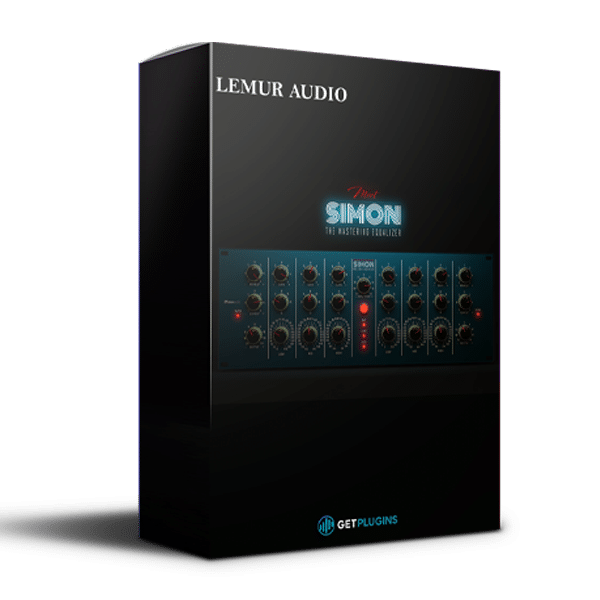
Lemur Audio – SIMON 2 (Windows)
£32.99
Discover Lemur Audio – SIMON 2 (Windows)
🔥 Experience Precision Equalization, Rich Analog Warmth & Professional Mastering Control with Lemur Audio SIMON 2!
🎛️ Professional Mastering Equalizer – Achieve detailed tonal control with transparent, musical equalization.
🎚️ Symmetrical Dual-Channel Design – Process two independent channels with precise frequency adjustments.
🎵 Three Fully Parametric EQ Bands – Control frequency, gain, and bandwidth for detailed audio shaping.
Explore product features & full description
🎛️ Lemur Audio – SIMON 2 | Professional Mastering Equalizer & Analog Saturation Plugin
🔥 Experience Precision Equalization, Rich Analog Warmth & Professional Mastering Control with Lemur Audio SIMON 2!
Lemur Audio SIMON 2 is a powerful professional mastering equalizer and analog-style saturation plugin designed for mixing engineers, mastering professionals, music producers, composers, and modern audio creators who demand exceptional tonal accuracy and musical character.
Combining high-precision parametric equalization, four analog-inspired saturation models, independent dual-channel processing, Mid/Side functionality, and advanced filtering, SIMON 2 provides a versatile environment for shaping professional recordings.
Unlike conventional digital equalizers focused exclusively on frequency correction, SIMON 2 combines transparent EQ processing with adjustable harmonic saturation, allowing engineers to achieve everything from subtle tonal refinements to rich, warm, analog-inspired coloration.
Whether you're mastering a complete album, refining a stereo mix, polishing vocals, enhancing acoustic instruments, or adding character to electronic productions, Lemur Audio SIMON 2 delivers precise frequency control and expressive sound shaping.
🎧 Shape Every Frequency. 🔥 Add Analog Character. 🎚️ Master with Confidence.
🚀 Key Features of Lemur Audio SIMON 2
-
🎛️ Professional Mastering Equalizer – Achieve detailed tonal control with transparent, musical equalization.
-
🎚️ Symmetrical Dual-Channel Design – Process two independent channels with precise frequency adjustments.
-
🎵 Three Fully Parametric EQ Bands – Control frequency, gain, and bandwidth for detailed audio shaping.
-
✨ High & Low Shelving Filters – Enhance warmth, brightness, presence, and tonal balance.
-
🔊 Advanced High-Pass & Low-Pass Filters – Remove unwanted frequencies with adjustable filtering.
-
🔥 Four Analog-Inspired Saturation Models – Explore Original, Class-A, Op-Amp, and Tube processing.
-
🎧 Professional Mid/Side Equalization – Independently process center and stereo-side information.
-
⚡ Zero-Latency Processing Mode – Ideal for real-time mixing and latency-sensitive production workflows.
-
💎 HQ & ULTRA Quality Modes – Select enhanced processing quality for mixing and mastering.
-
🎚️ Automatic Gain Compensation – Evaluate tonal changes while reducing misleading loudness differences.
-
🔗 Stereo LINK Function – Make simultaneous adjustments across both channels.
-
🎨 Customizable Interface Colors – Personalize the plugin using adjustable visual layouts.
-
🎯 Precise Stepped Controls – Achieve reliable parameter recall and repeatable mastering adjustments.
-
💻 Modern DAW Integration – Designed for professional digital audio production environments.
🎚️ Precision Mastering Equalizer – Shape Your Sound with Confidence
At the heart of Lemur Audio SIMON 2 is a sophisticated equalization system engineered for accurate and musical frequency shaping.
Each processing channel includes high and low shelving EQs, three fully parametric bands, and dedicated high-pass and low-pass filters.
This comprehensive architecture allows engineers to make detailed tonal adjustments without relying on multiple separate equalizer plugins.
🔊 Low Shelf – Add Warmth, Weight & Depth
Enhance the foundation of your audio using the dedicated low-frequency shelving section.
Switch between 50 Hz and 100 Hz to shape the tonal balance of bass instruments, drums, and complete mixes.
Perfect for:
-
Adding weight to kick drums
-
Enhancing bass guitar warmth
-
Strengthening electronic low-end
-
Refining mastering tonal balance
-
Improving the body of acoustic recordings
✨ High Shelf – Enhance Clarity, Presence & Air
Bring additional brightness and openness to your recordings using SIMON 2's musical high-frequency shelving EQ.
Create subtle mastering polish or enhance the presence of individual instruments.
Use it to refine vocals, brighten acoustic guitars, enhance percussion detail, or add openness to a stereo mix.
🎧 Achieve polished, detailed high frequencies without unnecessarily aggressive processing.
🎛️ Three Fully Parametric EQ Bands
SIMON 2 includes three flexible parametric bands per channel, providing detailed control over important frequency ranges.
Each band offers adjustable frequency, gain, and stepped Q settings, allowing targeted corrections and broader tonal adjustments.
Use these controls to:
-
🎤 Improve vocal clarity and presence.
-
🥁 Shape drum attack and tonal balance.
-
🎸 Refine guitar and bass frequencies.
-
🎹 Enhance piano and synthesizer detail.
-
🎧 Reduce unwanted resonances.
-
🎚️ Perfect the tonal balance of complete mixes.
From precise frequency correction to broad musical enhancement, SIMON 2 offers the control required for professional audio production.
🔥 Four Analog-Inspired Saturation Models – Add Warmth & Harmonic Character
Go beyond traditional equalization with SIMON 2's four selectable saturation engines.
These carefully designed processing models introduce different harmonic characteristics, allowing producers to enhance recordings with subtle color or more noticeable analog-inspired character.
🎧 1. Original – Clean & Transparent Saturation
The Original model, previously known as Digital, delivers gentle harmonic enhancement while maintaining a clean, controlled sound.
Ideal for applications where tonal accuracy and transparency are essential.
Perfect for: Mastering, acoustic instruments, subtle stereo-bus processing, and transparent mixing.
🔥 2. Class-A – Rich Analog Depth & Presence
Experience the character of a modeled Class-A discrete line stage.
This mode introduces additional harmonic richness, high-frequency presence, and perceived depth.
Use Class-A saturation to give vocals, drums, guitars, and complete mixes a fuller, more expressive character.
Perfect for: Analog-style mixing, warm mastering, vocals, and instrument buses.
⚡ 3. Op-Amp – Controlled Harmonic Enhancement
The Op-Amp saturation model recreates the character of a modeled operational amplifier.
It provides controlled harmonic processing and maintains a relatively clean response at stronger input levels.
Ideal for producers who want subtle analog coloration without excessive distortion.
Perfect for: Electronic instruments, drum processing, stereo mixing, and detailed mastering.
🌊 4. Tube – Warm, Smooth & Musical Saturation
Add classic valve-inspired warmth with SIMON 2's Tube saturation engine.
Introduce smooth harmonics, additional density, and gentle tonal coloration to digital recordings.
Perfect for:
-
Warm vocal processing
-
Acoustic guitar enhancement
-
Smooth instrument coloration
-
Analog-inspired mix processing
-
Gentle mastering saturation
🎛️ Four Unique Saturation Characters – One Complete Professional Equalizer.
🎚️ Input Trim – Take Complete Control of Saturation
SIMON 2 features a central Input Trim control that determines how strongly the incoming signal drives the selected saturation model.
At lower input levels, processing remains relatively subtle and transparent.
Increase the input drive to introduce additional harmonic content, tonal density, and analog-inspired coloration.
A dedicated visual saturation indicator provides useful feedback about the amount of nonlinear processing being applied.
🔥 Subtle Warmth or Bold Analog Character – You Decide.
🎧 Advanced Mid/Side Processing – Enhance Stereo Width & Depth
Take your stereo mastering workflow further with SIMON 2's powerful Mid/Side processing capabilities.
Switch between conventional Left/Right processing and Mid/Side mode to control different components of your stereo signal.
🎤 MID Channel – Refine the Center of Your Mix
The Mid channel represents the center information of a stereo recording.
Use it to refine elements such as centered vocals, bass, kick drums, and lead instruments.
Creative Applications:
-
Enhance vocal presence.
-
Refine centered bass frequencies.
-
Control unwanted midrange buildup.
-
Improve focus and tonal balance.
-
Strengthen important elements in the center of a mix.
🌌 SIDE Channel – Shape Stereo Atmosphere
The Side channel represents differences between the left and right signals.
Use Side processing to shape stereo ambience, guitars, synthesizers, and reverberation.
Creative Applications:
-
Add brightness to stereo ambience.
-
Refine the tonal character of wide instruments.
-
Reduce excessive low-frequency content on the sides.
-
Enhance perceived openness.
-
Improve the balance of stereo effects.
🎧 Achieve Detailed Stereo Control Without Compromising Your Creative Workflow.
🔗 Stereo LINK – Fast & Precise Dual-Channel Processing
SIMON 2 includes a dedicated LINK function that connects both equalizer channels for simultaneous adjustments.
Enable LINK to make matching changes across a stereo signal.
Disable LINK when independent channel correction is required.
This flexibility is particularly valuable for mastering engineers working with asymmetric stereo recordings or detailed Mid/Side processing.
🎚️ Make Accurate, Repeatable Adjustments with Maximum Workflow Efficiency.
⚡ Dedicated High-Pass & Low-Pass Filters – Clean Up Your Mix
SIMON 2 includes professional filtering tools positioned before the main equalization section.
These dedicated filters help remove unwanted frequency content before additional tonal processing.
| Filter | Frequency Range | Slope |
|---|---|---|
| High-Pass Filter | 10 Hz – 300 Hz | 12 dB/octave |
| Low-Pass Filter | 3 kHz – 30 kHz | 12 dB/octave |
🔊 High-Pass Filter – Remove Unwanted Low Frequencies
Control subsonic rumble, unnecessary low-end buildup, and unwanted low-frequency content.
Useful for cleaning acoustic recordings, instrument buses, and complete mixes.
✨ Low-Pass Filter – Smooth Harsh High Frequencies
Refine excessive brightness, reduce unwanted high-frequency energy, and create smoother tonal balance.
Both filters are designed for zero added latency and can be fully removed from the signal path when disabled.
🎛️ Clean Your Frequencies. Improve Clarity. Achieve Professional Tonal Balance.
🎚️ Automatic Gain Compensation – Make Better Mixing Decisions
One of SIMON 2's practical mastering features is its automatic gain compensation system.
When adjusting equalization, changes in loudness can sometimes make processed audio appear better simply because it is louder.
SIMON 2 helps reduce this problem by automatically compensating for level changes during EQ adjustments.
This makes it easier to compare tonal differences and evaluate the actual impact of your processing.
Independent output trims provide further control over final channel levels.
🎧 Focus on Sound Quality, Not Just Loudness.
💎 Three Professional Processing Modes – Choose Your Quality
SIMON 2 offers three processing modes designed for different stages of music production.
| Processing Mode | Ideal Application |
|---|---|
| ⚡ ZL – Zero Latency | Recording, real-time monitoring, and responsive mixing |
| 🎧 HQ – High Quality | Professional mixing and everyday mastering |
| 💎 ULTRA – Maximum Quality | Final mastering and high-quality rendering |
All four saturation models remain available across the supported quality modes.
Choose efficient processing during production and higher-quality settings when preparing final masters.
🎨 Customizable Interface – Create Your Perfect Studio Workflow
SIMON 2 combines professional audio processing with a flexible, customizable graphical interface.
🎛️ FULL Layout
A uniform faceplate design provides a clean, consistent appearance across the interface.
🎚️ COMBINED Layout
Grayed shelving sections make it easier to distinguish EQ controls during detailed mastering work.
🌈 Adjustable HUE Control
Customize the plugin faceplate using a wide range of colors.
🔍 Adjustable Popup Size
Resize parameter-value displays for improved readability on different screens.
Interface color preferences can be saved separately for individual plugin instances.
Work with an interface that matches your studio preferences and production environment.
🎶 Perfect for Mixing, Mastering & Music Production
🎧 Professional Mastering
Refine complete mixes using transparent EQ, precise filtering, harmonic saturation, and Mid/Side processing.
🎤 Vocal Mixing
Enhance presence, reduce unwanted resonances, and introduce subtle analog-inspired warmth.
🥁 Drum Processing
Shape low-frequency punch, refine transients, and add harmonic character to drums and percussion.
🎸 Guitar & Bass
Enhance warmth, body, articulation, and frequency balance in recorded instruments.
🎹 Electronic Music Production
Process synthesizers, pads, basslines, and electronic drums with musical equalization and saturation.
🎬 Cinematic & Orchestral Music
Refine complex instrumental arrangements, stereo ambience, and cinematic soundscapes.
🎚️ Stereo Bus Processing
Apply broad tonal corrections and subtle harmonic enhancement to create cohesive mixes.
🌟 Why Choose Lemur Audio SIMON 2?
✅ Professional Mastering Equalizer – Precise, musical frequency shaping for modern productions.
✅ Four Saturation Models – Explore Original, Class-A, Op-Amp, and Tube character.
✅ Three Parametric Bands Per Channel – Detailed frequency, gain, and bandwidth control.
✅ Musical High & Low Shelves – Enhance warmth, brightness, and tonal balance.
✅ Advanced Mid/Side Processing – Shape center and stereo-side information independently.
✅ Dedicated High-Pass & Low-Pass Filters – Remove unwanted frequencies with precision.
✅ Automatic Gain Compensation – Make more reliable tonal decisions.
✅ Independent Dual-Channel Architecture – Process stereo information with extensive flexibility.
✅ Zero-Latency Mode – Suitable for latency-sensitive production workflows.
✅ HQ & ULTRA Processing – Optimize quality for mixing and mastering.
✅ Customizable Interface – Adjust faceplate colors and parameter display sizes.
✅ Precise Parameter Recall – Perfect for repeatable professional mastering sessions.
Compatibility checklist
- Windows 10,11 (64Bit Only)
- VST3, VST, AAX
- Formats: VST3 · AAX · VST
Requirements vary by supplied version. Confirm your setup with support before purchasing.
Delivery & activation
- Complete your purchaseReview compatibility and purchase details.
- Download your filesAccess available downloads through your order and account.
- Follow the included setup guideContact GetPlugins if you need installation help.
Activation, where included, is provided by GetPlugins. Publisher-account registration, transferable publisher keys and a publisher-issued licence are not included. Read the activation policy.
Frequently asked questions
How do I receive my download?
After payment, access available files from your order details and GetPlugins account. Contact support if a download is missing.
What activation is included?
Follow the activation instructions supplied with your download. Activation is provided by GetPlugins. Confirm device allowances and reinstall arrangements before ordering.
Will this work with my computer and DAW?
Check the compatibility information for this listing and ask us to confirm the exact supplied build. Libraries may require a compatible sampler or additional software.
What if I need installation help?
Email support@getplugins.io with your order number, operating system, DAW and any error message.
Which updates are included?
Activation and updates are separate. Confirm the available version and update arrangements before ordering; do not assume access to future publisher releases.
How do I request a refund?
Contact support with your order number and issue details. Read our Refund Policy for eligibility and the request process.


Reviews
There are no reviews yet.