


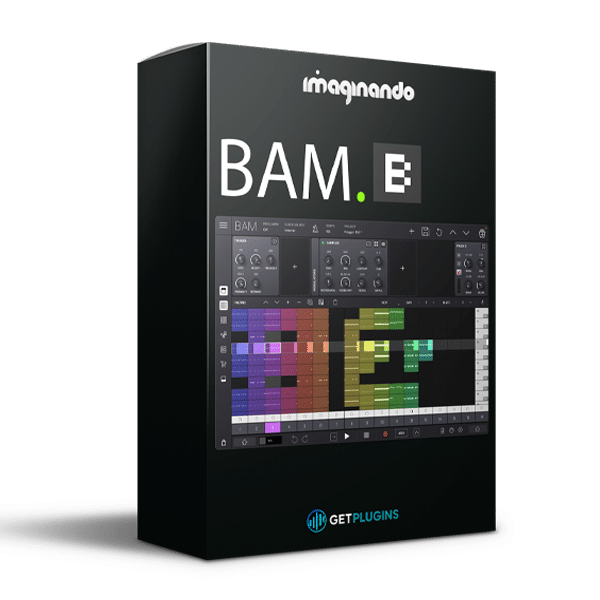
Imaginando – BAM (Windows)
System Requirements:
- Windows 10,11 (64Bit Only)
- Instant Download
- Lifetime Activation
- Future Free Updates
- VST, VST3
£37.99
Guaranteed Safe Checkout

Features & Compatibility
Imaginando – BAM (Windows)
All-in-One Beat Maker and Music Production Software
Imaginando BAM – Beat Maker & Music Maker is an all-in-one music production environment designed to take your ideas from the first beat to a complete track. Combining sequencing, sampling, synthesis, audio effects, MIDI composition, automation, mixing, and clip-based arrangement, BAM brings essential music-making tools together in one streamlined workspace.
Designed for both beginners and experienced producers, BAM offers a groovebox-inspired workflow for creating beats, developing melodies, arranging patterns, manipulating samples, and experimenting with sound. Its combination of built-in sound engines, a large factory sound library, and creative sequencing tools makes it a versatile solution for modern music production.
With 16 instrument tracks, two send channels, a master channel, and more than 1,000 factory sounds, BAM provides a flexible environment for creating electronic music, hip-hop beats, bass-driven productions, and experimental soundscapes on Windows.
Explore more professional music production plugins and software at getplugins.io.
A Complete Music Production Environment
BAM is built around a straightforward production workflow: create a beat, develop musical ideas, arrange clips, shape sounds, mix your tracks, and export your finished production.
Instead of constantly switching between separate applications for sequencing, sampling, synthesis, and arrangement, you can work within a single groovebox-style environment.
Use BAM to:
- Create drum patterns and rhythmic grooves.
- Program basslines, chords, and melodies.
- Sequence MIDI and manipulate audio samples.
- Build arrangements using clips and scenes.
- Automate parameters and create evolving patterns.
- Process sounds with integrated audio effects.
- Mix individual tracks and shape your overall production.
- Trigger clips and scenes for live performance.
- Export songs and other supported project elements.
16 Instrument Tracks and Integrated Mixing
BAM provides 16 instrument tracks, supported by two send channels and a master channel. This structure gives you space to combine multiple sound sources and develop ideas beyond simple loops.
Build arrangements featuring drums, percussion, bass, melodies, chords, synthesizers, vocal samples, and atmospheric textures.
The integrated mixer provides essential controls, including volume, pan, mute, solo, and routing, helping you balance individual elements and organize your production.
Built-In Synthesizers and Sound Engines
BAM includes built-in sound-generation tools that let you create musical parts without depending entirely on external instruments. Its sound engines cover different approaches to synthesis, sampling, and percussion production.
Use these tools to create everything from punchy electronic drums and deep basslines to melodic sequences, evolving textures, and experimental sounds.
The available sound-generation features include analog-style synthesis, an acid-style bass engine, sampling, synthesized drums, noise generation, and other sound sources.
Dedicated Drum Engines and Percussion Tools
Build rhythmic foundations using BAM’s dedicated drum engines for essential percussion sounds, including kick, snare, hi-hat, clap, tom, and cowbell.
Combine synthesized percussion with samples and other sound sources to create grooves suited to different musical styles.
Whether you’re producing tight hip-hop beats, driving electronic rhythms, or layered percussion for cinematic music, BAM provides a focused environment for programming and developing drum patterns.
More Than 1,000 Factory Sounds
BAM includes a factory sound library containing over 1,000 percussive and melodic sounds, providing a starting point for creating a wide range of musical ideas.
Use the included sounds to develop drum grooves, basslines, melodic patterns, electronic sequences, and atmospheric layers. You can also work with your own audio using BAM’s sampling tools.
The combination of built-in sound engines and factory content helps you move quickly from an initial idea to a more developed arrangement.
Advanced Step Sequencing
BAM’s step sequencer supports up to 256 steps per clip, allowing you to create short rhythmic loops or longer evolving patterns.
Independent clip lengths can provide additional flexibility when building sequences across multiple tracks. This is useful for creating rhythmic variations, polyrhythmic ideas, evolving electronic patterns, and detailed arrangements.
Use the step sequencer to program drums, develop repeating motifs, and introduce variation into your productions.
Piano Roll and MIDI Composition
BAM includes a piano-roll composer for programming and editing MIDI notes. Create basslines, melodies, chords, and other musical parts while using available scale and composition tools.
Its melody and chord generation and mutation features can help you explore new musical ideas, develop variations, and overcome creative blocks.
From simple melodic phrases to more complex arrangements, BAM provides tools for building musical ideas directly inside your production environment.
Hybrid Audio and MIDI Clips
One of BAM’s distinctive workflow features is its ability to combine audio and MIDI material within a clip-based environment.
Work with drum loops, melodic samples, MIDI basslines, synthesizer parts, vocal samples, and other audio elements as part of your arrangement. Tempo-synchronized audio time-stretching helps adapt supported audio clips to your project’s tempo.
This hybrid approach is particularly useful for producers who combine programmed instruments with recorded or sampled audio.
Clip Matrix and Live Scene Launching
BAM’s clip matrix provides a visual way to organize musical patterns and build arrangements from individual clips.
Create scenes, launch clips, experiment with combinations, and develop musical structures using follow actions. The clip-based workflow also supports live performance, allowing you to trigger patterns and scenes in real time.
Move naturally between beat creation, arrangement, improvisation, and live performance without abandoning your existing project.
Parameter-Lock Automation and Creative Modulation
BAM supports step- and clip-based parameter-lock automation, allowing you to introduce parameter changes at specific points in a pattern.
Use this approach to create rhythmic filter movements, changing effects, repeating modulation patterns, dynamic transitions, and experimental sequences.
Its modulation sources include:
- LFO: Create repeating movement and rhythmic modulation.
- Envelope: Shape parameter changes in response to an envelope.
- Random Walk: Introduce evolving, less predictable modulation.
These tools can help transform static patterns into dynamic arrangements and give repeated musical phrases a more expressive character.
Integrated Audio Effects
BAM includes a selection of built-in effects for shaping individual tracks and refining your overall sound.
Available effect types include:
- Burner waveform shaping
- Multimode filter
- 3-band EQ
- Parametric EQ
- Delay
- Chorus
- Compressor
- Reverb
- Phaser
- Bit reduction
- Stereo enhancement
With up to 11 effect types listed in the product specifications, BAM provides a useful selection of processing tools for tonal shaping, dynamics, ambience, modulation, and creative sound design.
The ability to process sounds within the same environment helps maintain a focused workflow while developing your production.
Plugin Hosting and DAW Integration
BAM can operate as a standalone music production application or integrate with compatible digital audio workstations through supported plugin formats.
Its plugin capabilities make it possible to incorporate BAM into an existing studio workflow rather than using it exclusively as an independent production environment.
Windows users should check the official product specifications for the currently supported plugin formats, host requirements, and installation details before purchasing.
Export Your Musical Ideas
When your production is ready, BAM provides export options for supported project elements, including complete songs, individual tracks, scenes, and MIDI.
The supplied product information also lists Ableton Live project export in .als format. These options can help you transfer musical ideas into other production workflows for further arrangement, editing, or mixing.
Key Features of Imaginando BAM
- All-in-One Music Production: Create, sequence, arrange, and mix music in one environment.
- 16 Instrument Tracks: Build arrangements with multiple sound sources.
- 2 Send Channels and Master Channel: Organize your mixing workflow.
- 1,000+ Factory Sounds: Start producing with a broad selection of sounds.
- Built-In Synthesizers: Create basses, leads, pads, and melodic elements.
- Dedicated Drum Engines: Program essential percussion sounds.
- Up to 256 Steps per Clip: Develop short loops and extended patterns.
- Piano-Roll Composer: Edit MIDI notes and build musical parts.
- Melody and Chord Tools: Generate and mutate musical ideas.
- Hybrid Audio/MIDI Workflow: Combine sampled audio and programmed material.
- Tempo-Synchronized Time-Stretching: Adapt supported audio clips to your project.
- Clip Matrix and Scene Launcher: Organize arrangements and trigger patterns.
- Parameter-Lock Automation: Create detailed, step-based parameter changes.
- LFO, Envelope, and Random Walk: Add movement to sounds and sequences.
- Integrated Audio Effects: Shape tone, dynamics, space, and modulation.
- Standalone and Plugin Workflows: Use BAM independently or with compatible DAWs.
- Export Options: Transfer supported musical material into other workflows.
Suitable for Multiple Music Genres
Imaginando BAM supports a wide range of production styles and creative workflows.
Hip-Hop and Trap: Program drum grooves, develop basslines, and build melodic loops.
Electronic Music and EDM: Create sequenced rhythms, synth patterns, and evolving arrangements.
House and Techno: Develop repetitive grooves, layered percussion, and automated filter movements.
Lo-Fi and Experimental Music: Combine samples, unusual textures, and creative modulation.
Pop Production: Build rhythmic foundations, melodic parts, and supporting layers.
Cinematic Music: Experiment with atmospheric textures, evolving patterns, and sound-design elements.
Live Electronic Performance: Trigger clips and scenes to experiment with arrangements in real time.
Who Should Use Imaginando BAM?
Beatmakers can use BAM to develop drum patterns, basslines, and melodic loops in one environment.
Electronic Music Producers can combine synthesis, step sequencing, automation, and clip launching for a flexible production workflow.
Songwriters and Composers can sketch musical ideas, explore chord progressions, and develop arrangements.
Sound Designers can experiment with samples, modulation, effects, and parameter automation.
Beginner Producers can benefit from a focused environment that brings many essential music-making functions together.
Experienced Producers can use BAM for rapid idea generation, groovebox-style production, and integration with a wider DAW workflow.
Why Choose Imaginando BAM for Windows?
Imaginando BAM combines beat creation, synthesis, sampling, sequencing, arrangement, and mixing in a single production environment. Its clip-based workflow makes it practical to develop short musical ideas into more complete arrangements, while its integrated sound engines and effects provide flexibility for shaping those ideas.
Whether you prefer programming beats step by step, experimenting with audio samples, creating MIDI melodies, or triggering scenes during a performance, BAM offers multiple ways to approach music creation.
For producers seeking a dedicated beat-making environment that can also fit into a larger studio setup, BAM provides a versatile alternative to a workflow built around numerous separate tools.
Conclusion
Imaginando BAM – Beat Maker & Music Maker for Windows is an all-in-one production tool designed for beatmakers, electronic music producers, composers, and modern music creators.
With 16 instrument tracks, more than 1,000 factory sounds, built-in sound engines, advanced step sequencing, MIDI composition, hybrid audio/MIDI clips, automation, modulation, integrated effects, and clip-based arrangement, BAM provides a broad set of tools for creating and developing musical ideas.
From programming your first beat to arranging complete electronic tracks, BAM offers a streamlined approach to music production that combines creative flexibility with a focused workflow.
For the latest features, Windows compatibility, supported plugin formats, system requirements, pricing, and downloads, visit the official Imaginando BAM product page.
Explore more professional music production plugins and software at getplugins.io


Reviews
There are no reviews yet.