🎵 W.A. Production – InstaComposer 3 🤖
Unleash your creativity with InstaComposer 3, the most advanced AI-powered MIDI composition tool ever created by W.A. Production. Designed to help producers, composers, and musicians turn inspiration into full songs instantly, this intelligent plugin writes melodies, harmonies, basslines, and chord progressions — all with just a few clicks.
Whether you’re crafting EDM bangers, cinematic scores, pop anthems, trap beats, or lo-fi vibes, InstaComposer 3 gives you limitless creative power with AI-assisted songwriting that’s fast, musical, and deeply inspiring.
🎧 From a single idea to a complete arrangement — in seconds!
🎼 Write Complete Songs Instantly
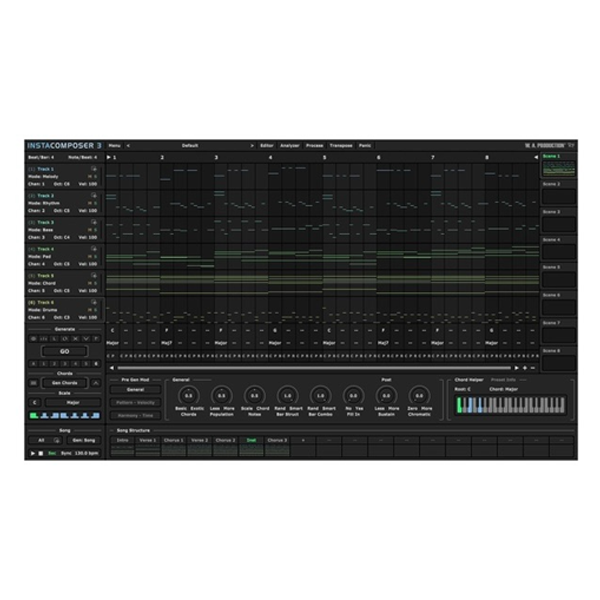
No more staring at a blank piano roll! InstaComposer 3’s upgraded song section engine lets you build entire tracks, part by part, from intros and verses to choruses and bridges.
✨ One click generates full musical sections — each with beautifully balanced melodies, harmonies, rhythms, and basslines that flow like a finished composition.
Create multiple scenes and variations for evolving arrangements, ensuring every part of your song tells a unique musical story.
🎹 Smarter Harmony, Deeper Musical Intelligence
Powered by enhanced AI music theory, InstaComposer 3 understands musical context — adapting chords and melodies that sound emotional, organic, and inspiring.
🎶 Key Innovations Include:
🎵 Slash Chord Support: Add expressive chord voicings with alternate bass notes.
🎵 Advanced Chord & Scale Recognition: Automatically detects keys, tonal centers, and progressions with precision.
🎵 Upgraded Chord Editor: Resize, rearrange, and edit chords freely with drag-and-drop simplicity.
💡 The result: Natural-sounding music that feels composed, not generated.
⚙️ Streamlined Workflow for Modern Producers
InstaComposer 3 integrates seamlessly into your DAW, giving you total creative control without breaking your flow.
🎧 Top Workflow Enhancements:
🎹 MIDI Import & Mixing – Combine AI-generated parts with your own ideas for hybrid creativity.
🎛️ DAW Song Sync – Sync playback perfectly with your timeline for tight arrangements.
🎚️ Range Control – Define pitch limits for each instrument track.
🎼 Multi-Track Creation – Generate up to 6 individual tracks across 8 scenes per section for complex, evolving compositions.
💎 Key Features at a Glance
✅ Next-generation AI MIDI Generator for full songs, melodies & harmonies
✅ Multi-scene, multi-track system for dynamic arrangements
✅ Real-time adaptive harmony engine for musical consistency
✅ Easy drag-and-drop MIDI export/import
✅ Full DAW integration with playback sync
✅ Adjustable difficulty, variation, and probability settings
✅ Includes factory presets, tutorials, and PDF manual
🎶 Why Producers Love InstaComposer 3
⭐ Write professional MIDI compositions in seconds
⭐ Endless inspiration powered by AI
⭐ Smarter harmony & melody generation
⭐ Perfect for beginners and advanced producers alike
⭐ Ideal for EDM, Pop, Trap, Cinematic, and more

Reviews
There are no reviews yet.