⚙️ Excite Audio – Evolve Alloy (Windows)
🔩 The Art of Metal in Motion
Unleash the sonic essence of metal with Evolve Alloy — the groundbreaking multi-layer sample-based synthesizer by Excite Audio, now optimized for Windows systems. Whether you're sculpting ambient textures, cinematic tension, or futuristic beats, Evolve Alloy blends organic and synthetic metallic tones into an expressive, modern sound design instrument. 🎶🛠️
🎯 What is Evolve Alloy?
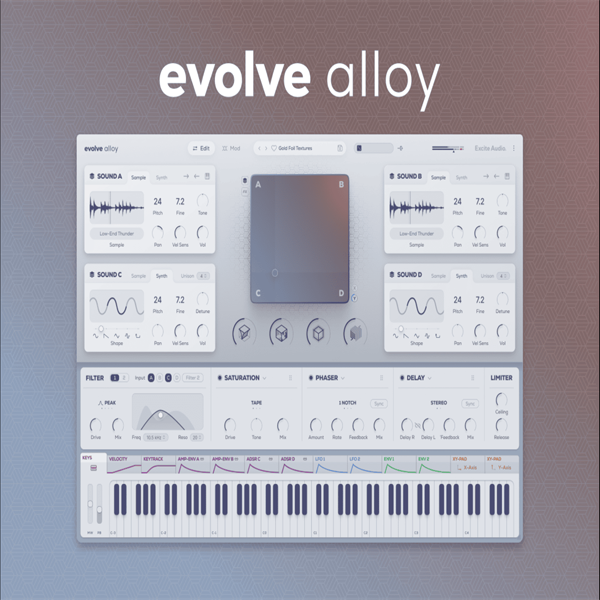
Evolve Alloy is more than just a synthesizer — it’s a metal-infused creative playground. With over 250 meticulously crafted sound sources, four dynamic sound layers, intuitive modulation, and a host of powerful FX, it gives producers and composers total control over complex, character-rich sounds.
🔥 Key Features (Windows Version)
🔹 Quad-Layer Engine – Blend four independent sample/synth layers
🔹 250+ Sound Sources – Bells, glockenspiels, industrial foley, synths & more
🔹 🧲 XY Pad – Real-time sound blending or parameter modulation
🔹 🎛 User Sample Import – Drop in your own sounds for ultimate custom patches
🔹 🎲 Randomization – Instantly spark ideas with sound, FX, and parameter dice
🔹 💫 12 Modulation Sources – Envelopes, LFOs, velocity, XY & key tracking
🔹 🛠 4 Signature FX Macros – Sharpen, Rust, Vibrate & Spring for metal-inspired sound shaping
🔹 🔧 3 FX Slots + Dual Filters – Choose from 16 high-quality effects for endless sonic tweaking
🔹 🎹 250 Factory Presets – Covering ambient, techno, hyperpop, cinematic & experimental genres
🧪 Create, Morph, and Modulate
🎛️ Dual Synth/Sample Engine – Use waveforms like Sine, Triangle, Saw, Pulse
🎚️ Pitch, Fine-Tune, Tone, Pan & Velocity Sensitivity
📥 Drag-and-Drop Modulation Routing – Build animated, evolving textures
🌀 Mod Matrix – Visual modulation editor with curve and polarity control
🎚️ Eco Mode – CPU-friendly operation for smooth workflow
🧩 Four Macro FX Controls Inspired by Metal
-
✨ Sharpen – Add attack and transient clarity
-
🔧 Rust – Inject vintage-style distortion and grit
-
🔁 Vibrate – Add metallic resonances and subtle delays
-
🌊 Spring – Emulate lush, characterful spring reverbs
🎵 Perfect For:
✔️ Cinematic Sound Design
✔️ Ambient & Experimental Music
✔️ Industrial Techno & Electronic
✔️ Modern Pop & Hyperpop
✔️ Game Audio & FX Creation











Reviews
There are no reviews yet.