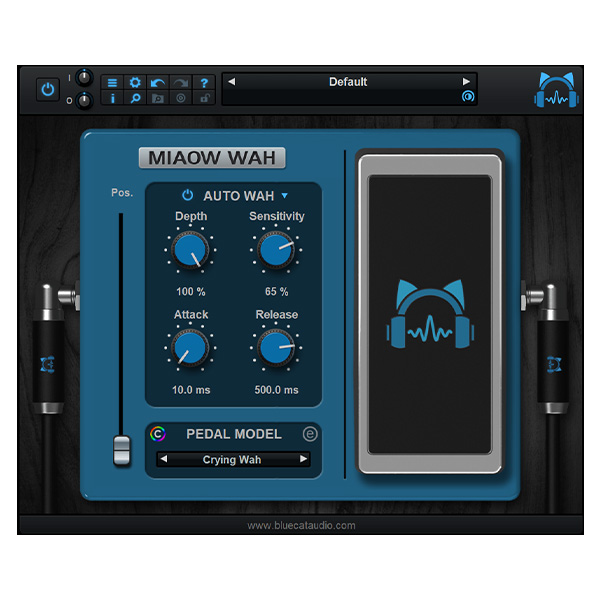
Blue Cat Audio – Miaow Wah (Windows)

Unleash the expressive power of classic and modern wah tones with Blue Cat’s Miaow Wah – a highly…
Formats: VST3 · VST

£25.00

Discover Blue Cat Audio – Miaow Wah (Windows)

Unleash the expressive power of classic and modern wah tones with Blue Cat’s Miaow Wah – a highly advanced virtual wah pedal plugin that does way more than just "wah." Whether you're chasing the sound of vintage stompboxes or designing futuristic modulation effects, Miaow Wah gives you limitless tonal flexibility, intuitive control, and a purring…

Guitarists and bassists seeking expressive tone-shaping

Producers and sound designers exploring creative modulation

Electronic musicians designing movement and vibe

Explore product features & full description

🎚️ Blue Cat Audio – Miaow Wah (Windows) 😺🎸

Unleash the expressive power of classic and modern wah tones with Blue Cat’s Miaow Wah – a highly advanced virtual wah pedal plugin that does way more than just "wah." Whether you're chasing the sound of vintage stompboxes or designing futuristic modulation effects, Miaow Wah gives you limitless tonal flexibility, intuitive control, and a purring user experience. 🎛️🎶

🐾 Key Features

🎸 29 Legendary Wah Models – Emulate iconic wah pedals from every era
🎛️ Custom Wah Creation – Use the built-in Wah Editor to sculpt your own filter curves
🎛️ Multi-Control Options – Control via expression pedal, envelope follower (auto-wah), or LFO sync
🌐 Tone Maps Browser – Explore and tweak over 200 factory presets across multiple effect styles
🌀 Versatile FX Engine – Go beyond wah with filtered tremolos, flangers, phasers, univibes, and more
🎚️ LFO Sync – Lock your modulation to the tempo of your host DAW
🎨 Customizable GUI – Scalable, resizable interface with full MIDI Learn and automation support
🧠 Zero CPU When Idle – Efficient performance that doesn’t weigh down your system
🎯 Smooth Bypass – Silent transitions between activated and bypassed states
📂 Preset Manager – Save, copy/paste, and recall presets across sessions with ease

🎵 Ideal For:

  • Guitarists and bassists seeking expressive tone-shaping

  • Producers and sound designers exploring creative modulation

  • Electronic musicians designing movement and vibe

  • Fans of classic funk, rock, and psychedelic textures

💡 Why Choose Miaow Wah?
Because it’s not just a wah pedal plugin – it’s a creative modulation workstation. Whether you want a subtle auto-wah, swirling phaser, or funky envelope filter, Miaow Wah delivers all the meowgic with rock-solid performance. 😺

Compatibility checklist

  • Windows 10,11 (64Bit Only)
  • VST3, VST
  • Formats: VST3 · VST

Requirements vary by supplied version. Confirm your setup with support before purchasing.

Delivery & activation

  1. Complete your purchaseReview compatibility and purchase details.
  2. Download your filesAccess available downloads through your order and account.
  3. Follow the included setup guideContact GetPlugins if you need installation help.

Activation, where included, is provided by GetPlugins. Publisher-account registration, transferable publisher keys and a publisher-issued licence are not included. Read the activation policy.

Frequently asked questions

How do I receive my download?

After payment, access available files from your order details and GetPlugins account. Contact support if a download is missing.

What activation is included?

Follow the activation instructions supplied with your download. Activation is provided by GetPlugins. Confirm device allowances and reinstall arrangements before ordering.

Will this work with my computer and DAW?

Check the compatibility information for this listing and ask us to confirm the exact supplied build. Libraries may require a compatible sampler or additional software.

What if I need installation help?

Email support@getplugins.io with your order number, operating system, DAW and any error message.

Which updates are included?

Activation and updates are separate. Confirm the available version and update arrangements before ordering; do not assume access to future publisher releases.

How do I request a refund?

Contact support with your order number and issue details. Read our Refund Policy for eligibility and the request process.

Customer Reviews

Reviews

There are no reviews yet.

Be the first to review “Blue Cat Audio – Miaow Wah (Windows)”

Your email address will not be published. Required fields are marked *