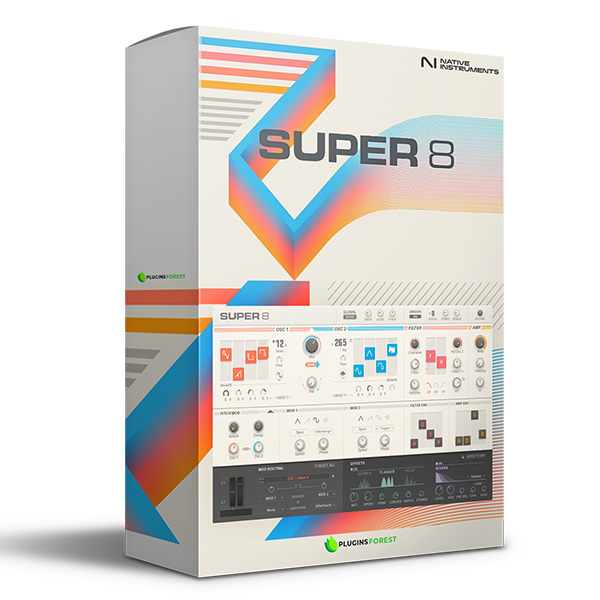
Native Instruments – Super 8 R2 (Windows)

Unleash the legendary warmth and lush textures of classic analog polysynths — reimagined for modern music production. SUPER…
Formats: VST3 · VST

£30.00

Discover Native Instruments – Super 8 R2 (Windows)

Unleash the legendary warmth and lush textures of classic analog polysynths — reimagined for modern music production. SUPER 8 is your new go-to VST3 synthesizer plugin for crafting bold, expressive, and retro-futuristic sounds in seconds.

Explore product features & full description

https://youtu.be/iIgASqUja_o

🎹 SUPER 8 (Windows) — Vintage Synth Soul, Supercharged for Today’s Sound

Unleash the legendary warmth and lush textures of classic analog polysynths — reimagined for modern music production. SUPER 8 is your new go-to VST3 synthesizer plugin for crafting bold, expressive, and retro-futuristic sounds in seconds.

Whether you're diving into synthwave, cinematic scoring, ambient soundscapes, or cutting-edge electronic beats, SUPER 8 delivers analog character with digital precision in a sleek, user-first interface. 🎛️✨


🌟 Key Features That Spark Creativity

🔊 Retro Analog Tone, Refined
Inspired by iconic synths of the ‘80s, SUPER 8 offers eight voices of vintage flavor with modern control — perfect for warm pads, bold basses, and soaring leads.

🎚️ Effortless Sound Design
Mix up to four waveforms per oscillator, apply FM modulation, and sync oscillators with ease. SUPER 8’s streamlined UI keeps you focused and in the flow.

🔄 Powerful Modulation Engine
Animate your patches with multiple LFO waveforms, adjustable speed and phase, and wide modulation routing. Craft evolving textures that breathe and move. 🌀

🎛 Classic Filters & Envelopes
Shape your sound with low-pass, high-pass, and band-pass filters, plus fast-access ASDR envelopes for expressive dynamics.

🎵 550+ Curated Presets
Get inspired instantly with a massive library of ready-to-go sounds — from deep analog basses to shimmering cinematic pads. 🎶


💡 Why SUPER 8 Is a Producer Favorite

✅ Authentic analog vibe with digital versatility
✅ Fast, frustration-free workflow — no menu-diving
✅ Ideal for synthwave, ambient, pop, EDM, film scoring, and more
✅ Clean, modern interface — everything you need is front and center
✅ Lightweight, responsive, and ready to spark inspiration


🚀 Vintage Vibe Meets Modern Power

SUPER 8 isn’t just another analog emulation — it’s a creative powerhouse built to bridge the past and future of sound design. Whether you’re layering retro textures or sculpting fresh sonic landscapes, SUPER 8 gives you the tools to sound timeless and trendsetting — all in one beautifully designed plugin.
Compatibility checklist

  • Windows 10,11 (64-bit Only)
  • VST,VST3
  • Formats: VST3 · VST

Requirements vary by supplied version. Confirm your setup with support before purchasing.

Delivery & activation

  1. Complete your purchaseReview compatibility and purchase details.
  2. Download your filesAccess available downloads through your order and account.
  3. Follow the included setup guideContact GetPlugins if you need installation help.

Activation, where included, is provided by GetPlugins. Publisher-account registration, transferable publisher keys and a publisher-issued licence are not included. Read the activation policy.

Frequently asked questions

How do I receive my download?

After payment, access available files from your order details and GetPlugins account. Contact support if a download is missing.

What activation is included?

Follow the activation instructions supplied with your download. Activation is provided by GetPlugins. Confirm device allowances and reinstall arrangements before ordering.

Will this work with my computer and DAW?

Check the compatibility information for this listing and ask us to confirm the exact supplied build. Libraries may require a compatible sampler or additional software.

What if I need installation help?

Email support@getplugins.io with your order number, operating system, DAW and any error message.

Which updates are included?

Activation and updates are separate. Confirm the available version and update arrangements before ordering; do not assume access to future publisher releases.

How do I request a refund?

Contact support with your order number and issue details. Read our Refund Policy for eligibility and the request process.

Customer Reviews

Reviews

There are no reviews yet.

Be the first to review “Native Instruments – Super 8 R2 (Windows)”

Your email address will not be published. Required fields are marked *