
Discover Zynaptiq – Pitchmap (Windows)
Step into the future of audio manipulation with Zynaptiq PITCHMAP, the first and only plugin that lets you re-tune individual notes inside a full mix — live and in real-time! Whether you're a music producer, remix artist, DJ, or sound designer, PITCHMAP empowers you to reshape your tracks with unmatched pitch control, MIDI integration, and…
🎛️ Electronic Producers – For EDM, trap, techno, and experimental genres
🎙️ Vocal Engineers – Shape harmonies in dense arrangements without solo tracks
🎧 DJs & Mashup Artists – Key-match songs live without time-consuming edits
Explore product features & full description
🎯 Zynaptiq PITCHMAP (Windows) – The Ultimate Real-Time Polyphonic Pitch Editor 🎹🧠
Step into the future of audio manipulation with Zynaptiq PITCHMAP, the first and only plugin that lets you re-tune individual notes inside a full mix — live and in real-time! Whether you're a music producer, remix artist, DJ, or sound designer, PITCHMAP empowers you to reshape your tracks with unmatched pitch control, MIDI integration, and advanced AI-based audio separation. 🧬⚡
No stems? No problem. With PITCHMAP, your entire mix becomes a playable, editable instrument. 🎹✨

🔥 Feature-Packed & Creative-Ready
🎵 Real-Time Polyphonic Pitch Shifting – Reharmonize full mixes without touching the stems
🎹 Live MIDI Control – Re-map melodies and chords on-the-fly via your MIDI keyboard
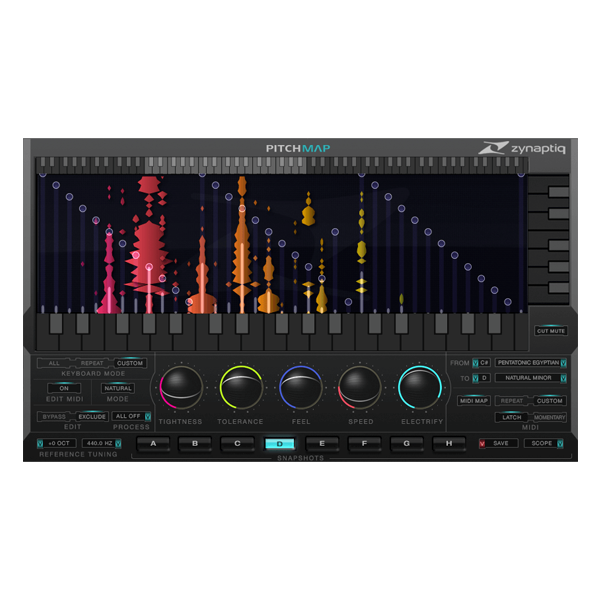
🖱️ Visual GUI Pitch Mapping – Drag-and-drop notes into place with an ultra-responsive interface
🧠 AI-Based Signal Separation (MAP) – Break down complex audio into editable pitch elements
🎙️ Natural Mode – Vocal-aware processing for organic, realistic pitch correction
⚡ Electric Mode – Inject modern, glitchy, or stylized artifacts for futuristic sound design
🌀 Purify & Electrify – Blend between natural and synthetic tones effortlessly
🎚️ Polyphonic Glide (Portamento) – Smooth pitch transitions across complex chords
📸 8 Snapshot Slots – Save, compare, automate, and explore sound variations instantly
🎨 What You Can Do With PITCHMAP:
🔁 Remix in Real Time – Instantly rework vocals, loops, or full tracks to match your set
🔧 Fix Tuning in Mixed Audio – Correct pitch issues even in mastered stereo files
🎼 Experiment with Chords & Harmonies – Craft new progressions from existing material
🎙️ Isolate or Suppress Mix Elements – Mute or morph instruments and vocals via MIDI
🎮 Design Cinematic FX – Transform field recordings or samples into synth-like atmospheres
🎧 Mash Up On the Fly – Combine songs effortlessly by matching key/scale in seconds
🔊 Perform Live with MIDI – Add expressive, real-time pitch shifts on stage
🧠 Built on Rocket Science
Powered by Zynaptiq’s MAP (Mixed-Signal Audio Processing) technology, PITCHMAP analyzes sound using AI-driven perceptual modeling, mimicking the way your brain interprets frequencies. It doesn't just shift notes — it understands them. 🚀🧬
👥 Who Is It For?
-
🎛️ Electronic Producers – For EDM, trap, techno, and experimental genres
-
🎙️ Vocal Engineers – Shape harmonies in dense arrangements without solo tracks
-
🎧 DJs & Mashup Artists – Key-match songs live without time-consuming edits
-
🎮 Game/Film Sound Designers – Create alien textures and immersive soundscapes
-
🎤 Live Performers – Add spontaneous harmonic shifts and FX with MIDI on stage
🆚 PITCHMAP vs The Rest:
🎯 Auto-Tune – Great for solo vocals
🎯 Melodyne – Perfect for off-line edits of isolated instruments
✅ PITCHMAP – Unmatched real-time control over full mixes and polyphonic content 🎹💥
Compatibility checklist
- Windows 10,11 (64-bit Only)
- VST,VST3
- Formats: VST3 · VST
Requirements vary by supplied version. Confirm your setup with support before purchasing.
Delivery & activation
- Complete your purchaseReview compatibility and purchase details.
- Download your filesAccess available downloads through your order and account.
- Follow the included setup guideContact GetPlugins if you need installation help.
Activation, where included, is provided by GetPlugins. Publisher-account registration, transferable publisher keys and a publisher-issued licence are not included. Read the activation policy.
Frequently asked questions
How do I receive my download?
After payment, access available files from your order details and GetPlugins account. Contact support if a download is missing.
What activation is included?
Follow the activation instructions supplied with your download. Activation is provided by GetPlugins. Confirm device allowances and reinstall arrangements before ordering.
Will this work with my computer and DAW?
Check the compatibility information for this listing and ask us to confirm the exact supplied build. Libraries may require a compatible sampler or additional software.
What if I need installation help?
Email support@getplugins.io with your order number, operating system, DAW and any error message.
Which updates are included?
Activation and updates are separate. Confirm the available version and update arrangements before ordering; do not assume access to future publisher releases.
How do I request a refund?
Contact support with your order number and issue details. Read our Refund Policy for eligibility and the request process.








Reviews
There are no reviews yet.