Synchro Arts – ReVoice Pro 5 (Windows)
£27.00
Discover Synchro Arts – ReVoice Pro 5 (Windows)
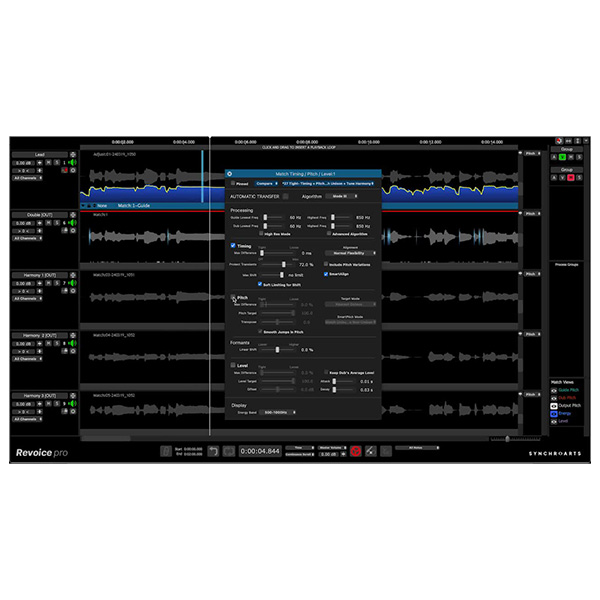
Unlock the full potential of your vocal and dialogue editing workflow with ReVoice Pro 5 for Windows by Synchro Arts – the go-to tool for music producers, sound editors, and voice professionals worldwide. From pitch-perfect vocals to perfectly synced ADR, ReVoice Pro 5 delivers studio-grade results with unmatched speed and accuracy.
Aligns stacked vocals, harmonies, doubles, and ADR in seconds
Ideal for tightening multi-track vocals or syncing film dialogue
Speeds up editing with frame-accurate precision
Explore product features & full description
🎤 Synchro Arts – ReVoice Pro 5 🎶
Unlock the full potential of your vocal and dialogue editing workflow with ReVoice Pro 5 for Windows by Synchro Arts – the go-to tool for music producers, sound editors, and voice professionals worldwide. From pitch-perfect vocals to perfectly synced ADR, ReVoice Pro 5 delivers studio-grade results with unmatched speed and accuracy.
🌟 Core Features of ReVoice Pro 5
⚡ SmartAlign™ – Automatic Vocal & Dialogue Sync
-
Aligns stacked vocals, harmonies, doubles, and ADR in seconds
-
Ideal for tightening multi-track vocals or syncing film dialogue
-
Speeds up editing with frame-accurate precision
🎵 SmartPitch™ – Natural Pitch Correction & Matching
-
Automatically tunes vocals while keeping natural character
-
Maintains formants for expressive, lifelike results
-
Works with both sung and spoken vocals
🔊 Warp Processing – Time & Pitch Flexibility
-
Manually edit pitch, timing, and vibrato with detailed control
-
Non-destructive processing retains the original feel
-
Perfect for post-production, remixes, and sound design
🎚️ Formant & Timing Preservation
-
High-quality time-stretching without artifacts
-
Maintains realistic vocal texture, even under heavy edits
-
Great for ADR, VO, and vocal production
🖥️ Optimized for Windows + DAW Integration
-
Fully compatible with Windows 10 & 11 (64-bit)
-
Runs as standalone or as a VST/AAX plugin
-
ARA2 support for real-time integration with DAWs like Cubase, Studio One, and Reaper
✅ Who Should Use ReVoice Pro 5
🎚️ Music Producers & Engineers – Tune and align vocals fast with pristine results
🎬 Post-Production Editors – Synchronize ADR and dubbing with studio-level precision
🎙️ Voiceover & Podcast Editors – Smooth timing and pitch edits for natural-sounding speech
🎧 Sound Designers – Stretch, shape, and transform voice recordings creatively
🚀 Why Choose ReVoice Pro 5 for Windows?
✅ Fast and intuitive vocal alignment
✅ Natural pitch correction with pro-level control
✅ Fully Windows-compatible for seamless performance
✅ Trusted by top studios for music, film, and broadcast
✅ Saves hours of manual editing with intelligent automation
Compatibility checklist
- Windows 10,11 (64-bit Only)
- VST3, AAX
- Formats: VST3 · AAX
Requirements vary by supplied version. Confirm your setup with support before purchasing.
Delivery & activation
- Complete your purchaseReview compatibility and purchase details.
- Download your filesAccess available downloads through your order and account.
- Follow the included setup guideContact GetPlugins if you need installation help.
Activation, where included, is provided by GetPlugins. Publisher-account registration, transferable publisher keys and a publisher-issued licence are not included. Read the activation policy.
Frequently asked questions
How do I receive my download?
After payment, access available files from your order details and GetPlugins account. Contact support if a download is missing.
What activation is included?
Follow the activation instructions supplied with your download. Activation is provided by GetPlugins. Confirm device allowances and reinstall arrangements before ordering.
Will this work with my computer and DAW?
Check the compatibility information for this listing and ask us to confirm the exact supplied build. Libraries may require a compatible sampler or additional software.
What if I need installation help?
Email support@getplugins.io with your order number, operating system, DAW and any error message.
Which updates are included?
Activation and updates are separate. Confirm the available version and update arrangements before ordering; do not assume access to future publisher releases.
How do I request a refund?
Contact support with your order number and issue details. Read our Refund Policy for eligibility and the request process.

Reviews
There are no reviews yet.