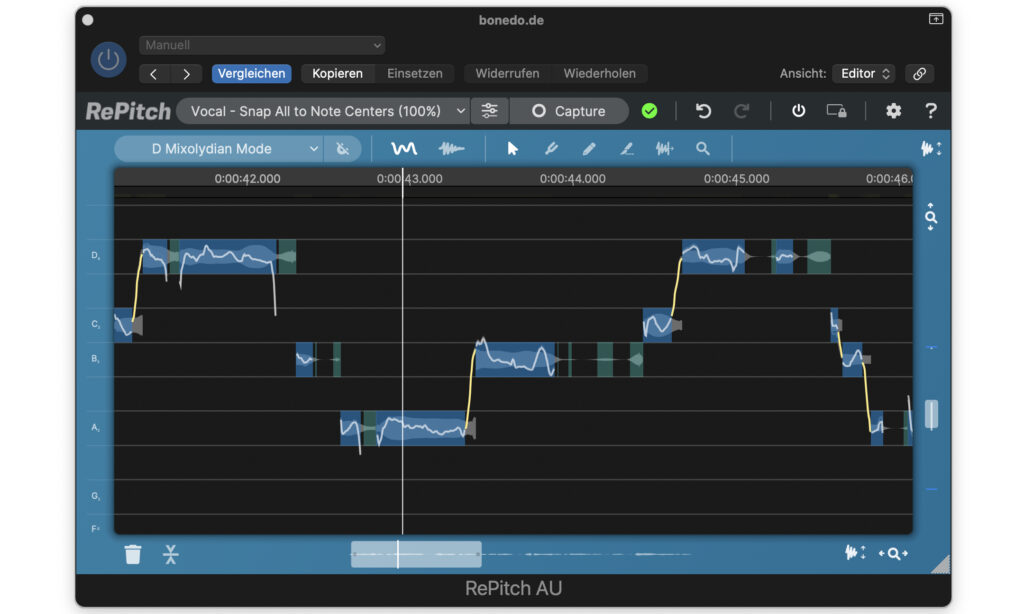
Synchro Arts – RePitch (Windows)
£22.00
Discover Synchro Arts – RePitch (Windows)
Bring your vocal editing to the next level with RePitch for Windows by Synchro Arts – the next-generation pitch correction software trusted by music producers, vocal engineers, and post-production pros worldwide. Whether you're tuning lead vocals, aligning harmonies, or refining ADR dialogue, RePitch delivers natural-sounding results with pinpoint accuracy – right inside your Windows DAW.
Studio-quality pitch correction for monophonic vocals & instruments
Transparent tuning – no robotic or unnatural effects
Perfect for subtle enhancements or bold tuning styles
Explore product features & full description
🎤 Synchro Arts – RePitch for 🎶
🎯 Professional Pitch Correction That Sounds Effortless
Bring your vocal editing to the next level with RePitch for Windows by Synchro Arts – the next-generation pitch correction software trusted by music producers, vocal engineers, and post-production pros worldwide. Whether you're tuning lead vocals, aligning harmonies, or refining ADR dialogue, RePitch delivers natural-sounding results with pinpoint accuracy – right inside your Windows DAW.
💡 Key Features – RePitch for Windows
🎵 Natural Pitch Correction
-
Studio-quality pitch correction for monophonic vocals & instruments
-
Transparent tuning – no robotic or unnatural effects
-
Perfect for subtle enhancements or bold tuning styles
🧠 SmartPitch™ Technology
-
Auto-detects pitch and intelligently suggests corrections
-
Preserves natural vocal tone and formants
-
Manual pitch curve editing for surgical control
🎤 Vibrato & Formant Control
-
Tweak formants to adjust vocal tone creatively or naturally
-
Enhance or reduce vibrato with ease
⚡ Real-Time ARA2 Integration
-
Works seamlessly with ARA2-supported Windows DAWs:
Studio One, Cubase, Reaper, and more -
Instant vocal tuning – no waiting, no rendering
🔧 Automatic & Manual Editing Modes
-
Auto mode: fast, on-the-fly fixes
-
Manual mode: deep editing for professionals
-
Snap-to-scale function for key-locked perfection
🔁 Perfect Partner for VocAlign
-
Sync pitch and timing across vocal stacks
-
Ideal for backing vocals, doubles, and ADR alignment
🖥️ Optimized for Windows Users
-
Fully compatible with Windows 10 & 11 (64-bit)
-
Designed for smooth integration into your Windows-based studio setup
-
Lightweight and efficient – minimal CPU load, maximum performance
✅ Who Is RePitch for?
🎚️ Producers & Engineers – Create chart-ready vocals with confidence
🎙️ Singers & Songwriters – Polish your voice while keeping its soul
🎬 Post-Production Editors – Make every line pitch-perfect for film & TV
🎧 Live & Studio Performers – Get real-time pitch correction on stage or in the booth
🌟 Why Choose RePitch (Windows)?
✅ More natural than Auto-Tune
✅ More precise than Melodyne
✅ Real-time ARA2 workflow
✅ VocAlign integration for pitch + timing control
✅ Windows-optimized for peak performance
Compatibility checklist
- Windows 10,11 (64-bit Only)
- VST3, AAX
- Formats: VST3 · AAX
Requirements vary by supplied version. Confirm your setup with support before purchasing.
Delivery & activation
- Complete your purchaseReview compatibility and purchase details.
- Download your filesAccess available downloads through your order and account.
- Follow the included setup guideContact GetPlugins if you need installation help.
Activation, where included, is provided by GetPlugins. Publisher-account registration, transferable publisher keys and a publisher-issued licence are not included. Read the activation policy.
Frequently asked questions
How do I receive my download?
After payment, access available files from your order details and GetPlugins account. Contact support if a download is missing.
What activation is included?
Follow the activation instructions supplied with your download. Activation is provided by GetPlugins. Confirm device allowances and reinstall arrangements before ordering.
Will this work with my computer and DAW?
Check the compatibility information for this listing and ask us to confirm the exact supplied build. Libraries may require a compatible sampler or additional software.
What if I need installation help?
Email support@getplugins.io with your order number, operating system, DAW and any error message.
Which updates are included?
Activation and updates are separate. Confirm the available version and update arrangements before ordering; do not assume access to future publisher releases.
How do I request a refund?
Contact support with your order number and issue details. Read our Refund Policy for eligibility and the request process.

Reviews
There are no reviews yet.