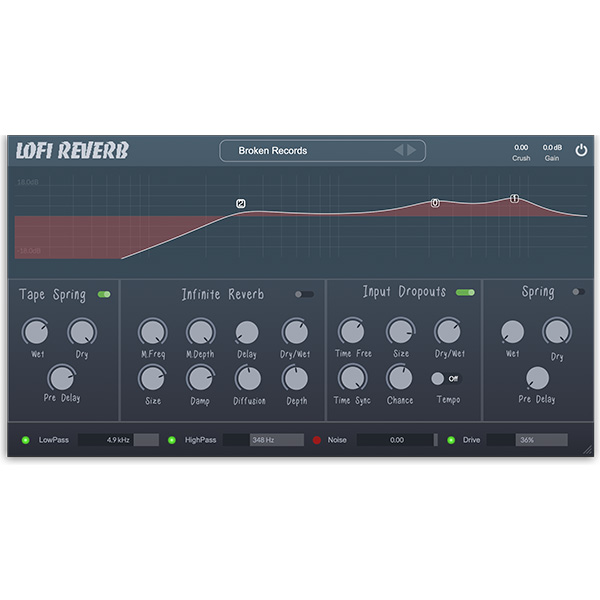
Lofi Reverb combines two spring reverbs with a granular reverb for a dreamy, degraded, and vintage sound. Experience tape-like oscillations, saturation, and subtle crushing of beats for unique creative effects. Perfect for traditional lo-fi or smooth vintage vibes.
A spring reverb with a dull and tape-like response for a warm, vintage sound.
A granular reverb that delivers a dense, atmospheric sound with unique feedback and diffusion, creating a lush, immersive reverb tail for added…
An input dropout effect that creates stuttering, and glitchy dropouts, adding texture and unpredictability to your sound.
Explore product features & full description
Instant dreamy, degraded, and vintage character
Lofi Reverb combines two spring reverbs with a granular reverb for a dreamy, degraded, and vintage sound. Experience tape-like oscillations, saturation, and subtle crushing of beats for unique creative effects. Perfect for traditional lo-fi or smooth vintage vibes.
Peculiarities
A spring reverb with a dull and tape-like response for a warm, vintage sound.
A granular reverb that delivers a dense, atmospheric sound with unique feedback and diffusion, creating a lush, immersive reverb tail for added depth and space.
An input dropout effect that creates stuttering, and glitchy dropouts, adding texture and unpredictability to your sound.
A tape spring reverb that creates a brighter, yet warmer response.
A built-in parametric EQ for tweaking the reverb sound.
Traditional LP and HP filters, a tape hiss noise generator, and a warm saturation effect.
Complete your purchaseReview compatibility and purchase details.
Download your filesAccess available downloads through your order and account.
Follow the included setup guideContact GetPlugins if you need installation help.
Activation, where included, is provided by GetPlugins. Publisher-account registration, transferable publisher keys and a publisher-issued licence are not included. Read the activation policy.
Frequently asked questions
How do I receive my download?
After payment, access available files from your order details and GetPlugins account. Contact support if a download is missing.
What activation is included?
Follow the activation instructions supplied with your download. Activation is provided by GetPlugins. Confirm device allowances and reinstall arrangements before ordering.
Will this work with my computer and DAW?
Check the compatibility information for this listing and ask us to confirm the exact supplied build. Libraries may require a compatible sampler or additional software.
What if I need installation help?
Email support@getplugins.io with your order number, operating system, DAW and any error message.
Which updates are included?
Activation and updates are separate. Confirm the available version and update arrangements before ordering; do not assume access to future publisher releases.
How do I request a refund?
Contact support with your order number and issue details. Read our Refund Policy for eligibility and the request process.
Customer Reviews
Reviews
There are no reviews yet.
Be the first to review “Clark Audio – Lofi Reverb (Windows)” Cancel reply









Reviews
There are no reviews yet.