Modern Metal Songwriter – NovaClip (Windows)
£15.00
Discover Modern Metal Songwriter – NovaClip (Windows)
Whether you're looking to get the most smack out of your drums, enhance your guitar DI before an amp, or master your music, clipping is a staple of modern, heavy music.
Explore product features & full description
NOVACLIP - ADVANCED PEAK CLIPPER
UNPARALLELEDAGGRESSION MEETS PRECISION
Whether you're looking to get the most smack out of your drums, enhance your guitar DI before an amp, or master your music, clipping is a staple of modern, heavy music.
NOVAClip offers a wide range of features that enable you to effortlessly infuse aggression and consistency into your music, all without requiring extensive audio production knowledge.
AUDIO EXAMPLES
KEY FEATURES
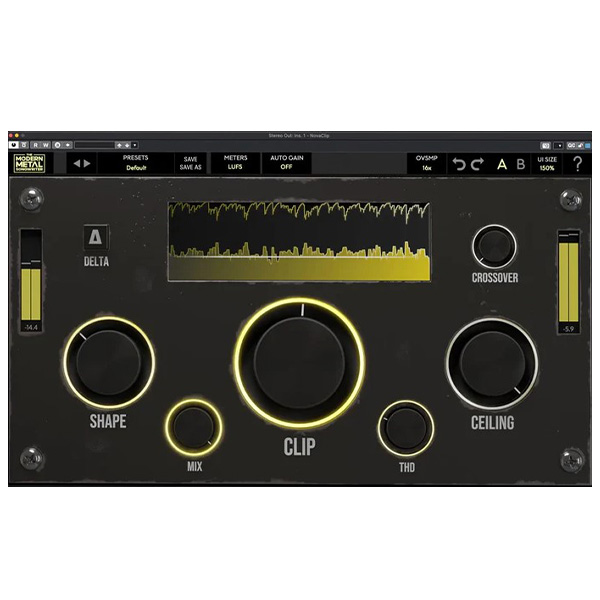
Crossover: Achieve an impeccably clean low end while still capturing the high-end punch that defines a clipper's sound.
THD: World-class saturation at your fingertips, allowing you to add warmth and harmonic excitement to your tracks effortlessly.
Shape: Adjust the shape of the clipper knee, allowing for the ultimate control over your sound for any scenario.
Auto Gain: Don't get fooled. Adjust all your parameters without any volume change.
Delta: Listen to ONLY the clipped audio, allowing you to hear exactly what the plugin is doing.
Latency Free: Enjoy crystal clear, aggressive mixing and mastering chains while writing, and recording.
Compatibility checklist
- Windows 10,11 (64Bit Only)
- Full Version
- VST3, AAX
- Formats: VST3 · AAX
Requirements vary by supplied version. Confirm your setup with support before purchasing.
Delivery & activation
- Complete your purchaseReview compatibility and purchase details.
- Download your filesAccess available downloads through your order and account.
- Follow the included setup guideContact GetPlugins if you need installation help.
Activation, where included, is provided by GetPlugins. Publisher-account registration, transferable publisher keys and a publisher-issued licence are not included. Read the activation policy.
Frequently asked questions
How do I receive my download?
After payment, access available files from your order details and GetPlugins account. Contact support if a download is missing.
What activation is included?
Follow the activation instructions supplied with your download. Activation is provided by GetPlugins. Confirm device allowances and reinstall arrangements before ordering.
Will this work with my computer and DAW?
Check the compatibility information for this listing and ask us to confirm the exact supplied build. Libraries may require a compatible sampler or additional software.
What if I need installation help?
Email support@getplugins.io with your order number, operating system, DAW and any error message.
Which updates are included?
Activation and updates are separate. Confirm the available version and update arrangements before ordering; do not assume access to future publisher releases.
How do I request a refund?
Contact support with your order number and issue details. Read our Refund Policy for eligibility and the request process.

Reviews
There are no reviews yet.