Tracktion Software SINEE Chop Suey (Windows)

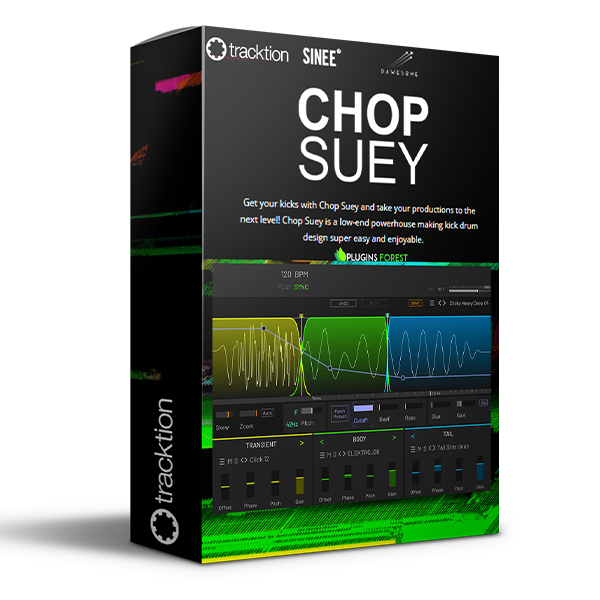
Get your kicks with Chop Suey and take your productions to the next level! Chop Suey is a low-end…
Formats: VST3 · VST2

£20.00

Discover Tracktion Software SINEE Chop Suey (Windows)

Get your kicks with Chop Suey and take your productions to the next level! Chop Suey is a low-end powerhouse making kick drum design super easy and enjoyable.

Explore product features & full description

Get your kicks with Chop Suey and take your productions to the next level! Chop Suey is a low-end powerhouse making kick drum design super easy and enjoyable.

Ultimate Workflow

We’ve all been there: you browse through hundreds of kicks, but nothing really works. One has a nice transient, another one a cool punch in the face and the third has the perfect boomy tail. But once you layer them the result is a weak muddy mess: layering kicks are rarely successful.

Chop Suey is the solution: instead of layering, the elements are sequenced. This method eliminates phasing issues while allowing the combined kick to maintain the crisp transient, the punch of the body, and the characteristic tail.
What You See Is What You Get

Shaping kicks with a compressor, saturator or transient designer can be a tedious task. These tools affect the whole kick, making it impossible to simply edit the transient without impacting the body. The workable ranges are tiny and your options are massively limited. With Chop Suey you can always see what you are doing. As the first few milliseconds of a kick are so crucial for the perception you can visually stretch this area to allow for fine editing.

Edit with Surgical Precision

You can shape the sound with surgical precision using curves. This allows you to edit exactly what and where you want to shape the sound. Editing the transient will not affect the punch or the tail. Normal (digital) filters are often not suited to edit kicks, as they don’t respond fast enough to parameter changes. Chop Suey’s filter has been designed specifically for editing kicks: it reacts extremely fast to rapid changes of cutoff or resonance without introducing zipper noise or artifacts.

Designed with Top Producers

Chop Suey has been designed in close collaboration with producers and artists across the dance music scene. Drawing from decades of experience the workflow has been optimized to make this plugin a workhorse for professional kick design. For example, we have added "Punch Protect" - if activated the important frequencies below ~150 Hz that are crucial for the punch are protected from the filter. So you can shape your sound, but you never need to worry about weakening the punch.

Compatibility checklist

  • Confirm the supplied build, operating system and required host before ordering.
  • Formats: VST3 · VST2

Requirements vary by supplied version. Confirm your setup with support before purchasing.

Delivery & activation

  1. Complete your purchaseReview compatibility and purchase details.
  2. Download your filesAccess available downloads through your order and account.
  3. Follow the included setup guideContact GetPlugins if you need installation help.

Activation, where included, is provided by GetPlugins. Publisher-account registration, transferable publisher keys and a publisher-issued licence are not included. Read the activation policy.

Frequently asked questions

How do I receive my download?

After payment, access available files from your order details and GetPlugins account. Contact support if a download is missing.

What activation is included?

Follow the activation instructions supplied with your download. Activation is provided by GetPlugins. Confirm device allowances and reinstall arrangements before ordering.

Will this work with my computer and DAW?

Check the compatibility information for this listing and ask us to confirm the exact supplied build. Libraries may require a compatible sampler or additional software.

What if I need installation help?

Email support@getplugins.io with your order number, operating system, DAW and any error message.

Which updates are included?

Activation and updates are separate. Confirm the available version and update arrangements before ordering; do not assume access to future publisher releases.

How do I request a refund?

Contact support with your order number and issue details. Read our Refund Policy for eligibility and the request process.

Customer Reviews

Reviews

There are no reviews yet.

Be the first to review “Tracktion Software SINEE Chop Suey (Windows)”

Your email address will not be published. Required fields are marked *